


Summary of CCS C EXAMPLES PIC18F2550 USB LEDS
This article details two CCS C source code applications for the PIC18F2550 microcontroller to control LEDs via USB. One project toggles LEDs while reading A/D values, utilizing the WinUSB driver compatible with Windows Vista and XP. The second example focuses on turning a bicolor LED on or off and summing numbers entered via PC software. Both projects are designed for beginners and can be adapted for other 18Fxx5x series microcontrollers without needing specific developer hardware.Parts used in the PIC18F2550 USB LED Project:
- PIC18F2550 Microcontroller
- LEDs (including Bicolor LED)
- PC running Windows Vista or XP
- WinUSB Driver
- Visual C# 2005 Source Code
- PicUSB.exe Application
- CCS C Compiler
- USB Connection Interface
Two main application’s source code ccs c there are other files necessary computer programs. One of the applications PIC18F2550 USB LED turn off the LEDs are doing has a source code through Visual C #. If other applications ACD... Electronics Projects, CCS C Examples PIC18F2550 USB LEDs "microchip projects, microcontroller projects, pic18f2550 projects,
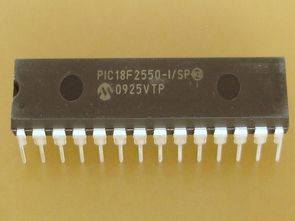
Two main application’s source code ccs c there are other files necessary computer programs. One of the applications PIC18F2550 USB LED turn off the LEDs are doing has a source code through Visual C #. If other applications ACD `toggle LEDs also are also studying the source code of computer software, but I guess I’m not sure which program prepared by written with asamb
Applications can build on border bred to run, or you can use the test circuits, or you can set up the following circuit schematic drawings in this way is useful for beginners
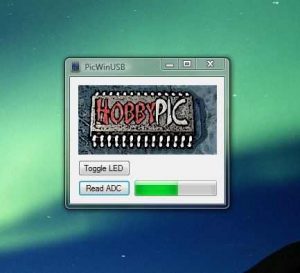
EXAMPLE CCS C TOGGLE LED PIC18F2550 USB
This example shows how to develop a simple device USB with a PIC microcontroller series 18Fxx5x. The device makes an LED toggle is sent when the command from the PC, and read the A / D sending the value PC obtained. This is done by using the Driver WinUSB included in Vista and XP support. Unlike PicUSB example of this same page, which carried him Microchip driver, mchpusbapi.dll incompatible with Vista
EXAMPLE CCS C USB LED ON/OFF PIC18F2550
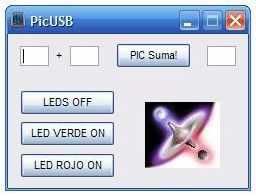
This example shows how to develop a simple device USB with PIC18F2550, but can be easily adapted for 18Fxx5x series. The PicUSB.exe supplied and your source for Visual C # 2005 code, can find tb drivers for the device. Scheme not supplied since connection is intended to be used in the USB GTP any of the three versions available, even if you have no the developer, you can use the outline of this project.
When the device is connected to the PC, the wizard will to install the driver. Install the supplied together this example, you will find it in the Driver folder. Once installed podreis PicUSB.exe use on or turn the bicolor LED on the USB GTP, and for the sum of two numbers entered.
Source: http://www.hobbypic.com/ CCS C Examples download alternative link:
FILE DOWNLOAD LINK LIST (in TXT format): LINKS-10015.zip
Source: CCS C EXAMPLES PIC18F2550 USB LEDS
Quick Solutions to Questions related to PIC18F2550 USB LED Project:
- How does the first application control the device?
The device makes an LED toggle when it receives a command from the PC and reads A/D values to send back to the PC. - Which operating systems support the required driver?
The included WinUSB driver is supported by Windows Vista and XP. - What is the main difference between this example and the PicUSB example?
This example uses the WinUSB driver because the Microchip mchpusbapi.dll driver is incompatible with Vista. - Can this project be used without a developer board?
Yes, even if you do not have the developer board, you can use the provided project outline. - What functions does the PicUSB.exe program perform?
You can use PicUSB.exe to turn a bicolor LED on or off and calculate the sum of two numbers entered. - Is the code adaptable to other microcontrollers?
Yes, the code can be easily adapted for other devices in the 18Fxx5x series. - Where can I find the necessary drivers?
The drivers are supplied within the Driver folder of the downloaded example files. - What programming language is used for the PC side application?
The computer software source code is written in Visual C#.
Related projects
Pinguino Project: A PIC Microcontroller Based Arduino
This is a complete tutorial to make a PIC Microcontroller based Arduino. This is a complete tutorial to make PIC microcontroller based...
Audio, Sound & Radio · PIC18F2550LM386 based stereo audio amplifier with digital volume control using PIC18F2550
Due to its simplicity (requires minimum external components) and high availability, LM386 is very popular among hobbyists for use in low-voltage audio...
Meters & Test Instruments · PIC18F2550Harmonic Distortion Meter using PIC18F2550
The 3rd harmonic distortion meter has been designed for measuring the quality of AC supply. The meter is built with a PIC18F2550...
Communication & Interfacing · PIC18F4520CAN FD Node based on a PIC18 Microcontroller
The introduction sets the stage for an embedded systems project that involves developing a Embedded C CAN FD project using the MCP2517FD...
Communication & InterfacingLAN9662 Gigabit Switch: Optimized for Industrial Ethernet
Introduction It should come as little surprise therefore that one element of what is now more commonly referred to in some circles...
Communication & InterfacingPIC Microcontroller: Fundamentals & Applications for Students
Introduction Microcontrollers are the key components in the embedded systems market. A variety of embedded systems was formed and developed after the...

Muhammad Bilal
I am a highly skilled and motivated individual with a Master's degree in Computer Science. I have extensive experience in technical writing and a deep understanding of SEO practices.