


Summary of Digital thermometer with PIC16F84 circuit
This project is a simple digital thermometer using a PIC16F84A microcontroller that measures ambient temperature by exploiting variations in the watchdog timer (WDT) time-out period instead of a separate temperature sensor. It counts WDT time-outs, calibrates time-out versus temperature, and maps counts to degrees Celsius. The device normally sleeps to save power, wakes on key press to display temperature, and offers a calibration mode to store new calibration values.Parts used in the Digital thermometer with PIC16F84:
- PIC16F84A microcontroller
- LEDs for temperature display
- Pushbutton(s) or keys (TEMP key and calibration controls)
- Resistors (for LEDs and pull-ups as required)
- Capacitors (for power decoupling and stability)
- Crystal or resonator (if used for clock, optional depending on design)
- Power supply (battery or regulated DC source)
- PCB or prototyping board and wiring
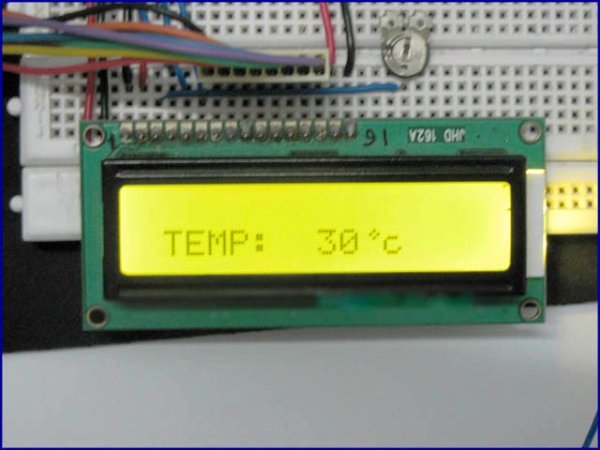 This Digital thermometer microcontroller project use watchdog timer function to measure temperature. The WDT on all PIC-micro microcontrollers has a nominal time-out period of 18 ms. The WDT time-out period varies with temperature, VDD and part-to-part process variations.
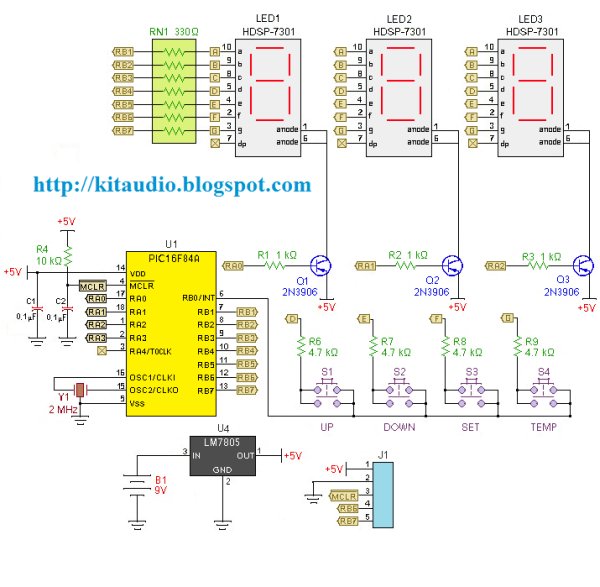 SLEEP Mode: This is the default mode the system starts in when power is applied .
Quick Solutions to Questions related to Digital thermometer with PIC16F84:
- How does this thermometer measure temperature without a separate sensor?
It measures temperature by counting variations in the PIC16F84A watchdog timer time-out period, which varies with temperature. - Can the thermometer work while minimizing power consumption?
Yes. The PIC16F84A stays in SLEEP mode by default, consuming little current, and wakes only when a key is pressed. - What are the operating modes of the WDT thermometer?
The three modes are SLEEP Mode, Display Mode (shows temperature in degrees Centigrade), and Calibration Mode (creates new calibration values). - How is temperature translated into an actual reading?
The system establishes a time-out to temperature calibration, counts WDT time-outs over a period, and equates the count to a temperature. - Why use a microcontroller-based thermometer instead of an analog thermometer?
Because it allows building a complex, low-cost solution with few external components that provides high-precision measurement. - Does the WDT time-out period remain constant?
No. The WDT time-out period varies with temperature, VDD, and part-to-part process variations. - When does the PIC16F84A update the WDT count?
It updates the WDT count when it wakes from SLEEP mode after a key press and checks for additional key presses before returning to SLEEP.
Related projects
PIC Stepper Motor Controller using PIC16F84A with Proteus Simulation
Introduction Stepper motors are widely used in embedded systems and DIY electronics projects where precise position control is required. This PIC Stepper...
Programmers & ICSP · PIC16F84APIC Musical Doorbell using PIC16F84A with Proteus Simulation
IntroductionThis microcontroller project demonstrates a musical doorbell built around a PIC16F84A and a simple piezo sounder.Using two push buttons, the system allows...
Beginner Tutorials · PIC16C84Exploring the World of PIC Microcontrollers: An Architectural Overview
A Peripheral Interface Microcontroller (PIC), developed by General Instruments Microcontrollers in 1993, operates under software control and is programmed to execute various...
Meters & Test Instruments · PIC16F688Determine capacitance by measuring the charging time using PIC16F688
When TEST botton is pressed, RA3 pin is set to "1". R2 and R3 are divide the voltage to 1/2 Vra3 which...
Meters & Test InstrumentsFrequency Meter Using Microcontroller
This tutorial simply states how to calculate frequency of a pulse source using a microcontroller. Story https://youtu.be/NAoj-HLRIro This tutorial simply states how...
Meters & Test InstrumentsProjects on Speed Checker To Detect Rash Driving On Highways
While driving on highways, drivers should not exceed the maximum speed limit permitted for their vehicle. However, accidents keep on occurring due...

Ibrar Ayyub
I am an experienced technical writer holding a Master's degree in computer science from BZU Multan, Pakistan University. With a background spanning various industries, particularly in home automation and engineering, I have honed my skills in crafting clear and concise content. Proficient in leveraging infographics and diagrams, I strive to simplify complex concepts for readers. My strength lies in thorough...