


Summary of A Beginner’s data logger project using PIC12F683 microcontroller
This article describes a beginner-friendly data logger using the PIC12F683 microcontroller and DS18B20 temperature sensor. The system reads temperature at configurable intervals, stores up to 254 values in internal EEPROM, and transfers data to a PC via a custom serial interface. It features three tact switches for controlling logging start/stop, setting sampling times (1s, 1min, 10min), and resetting memory.Parts used in the PIC12F683 Data Logger:
- PIC12F683 microcontroller
- DS18B20 temperature sensor
- Internal EEPROM memory
- Three tact switches
- LED indicator
- LM78L05 regulator IC
- 9V battery
- PNP transistor
- Passive components
- 10 uF capacitor
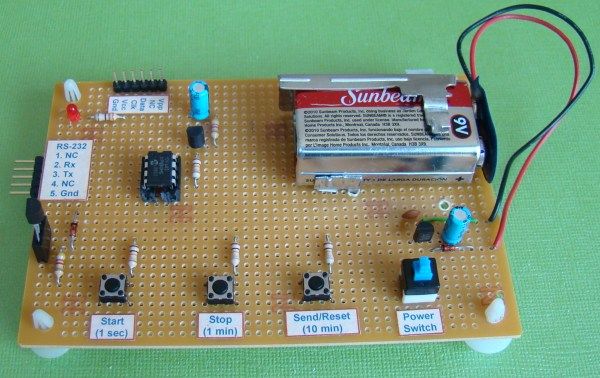
It is a very simple data logger project based on PIC12F683 microcontroller. The microcontroller reads temperature values from a temperature sensor on a regular interval basis and stores them into its internal EEPROM memory. The recorded temperatures can be later transferred to a PC through serial interface. I originally published this project on electronics-lab.com last summer. I thought this could be a very good learning project for beginners, and so I am posting it here for Embedded Lab’s readers too.
Theory
The sensor used in this project is DS18B20. It is a digital temperature sensor manufactured by Dallas Semiconductor (now MAXIM) that can measure temperature ranging from -55°C to +125°C with an accuracy of ±0.5°C over the range of -10°C to +85°C. The sensor provides the measured temperature (°C) output in user-configurable 9, 10, 11, or 12-bit data corresponding to the desired resolution of 0.5, 0.25, 0.125, and 0.0625 °C. The sensor communicates with a host microcontroller over a 1-wire bus. Readers are suggested to refer the datasheet on Maxim’s website for details on this sensor. Please keep in mind that there are three versions of this sensors, namely DS1820, DS18S20, and DS18B20, and they have some architectural differences. All of them have the same pin configuration and therefore the circuit diagram would be same for all three types. However, some modification in the software may be required while the microcontroller reads the temperature data from them.
PIC12F683 has 256 bytes of internal EEPROM. Each temperature reading is stored as a byte, which means only the eight most significant bits of DS18B20 output is recorded. Therefore, the temperature resolution is decreased down to 1 °C. This temperature logger can store up to 254 temperature values (254 bytes) in its internal EEPROM. The remaining two EEPROM locations are used to store the sampling time and number of samples information. Three tact switches are used to provide user inputs for controlling the operation of the data logger.
Circuit Diagram
The PIC microcontroller uses its internal clock source operated at 4.0 MHz. The DS18B20 sensor is interfaced to GP0 pin (7) of the microcontroller. An LED connected to the GP2 pin serves as the only display in the circuit to indicate various actions of the data logger. For example, it blinks every time a sample is recorded into EEPROM. The circuit is powered with +5 V derived from a 9V battery using an LM78L05 regulator IC. The LM78L05 circuit is a very common circuit and therefore, it is not shown here.
The three tact switches provide the following functions.
- Start: Starts data logging
- Stop: Stops the logging procedure
- Send/Reset: Transfers data to PC through serial port. However, if it is held pressed for 2 sec or more, the EEPROM locations are cleared and ready for new recordings.
Selection of sampling time
This data logger offers three options for sampling interval: 1 sec, 1min, and 10 min. The selection is made through the same three tact switches. Here is how it works. Suppose if 10 min sampling time is needed, then first turn OFF the power, hold the ‘Send/Reset’ button pressed, turn the power ON, and wait till the LED glows. Once the LED glows, release the button, and the sampling interval is set to 10 min. The new sampling time will be updated to EEPROM location 0 so that in case of power failure, the previous sampling time will be restored. Similarly, the use of ‘Start’ or ‘Stop’ button instead of the Send/Reset one sets the sampling time to 1 sec, or 1 min respectively. With 10 min sampling interval, this data logger can record temperature samples over 42 hours.
Serial Interface to PC
Transferring data to PC through serial port requires a voltage translation circuit to convert the TTL logic levels from PIC12F683 to appropriate RS232 voltage levels. A regular PNP transistor with few other passive components can do this job. The RS232 standard uses a -3 to -12 V for Logic 1 and +3 to +12 V for Logic 0. The required negative voltage is stolen from the TX pin of the RS232 port on PC’s side which is unused as there won’t be any data transfer from the PC to PIC12F683. Under idle condition the TX pin on PC’s side is held high (-12 V). The two figures below describe the operation of converting TTL levels for 1 and 0 to corresponding RS232 levels. The positive terminal of the 10 uF capacitor is grounded because its negative terminal has to deal with a more negative voltage.
For more detail: A Beginner’s data logger project using PIC12F683 microcontroller
- How does the project store temperature data?
The microcontroller records temperature readings as bytes into its internal EEPROM memory. - What is the maximum number of samples the logger can store?
The device can store up to 254 temperature values in its internal EEPROM. - Can I change the sampling time on this device?
Yes, users can select between 1 sec, 1 min, or 10 min intervals using the tact switches. - How do I reset the memory to clear old recordings?
Hold the Send/Reset button pressed for two seconds or more after powering on. - Does the circuit use an external display screen?
No, it uses only one LED connected to the GP2 pin to indicate actions. - What voltage source powers the circuit?
The circuit is powered by +5 V derived from a 9V battery using an LM78L05 regulator. - How is data transferred to a PC?
Data is sent through a serial port using a PNP transistor to convert TTL levels to RS232 levels. - Is the sampling interval saved if power fails?
Yes, the selected sampling time is updated to EEPROM location 0 so it is restored after power failure.
Related projects
Automotive Voltage Monitor using PIC12F683
Description Recently I got a new motorbike and on my second trip out, with only 50 miles on the clock the rectifier/regulator...
Communication & Interfacing · PIC12F683EnvStick USB Temperature Sensor using PIC12F683
The EnvStick is cheap, homemade temperature sensor that plugs into a USB port. It provides a simple way to collect a room’s...
Sensors & Temperature · PIC12F683Metal detector robot using pic microcontroller
This project describes hardware and software I have developed which allows a small 8 bit PIC microprocessor to function as a single...
Communication & Interfacing · PIC18F4520CAN FD Node based on a PIC18 Microcontroller
The introduction sets the stage for an embedded systems project that involves developing a Embedded C CAN FD project using the MCP2517FD...
Communication & InterfacingLAN9662 Gigabit Switch: Optimized for Industrial Ethernet
Introduction It should come as little surprise therefore that one element of what is now more commonly referred to in some circles...
Communication & InterfacingPIC Microcontroller: Fundamentals & Applications for Students
Introduction Microcontrollers are the key components in the embedded systems market. A variety of embedded systems was formed and developed after the...

Ibrar Ayyub
I am an experienced technical writer holding a Master's degree in computer science from BZU Multan, Pakistan University. With a background spanning various industries, particularly in home automation and engineering, I have honed my skills in crafting clear and concise content. Proficient in leveraging infographics and diagrams, I strive to simplify complex concepts for readers. My strength lies in thorough...