


Summary of Servo Motor Controller using PIC12F629
This project uses a PIC microcontroller and a joystick plus a potentiometer to control two servos with bidirectional motion and variable speed. The micro measures resistance via RC charge timing to decode joystick positions, outputs 1 ms or 2 ms control pulses to drive servos clockwise or anticlockwise, and varies pulse repetition interval based on the pot to change speed. LEDs show pulse activity for testing. The design is suited for pan-and-tilt camera control, crane or model animations, and servo testing.Parts used in the Servo Motor Controller:
- PIC microcontroller (PIC12F629 or similar)
- Joystick module (with multiple switch contacts)
- Potentiometer (variable resistor for speed control)
- Two servo motors (with red, black, white leads)
- Capacitor for RC timing
- Resistors (22k, 47k and others for RC network)
- Two LEDs (for pulse indication)
- Prototype board (or PCB)
- Battery or DC supply (positive and negative rails)
- Wiring and connectors
The CIRCUIT
The circuit is fairly simple.
The input from the Joy Stick has been separated into two sections to make detection easy and this requires 2 inputs.
A pot is connected to another input line and 2 more lines are required for the servos. Pin 8 is connected to 0v and pin 1 is connected to the supply. The only unused pin is GP3 (Input ONLY),
Most of the work is done by the micro. It uses a technique of charging a capacitor via a resistor and determining how long it takes to charge, to work out which switch is pressed or the position of the pot.
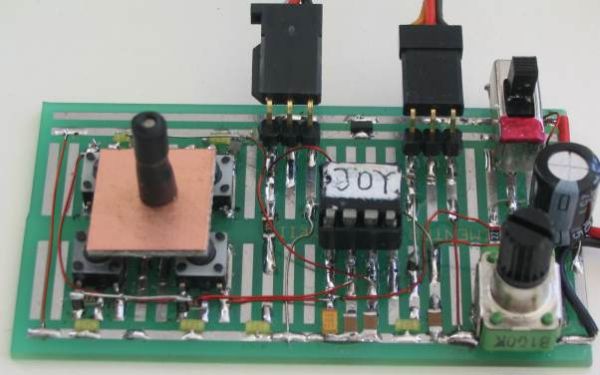
It then outputs a 1mS or 2mS pulse to one of the servo motors to create clockwise or anticlockwise rotation of the output shaft and the speed of rotation can be set by adjusting the pot. The two LEDs on the output pins let you see the pulses being delivered to the servo's when the project is used to test these devices. The photo's below show the circuit built on prototype board:
THE JOY STICK
There are 7 different (actually more) combinations of positions for the joy stick and we need to decode them and work out what to do with the result.
This is too many resistance-values for a single input and so we have used two inputs with 3 resistance-values for each plus the possibility of all switches being pushed at the same time.
The resistance values we have used are 22k and 47k. When 2 switches are pressed, the resistors are in parallel to produce 15k, but only 22k and 47k is detected in this program.
The program creates a loop that detects up to 19k, to produce an output of loop=1, then up to 38k for a value of loop=2 and higher than 38k for a value of loop=3. But if the program keeps looping for 10 loops, it determines that no button is pressed and creates a value of 4. The change-points are mid-way between the resistance-values we have used and thus any tolerances on the capacitors and resistors can be accommodated.
This means a resistance of 15k produces a value of 1, 22k produces a value of 2 and 47k produces a value of 3. This is most important as we don't want the cut-off points to be on the border as the program may produce an output of 1 instead of 2. The project is fairly voltage sensitive and if the right-hand buttons are not detected, the battery voltage is low.
THE SERVO
A servo module consists of a motor and gearbox, with a PC board containing the electronics to drive the motor in clockwise and anticlockwise direction. The electronics also detects the width of the incoming pulse to drive the motor to mid-position and also other positions, but this feature is not used in this project.
The motor is connected to the positive rail of the supply via a bridge of transistors within the servo and the red and black wires from the module are taken to the positive and negative of a battery to provide the current to drive the motor.
The third lead (white) is the control line and this is taken to the micro.
This line needs a pulse and the maximum repetition-rate accepted by the servo is every 18mS - it will accept a longer timing between pulses. This is the timing between pulses, the actual pulse-width is very short, between 0.9mS and 2.2mS.
If the pulse is less than 1mS duration (wide) the servo will travel fully in the anticlockwise direction.
If the pulse is 2mS, the servo will travel in the clockwise direction.
If the pulse is 1.5mS, the servo will travel to the mid position.
If the time between pulses is longer than 18mS, the speed of rotation is decreased.
This is what we have done. We have provided a 1mS or 2mS pulse and created a long time-interval between pulses to produce a reduced rate of movement.
The program looks at the position of the pot and adds a number of milliseconds between each pulse to produce these long time-intervals.
As the resistance of the pot is increased, the pulses are less frequent and the speed decreases.
For more detail: Servo Motor Controller using PIC12F629
Quick Solutions to Questions related to Servo Motor Controller:
- How does the micro detect joystick position?
The micro charges a capacitor via resistors and times how long it takes to charge to determine resistance values corresponding to joystick switches. - Can one input decode multiple joystick switches?
No, the design uses two inputs to separate the joystick into sections so multiple positions can be distinguished. - What pulse widths drive clockwise and anticlockwise servo motion?
A 1 ms pulse drives the servo fully anticlockwise and a 2 ms pulse drives it clockwise; 1.5 ms gives mid-position. - How is variable speed achieved?
The program increases the time between pulses based on the potentiometer resistance, reducing the pulse repetition rate to slow the servo. - Why are 22k and 47k resistors used for the joystick?
They provide distinct resistance levels that the program decodes (22k => value 2, 47k => value 3) while parallel combinations give other levels. - What indicates the servo control pulses during testing?
Two LEDs on the output pins show the pulses being delivered to the servos for testing purposes. - Does the servo need a separate power connection?
Yes, the servo red and black leads are connected to the battery positive and negative to supply motor current; the white lead is the control signal from the micro. - What happens if the time between pulses exceeds 18 ms?
The servo will accept a longer interval and its speed of rotation is decreased, which the project uses to vary speed.
Related projects
RGB LED PWM Driver for High Power 350mA LEDs using PIC12F629
Description This project combines a PIC and three constant current 'buck' converters to produce an RGB LED controller that will operate with...
Communication & Interfacing · PIC12F629Wireless controlled lightdimmer using PIC12F629
The meaning from this design is to build it in -i.e. a shaded lamp- and to switch this lamp on and off...
LED Projects · PIC12F629Navigation Lights for Models for PIC12F629
Description This project was inspired from a post on the Picprojects forum where a member had adapted the RGB Moodlight project for...
Motors & RoboticsReal-Time CAN-Based Vehicle Monitoring System with PIC MCU
INTRODUCTION The Controller Area Network (CAN) is a robust vehicle communication bus standard that was primarily developed for automobile applications but has...
Motors & RoboticsEasy Way to Learn Robotics Using Microcontrollers: A Beginner’s Guide
The title, "Easy Way to Learn Robotics Using Microcontrollers," promises an accessible entry point for those curious about the exciting world of...
Motors & Robotics · PIC16F877AEfficient Sun-Following Robot: A Solar Tracker with Microcontroller Control
Abstract The impending global challenge of dwindling non-renewable fuel resources underscores the urgency of transitioning towards renewable energy alternatives like solar power....

Ibrar Ayyub
I am an experienced technical writer holding a Master's degree in computer science from BZU Multan, Pakistan University. With a background spanning various industries, particularly in home automation and engineering, I have honed my skills in crafting clear and concise content. Proficient in leveraging infographics and diagrams, I strive to simplify complex concepts for readers. My strength lies in thorough...