
Summary of IN-8 single nixie tube clock using PIC16F84
This project is a single-digit IN-8 nixie tube clock built in an old wooden box. It uses a PIC16F84 microcontroller with a 32,768 Hz watch crystal and a CR2032 backup battery to maintain time when powered off. A step-up converter (MC34063A) generates ~170 V DC to drive the nixie tube. A bright green LED under the tube provides constant illumination and blinks every second when time is not displayed. Time is set via a single pushbutton during power-up; the clock displays time three times per minute.
Parts used in the IN-8 single nixie tube clock:
- IN-8 nixie tube (single digit)
- PIC16F84 microcontroller
- 32,768 Hz watch crystal
- CR2032 3V lithium backup battery
- MC34063A step-up converter IC
- 7V DC wall adapter (power supply)
- Bright green LED (under the nixie tube)
- Pushbutton (for time setting)
- Wooden box enclosure
After receiving one IN-8 tube from a friend (thanks), I decided to build myself a clock. This clock is more an ornament than a useful machine because it consists of just one digit (tube) so it displays current time every minute for three times. It is built inside of an old wooden box and it’s powered from a 7V DC wall adapter. Under a nixie tube there is a very bright green LED which makes everything look more beautiful. When time is not displayed, this LED blinks with 1 second period (seconds counter).
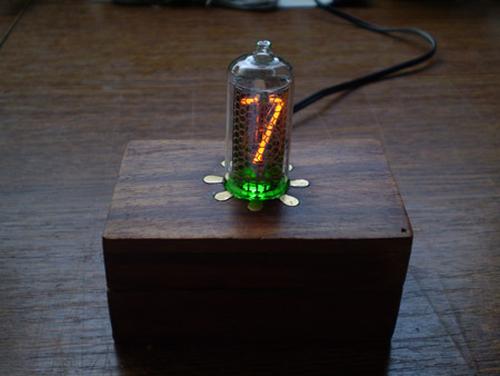
To power-up a nixie, some 170V DC is required, which means that there is a step-up converter on board with MC34063A IC.
You can download the project files at the bottom of this page by clicking on red “download” button.
Setting up the time
To set the time press the button and power-up the clock. This will enter the programming mode. Now 00, 00, 00,… will be displayed. Press and hold the button until hours are set. Release the button to switch to minutes. Now do the same thing with the minutes and that’s it! After programming, the current time will be displayed.
Timekeeping and measuring
Inside of this box there is a 3V Lithium battery (CR2032) that keeps the PIC microcontroller running even when the clock is turned off (the wall adapter). This is very convenient because after powering it up again, we don’t need to set the time – again. If a button is pressed during a power-down, nothing will happen. With PIC microcontroller I used a “watch” crystal at 32,768kHz. It’s value is pretty cool and now we will see why. PIC16F84 has internal TMR0 counter that increments itself no matter what the PIC is doing at the moment.
For more detail: IN-8 single nixie tube clock using PIC16F84
- How is the nixie tube powered?
The nixie tube is powered by a step-up converter using MC34063A to produce about 170V DC from the 7V adapter. - How do you set the time on the clock?
Press the button and power up to enter programming mode, hold the button to set hours, release to switch to minutes, and hold again to set minutes. - Does the clock keep time when powered off?
Yes, a CR2032 3V lithium battery keeps the PIC16F84 running so time is maintained when the wall adapter is disconnected. - What microcontroller and crystal are used for timekeeping?
The project uses a PIC16F84 microcontroller with a 32,768 Hz watch crystal. - What does the LED under the nixie tube do?
A bright green LED under the tube provides illumination and blinks every second when time is not displayed. - How often does the clock display the time?
The single-digit clock displays the current time three times every minute. - What power source is required for the project?
The clock is powered from a 7V DC wall adapter. - Can pressing the button during power-down change the time?
No, pressing the button during power-down does nothing; the backup battery maintains time but button input during power-down has no effect.
