PICCOLO Motor Controller Sample Design using TMS320F28023PT with Proteus Simulation

Summary of PICCOLO Motor Controller Sample Design using TMS320F28023PT with Proteus Simulation


This project implements a PICCOLO motor controller sample using the TMS320F28023PT microcontroller and Proteus VSM, focusing on safe boot redirection, optional watchdog disable, C runtime initialization, and an accurate microsecond delay routine executed from zero-waitstate RAM for timing-critical motor-control firmware; it is suitable for simulation-based prototyping and embedded-systems learning.

Parts used in the PICCOLO Motor Controller Sample Design:

  • TMS320F28023PT Piccolo microcontroller
  • Seven-segment displays (simulation indicators)
  • DC motor (simulation load)
  • +12V supply (motor side)
  • Proteus VSM digital analysis tools

Introduction

This project demonstrates a PICCOLO motor controller sample design implemented using the TMS320F28023PT Piccolo microcontroller and tested through Proteus simulation. It focuses on core embedded-system startup routines, timing control, and hardware-safe initialization commonly required in motor-control firmware. The design is ideal for learners exploring microcontroller projects, embedded systems, and practical electronics using virtual simulation. By combining low-level assembly routines with Proteus VSM, this project helps bridge theory and real-world motor-control firmware behavior.

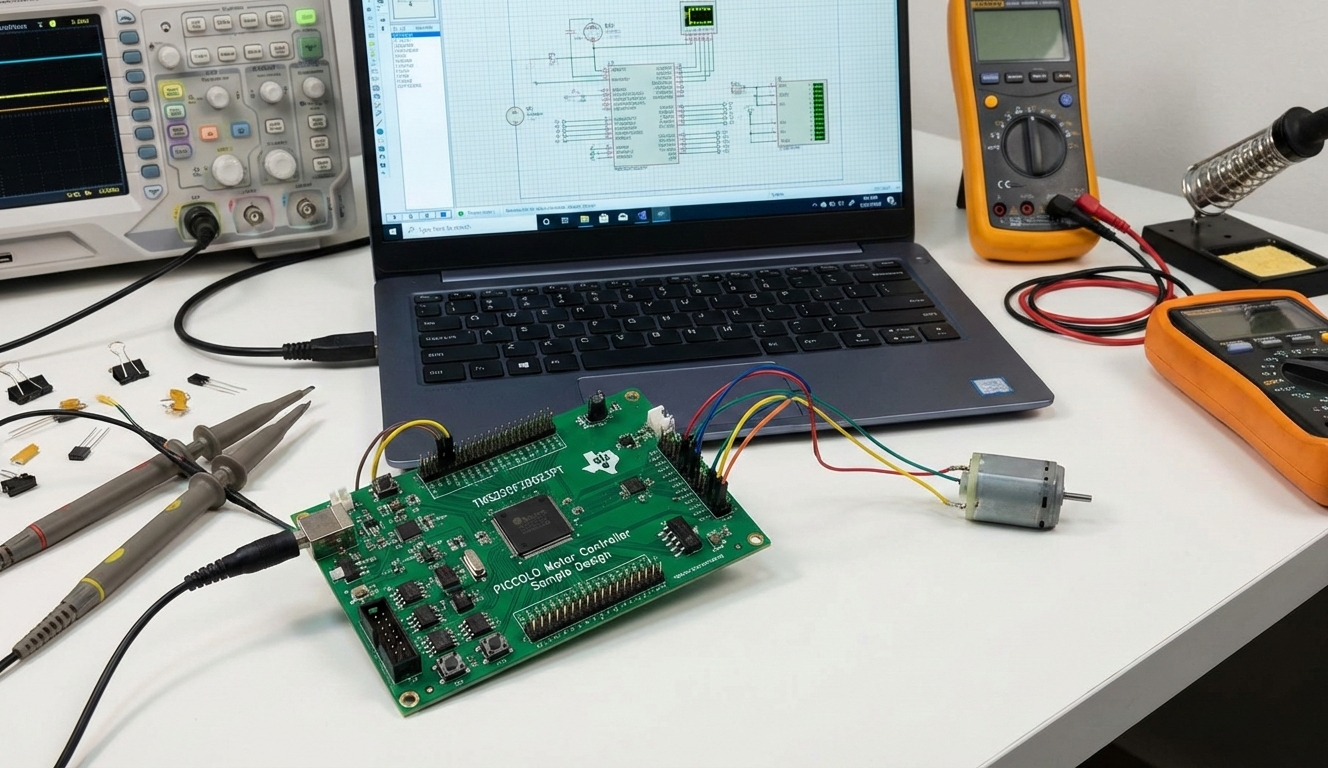
PICCOLO motor controller using TMS320F28023PT DSP with DC motor test setup.
Illustrative View of the Concept.

How the Project Works (Overview)

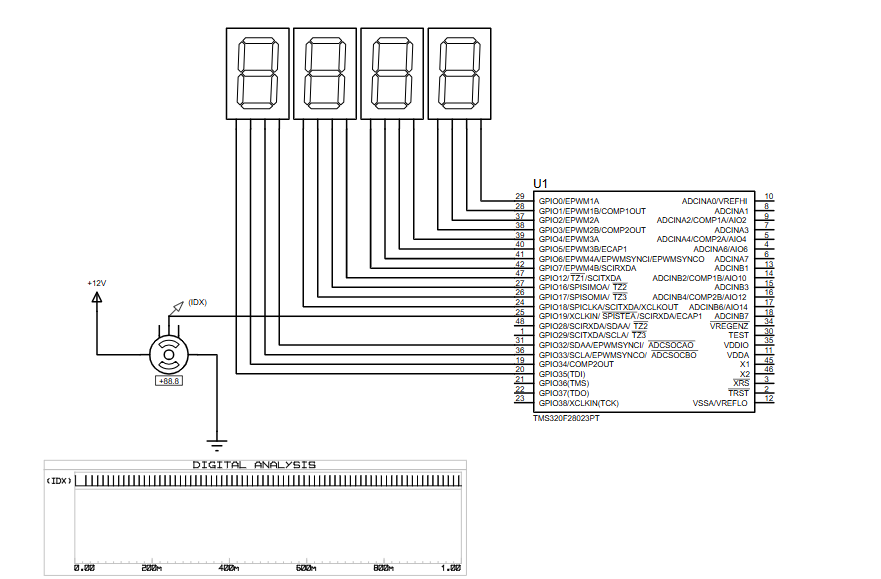
The project initializes the Piccolo DSP correctly after boot, disables the watchdog timer if required, and provides a precise microsecond delay routine. These are essential building blocks in motor-control applications where deterministic startup and timing accuracy are critical. The schematic connects the microcontroller to external loads and indicators, allowing behavior observation during Proteus simulation without physical hardware.

Block Diagram / Workflow Explanation

  1. Boot ROM Exit
    After reset, execution is redirected to a custom code start location.

  2. Watchdog Handling
    The firmware optionally disables the watchdog timer to avoid unintended resets during development.

  3. C Runtime Initialization
    Control is passed to the standard C runtime entry point.

  4. Delay Routine Execution
    A calibrated microsecond delay function provides accurate timing for control logic.

  5. Peripheral Interaction
    GPIO and connected outputs respond according to the running firmware, observable in simulation.

Key Features

  • Uses TMS320F28023PT Piccolo DSP for motor-control-oriented applications

  • Safe boot redirection using a dedicated codestart section

  • Optional watchdog timer disable for stable development testing

  • Accurate microsecond delay routine executed from zero-waitstate RAM

  • Fully testable using Proteus VSM simulation

  • Low-level assembly implementation suitable for real-time embedded systems

Components Used

  • TMS320F28023PT Piccolo microcontroller

  • Seven-segment displays (simulation indicators)

  • DC motor (simulation load)

  • +12V supply (motor side)

  • Proteus VSM digital analysis tools

Applications

  • Motor control firmware prototyping

  • Embedded systems education and training

  • DSP startup and boot-sequence testing

  • Timing-critical control applications

  • DIY electronics and controller validation using simulation

Explanation of the Code (High-Level)

The firmware is written in assembly and split into two functional modules:

  • Code Start & Watchdog Control
    Handles boot redirection and safely disables the watchdog timer before jumping to the C runtime initialization routine.

  • Microsecond Delay Routine
    Implements a calibrated loop-based delay function that depends on CPU clock frequency. This routine is intended to run from internal RAM to maintain timing accuracy, which is critical for motor control and real-time applications.

Source Code

Download
;//  The C assembly call from the DELAY_US(time) macro will
;//  look as follows: 
;//
;//  extern void Delay(long LoopCount);                
;//
;//        MOV   AL,#LowLoopCount
;//        MOV   AH,#HighLoopCount
;//        LCR   _Delay
;//
;//  Or as follows (if count is less then 16-bits):
;//
;//        MOV   ACC,#LoopCount
;//        LCR   _Delay

Proteus Simulation

The Proteus simulation allows observation of DSP startup behavior, GPIO activity, and timing-dependent operations without physical hardware. The motor and display elements respond based on firmware execution, while the digital analyzer helps verify timing and signal transitions.

(FAQs)

1. Can this project run entirely in Proteus without hardware?

Yes, the design is intended for full testing using Proteus VSM.

2. Why is the watchdog timer disabled?

To prevent unexpected resets during development and debugging.

3. Can the delay routine be used in other Piccolo projects?

Yes, it is reusable with proper CPU clock configuration.

4. Why must the delay function run from RAM?

To avoid wait states that would affect timing accuracy.

5. Is this project suitable for beginners?

It is best for users with basic knowledge of DSPs and embedded systems.

6. Can this be extended to real motor control hardware?

Yes, the startup and timing routines are directly applicable to hardware designs.

7. Which compiler is required?

CodeComposer Studio for Piccolo devices.

8. Can the watchdog be enabled later in the project?

Yes, it can be reconfigured once the system is stable.

Conclusion

This PICCOLO motor controller sample design provides a clean, practical foundation for understanding DSP startup routines, watchdog handling, and precise timing in embedded systems. By combining low-level firmware with Proteus simulation, the project offers strong educational value and a solid base for advanced motor-control development.

Quick Solutions to Questions related to PICCOLO Motor Controller Sample Design:

  • Can this project run entirely in Proteus without hardware?
    Yes, the design is intended for full testing using Proteus VSM.
  • Why is the watchdog timer disabled?
    To prevent unexpected resets during development and debugging.
  • Can the delay routine be used in other Piccolo projects?
    Yes, it is reusable with proper CPU clock configuration.
  • Why must the delay function run from RAM?
    To avoid wait states that would affect timing accuracy.
  • Is this project suitable for beginners?
    It is best for users with basic knowledge of DSPs and embedded systems.
  • Can this be extended to real motor control hardware?
    Yes, the startup and timing routines are directly applicable to hardware designs.
  • Which compiler is required?
    CodeComposer Studio for Piccolo devices.
  • Can the watchdog be enabled later in the project?
    Yes, it can be reconfigured once the system is stable.

About The Author

Ibrar Ayyub

I am an experienced technical writer holding a Master's degree in computer science from BZU Multan, Pakistan University. With a background spanning various industries, particularly in home automation and engineering, I have honed my skills in crafting clear and concise content. Proficient in leveraging infographics and diagrams, I strive to simplify complex concepts for readers. My strength lies in thorough research and presenting information in a structured and logical format.

Follow Us:
LinkedinTwitter