


Summary of Unipolar Stepper Motor Control Circuit with PIC16F877
This article describes a unipolar stepper motor control circuit using a PIC16F877 microcontroller with buttons to set steps, direction, and speed, supporting 1 to 200 steps and speeds from 1 step/sec up to over 200 steps/sec. The design uses ULN2803 Darlington drivers, allows menu navigation via arrow keys for settings and zeroing, and limits winding current to 500 mA. Proteus ISIS simulation and PicBasic Pro source files are provided in the downloadable ZIP.Parts used in the Unipolar Stepper Motor Control Circuit with PIC16F877:
- PIC16F877 microcontroller
- Unipolar stepper motor
- ULN2803 Darlington transistor array
- Push buttons (arrow keys and menu/select)
- Power supply capable of supplying motor currents up to 500 mA per winding
- Supporting passive components (resistors, capacitors for MCU and input debouncing)
- PCB or breadboard and wiring
- Proteus ISIS simulation files (project file)
- PicBasic Pro source code files
The purpose of this circuit is connected to unpolar stepper motor I designed buttons,
select the number of steps we determined the direction, speed, and with it a system that implements the step motor commands. Pic16f877 microcontroller circuit.
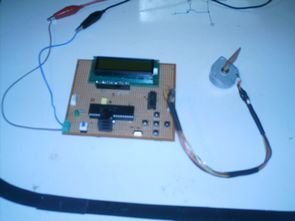 When first working circuit stepper motor 120 degree back and forth by applying signal makes zero adjustment. Located on the circuit using the arrow keys to switch between menus and menu you can adjust the volume. The engine speed setting step / sec are denominated in more than 200 steps / sec and at least 1adım/sani of moving at the speed .motor horse could step count up to 200 steps and at least one step atabilir.devre maximum of an engine winding 500 mA current passed.
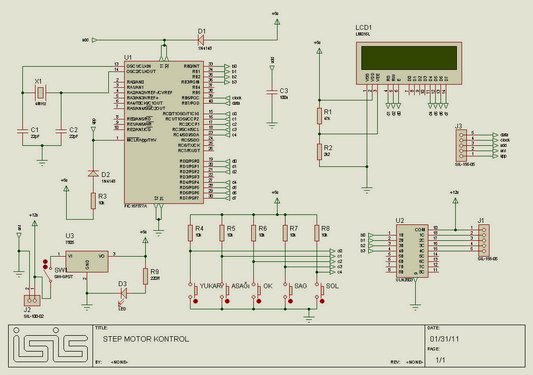 As motor drive uln2803 darlington transistor integrated connection is selected.
Unipolar stepper motor control with PIC16F877 project belongs to isis proteus simulation file PicBasic Pro code files: unipolar-stepper-motor-control-circuit-with-pic16f877.ZIP
For more detail: Unipolar Stepper Motor Control Circuit with PIC16F877
Quick Solutions to Questions related to Unipolar Stepper Motor Control Circuit with PIC16F877:
- What microcontroller is used in this project?
The project uses a PIC16F877 microcontroller. - How many steps per second can the system set?
The engine speed setting covers from at least 1 step/sec up to more than 200 steps/sec. - What is the maximum current allowed through a motor winding?
The circuit allows a maximum of 500 mA through a motor winding. - Which driver IC is used to drive the motor?
The ULN2803 Darlington transistor array is used as the motor driver. - How are settings like steps, direction, and speed selected?
Buttons including arrow keys on the circuit are used to switch between menus and adjust settings such as steps, direction, and speed. - What software files are provided with the project?
The project includes Proteus ISIS simulation files and PicBasic Pro code files in a ZIP archive. - Does the circuit provide a zero adjustment or homing function?
Yes, applying a signal causes the stepper to move back and forth by 120 degrees for zero adjustment. - How many steps can be counted or selected in the motor step count?
The motor step count can be set up to 200 steps and at least one step.
Related projects
PIC16F877 Driving LCD in 4-Bit Mode using PIC16F877 with Proteus Simulation
Introduction This microcontroller project shows how a PIC16F877 can drive an LCD display using 4-bit mode inside a Proteus simulation.The project demonstrates...
Programmers & ICSP · PIC16F877AEPE PIC/LCD Demo using PIC16F877 with Proteus Simulation
IntroductionThe EPE PIC/LCD Demo is a classic microcontroller project that demonstrates how a PIC16F877 can fully control a PG12864F graphical LCD.Designed as...
Motors & Robotics · PIC16F877AEfficient Sun-Following Robot: A Solar Tracker with Microcontroller Control
Abstract The impending global challenge of dwindling non-renewable fuel resources underscores the urgency of transitioning towards renewable energy alternatives like solar power....
Motors & RoboticsReal-Time CAN-Based Vehicle Monitoring System with PIC MCU
INTRODUCTION The Controller Area Network (CAN) is a robust vehicle communication bus standard that was primarily developed for automobile applications but has...
Motors & RoboticsEasy Way to Learn Robotics Using Microcontrollers: A Beginner’s Guide
The title, "Easy Way to Learn Robotics Using Microcontrollers," promises an accessible entry point for those curious about the exciting world of...
Motors & RoboticsInnovative Robotics: A Comprehensive Project Exploration
A DC motor functions as an electromechanical device, translating electrical signals into mechanical movements. The rotation of the motor correlates directly with...

Ibrar Ayyub
I am an experienced technical writer holding a Master's degree in computer science from BZU Multan, Pakistan University. With a background spanning various industries, particularly in home automation and engineering, I have honed my skills in crafting clear and concise content. Proficient in leveraging infographics and diagrams, I strive to simplify complex concepts for readers. My strength lies in thorough...