
Summary of How to make a contact-less digital tachometer using IR-light reflection technique using PIC18F2550
This article describes a contact-less digital tachometer using a PIC18F2550 microcontroller. It employs an optical sensing technique with an IR LED and photo diode to measure rotational speeds up to 99,960 RPM without physical shaft contact. The system uses StartUSB for PIC as the controller board, counts pulses generated by a reflective mark on a rotating disc via Timer0, and displays results on a 16×2 LCD.
Parts used in the Contact-less Digital Tachometer:
- PIC18F2550 Microcontroller
- StartUSB for PIC Controller Board
- Infrared Light Emitting Diode (IR LED)
- Photo Detecting Diode
- BC547 Transistor (NPN)
- BC557 Transistor (PNP)
- 16×2 Character LCD Display
- T0CON Register
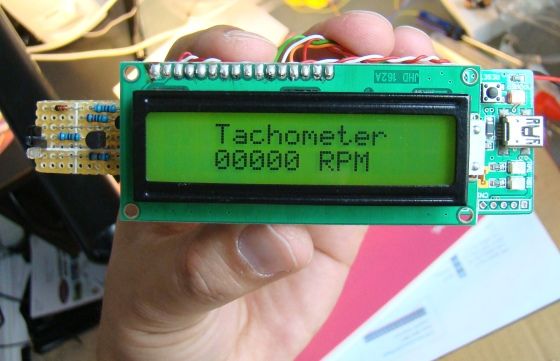
Tachometer is a device that measures the rotational speed of any shaft or disc. The unit of the measurement is usually revolutions per minute or RPM. The traditional method of measuring RPM of a rotating shaft was based on velocity feedback concept where a dc generator is hooked to the rotating shaft so that the voltage induced across the generator’s terminals is proportional to the speed of the shaft. Today, we are going to make a digital tachometer based on a PIC microcontroller that requires no physical contact with the rotating shaft to measure its rotational speed. The physical contact is avoided by using an optical detection technique that requires an infrared light emitting diode in conjunction with a photo detecting diode. StartUSB for PIC from mikroElektronika is the main controller board used in this project. To read more about this board, visit my article Getting started with PIC18F Microcontrollers. This tachometer can measure speeds up to 99960 RPM with the resolution of 60 RPM. The result is shown on a 16×2 character LCD display.
Theory
The contact with the rotating shaft is avoided with an optical sensing mechanism that uses an infrared (IR) light emitting diode and a photo detecting diode. The IR LED transmits an infrared light towards the rotating disc and the photo detecting diode receives the reflected light beam. This special arrangement of sensors is placed at about an inch away and facing towards the rotating disc. If the surface of the disc is rough and dark, the reflected IR light will be negligible. A tiny piece of white paper glued to the rotating disc is just enough to reflect the incident IR light when it passes in front of the sensor, which happens once per rotation (shown below).
If the entire disc surface is bright and reflective, use a piece of black paper instead so that the IR light will be absorbed by this portion once per rotation. In either case, a pulse will be generated at the output of the signal conditioning circuit for each complete rotation of the disc. The circuit diagram for the sensor part is shown below.
When the IR Tx pin is pulled high, the BC547 transistor (NPN) conducts and infrared light is transmitted. This is controlled through RA3 pin of PIC18F255o, and is turned on for 1 sec during which the number of reflected pulses received by the photo detecting diode are counted. The pulses appears at the collector of the BC557 transistor (PNP) goes to RA4/T0CKI pin of PIC18F2550. It is the external input pin for Timer0 module which counts the external pulses arriving at this pin. Under normal condition, the resistance of photo detecting diode is very high and therefore, the BC557 transistor is almost cut-off. The output at its collector is pulled to ground. When the photo detecting diode receives the reflected IR light, it’s resistance drops and BC557 conducts, and the collector output goes high. Thus, this simple circuit converts the reflected IR light from the white mark on the rotating disc into a pulse.
Timer0 Module in PIC18F2550
The Timer0 module in PIC16F series is 8-bit but in case of PIC18F2550, it is software selectable for 8- or 16-bit mode. Its operation is controlled by T0CON register; the function of each bit in the T0CON register is shown below.
For more detail: How to make a contact-less digital tachometer using IR-light reflection technique using PIC18F2550
- How does the device avoid physical contact?
The project avoids contact by using an optical detection technique with an infrared light emitting diode and a photo detecting diode. - What is the maximum speed this tachometer can measure?
This tachometer can measure speeds up to 99960 RPM. - How is the rotational speed displayed?
The result is shown on a 16×2 character LCD display. - Can the Timer0 module be configured differently?
In the PIC18F2550, the Timer0 module is software selectable for either 8-bit or 16-bit mode. - How are pulses generated from the rotating disc?
A pulse is generated when a reflective mark passes the sensor, causing the photo detecting diode resistance to drop and triggering the BC557 transistor. - What controls the transmission of infrared light?
The IR Tx pin is controlled through the RA3 pin of the PIC18F2550 to turn on the BC547 transistor. - Where do the counted pulses go within the microcontroller?
The pulses appear at the collector of the BC557 transistor and go to the RA4/T0CKI pin of the PIC18F2550. - What happens if the disc surface is bright and reflective?
If the entire disc surface is bright, use a piece of black paper so the IR light will be absorbed once per rotation.

