
Summary of 1Hz Clock Generator using PIC12F675
Summary: This project builds a precise 1 Hz clock generator using a PIC12F675 with a 32.768 kHz crystal. Timer1 runs from the PIC instruction clock (32.768 kHz / 4 = 8192 Hz). By preloading Timer1 with 0xE000 (65536 − 8192 = 57344), Timer1 overflows every 1 second, triggering an interrupt that toggles an LED. The code is written in MikroC and the initial TMR1H is reloaded in the interrupt to maintain the 1 Hz timebase.
Parts used in the 1Hz Clock Generator:
- PIC12F675 microcontroller
- 32.768 kHz crystal
- LED (for 1 Hz blinking)
- Resistor for LED current limiting
- Power supply (appropriate for PIC12F675, e.g., 5V)
- Optional: small PCB or breadboard and wiring
Based on the idea from http://www.josepino.com/pic_projects/?timebaseI have created a 1Hz Clock Generator. I use PIC12F675 as it’s available locally. Its price is just about US$1.
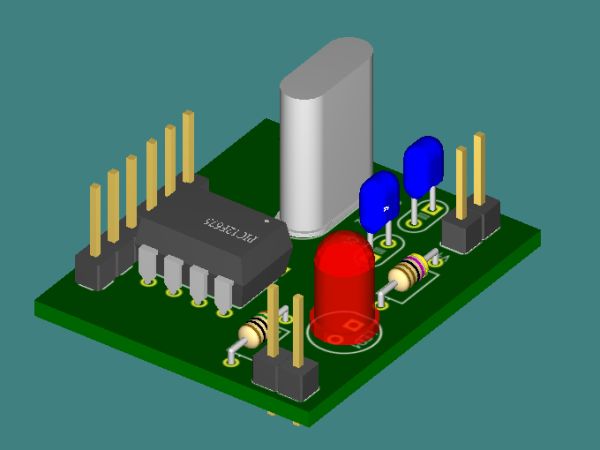
The concept is using 32.768kHz crystal as a clock for the PIC. Therefor, the internal instruction clock is 32768/4 = 8192 Hz. By using the 16 bit Timer1 to count the instruction clock cycles, the interrupt will occur every 8 second. This period can be reduced by setting initial value of the Timer1 (TMR1H:TMR1L). I have to make Timer1 to count up to 8192 for generating overflow interrupt every 1 second. To make Timer1 count up to 8192, the initial value of TMR1 must be 65536-8192 = 57344 or 0xE000. This means TMR1H = 0xE0 and TMR1L = 0x00. In this case, I need to set only the TMR1H=0xE0 and let TMR1L runs continuously. By changing the initial value of Timer1, I can generate almost any frequencies.
An application for this project is a precise 1Hz blinking LED signal 🙂 ha ha. I know that it’s not useful but I think it’s fun to look at (am I crazy?). Another application is a precise 1Hz time base for a clock.

The source code is written in MikroC.
// PIC12F675
// 1Hz Time Base Osc.
// Timer1 Module
// 32.768 KHz
unsigned short tick;
void Init ();
void interrupt ()
{
if (PIR1.TMR1IF)
{
TMR1H = 0xE0;
PIR1.TMR1IF = 0;
tick = 1;
}
}
void main ()
{
tick = 0;
//Initialize Ports and Timer1 Module
Init ();
while (1)
{
if (tick)
{
tick = 0;
GPIO = (1 << 2);
}
if (TMR1H > 0xF0)
{
GPIO = 0;
}
}
}
void Init ()
For more detail: 1Hz Clock Generator using PIC12F675
- What microcontroller is used in this 1Hz clock generator?
The project uses a PIC12F675 microcontroller. - What crystal frequency is used to create the 1Hz time base?
A 32.768 kHz crystal is used as the clock source. - How is the PIC instruction clock calculated from the crystal?
The instruction clock is the crystal frequency divided by 4, so 32.768 kHz / 4 = 8192 Hz. - How is Timer1 configured to overflow every 1 second?
Timer1 is preloaded with 0xE000 (65536 − 8192 = 57344) so it counts 8192 instruction cycles to overflow, producing a 1 second interval. - Which Timer1 register bytes are set for the 1Hz interval?
TMR1H is set to 0xE0 and TMR1L runs continuously (initially 0x00) to form 0xE000. - How does the code detect the 1 second tick?
The Timer1 overflow sets PIR1.TMR1IF; the interrupt handler reloads TMR1H and sets a tick flag. - What does the main loop do when a tick occurs?
When tick is set, the main loop clears tick and sets GPIO bit 2 to turn the LED on, and clears GPIO when TMR1H > 0xF0. - What language is the source code written in?
The source code is written in MikroC.
