


Summary of Microcontroller Programming Basics: Toolchains & SFRs Explained
The article is a concise primer explaining microcontrollers: their constrained compute and memory, memory types, peripherals, how code is compiled into machine binaries, and how binaries are flashed via protocols (JTAG, SWD, ISP, UPDI) or bootloaders. It emphasizes toolchains, programming/debug hardware, and Special Function Registers (SFRs) as the memory-mapped hardware API for controlling peripherals, noting portability challenges and the pedagogical value of examples for learning embedded systems.Parts used in the Microcontroller Programming Basics: Toolchains & SFRs Explained:
- Microcontroller units (examples: ATSAMD11, ATSAMD21, SAMD51, ATmega, ATtiny, ATTINY412, ESP32)
- Personal computer with IDE and compiler
- Programmer/debug probe (examples: CMSIS-DAP tools, Atmel-ICE, FabISP)
- USB-to-UPDI or USB-to-Serial bridges
- Bootloader (software component on microcontroller)
- Peripherals: UART, SPI, I2C (SERCOMs), Timers, ADC/DAC, USB controller
- Flash memory (on-chip non-volatile memory)
- SRAM (volatile memory)
- Example development boards/projects (Neil's Echo Board, SparkFun Mini Breakout, Adafruit Gemma, Feather M4)
Introduction and Scope
The tutorial initiates a journey into the foundational understanding of microcontrollers (uCs), targeting an audience that spans hobbyists transitioning from Arduino development boards to students encountering embedded systems in coursework. It acknowledges the natural curiosity of learners trying to unpack what precisely happens "under the hood" when firmware is uploaded to a device—be it a 3D printer, a sensor network node, or an Internet-of-Things (IoT) gadget.
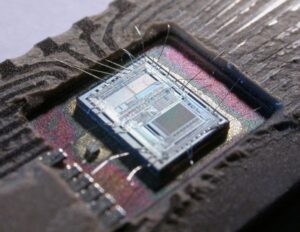
This introductory section is vital, as it clearly defines the purpose of the piece: to demystify microcontrollers, and to serve as a launchpad for embedded systems learning. The author cleverly positions this as a “tiny primer,” simultaneously reducing intimidation for beginners while implying conceptual depth.
A Micro… controller?
This section distills the essence of microcontrollers as computationally constrained, application-specific computing units, emphasizing their core differences from general-purpose computers.
Key Comparative Insights:
-
Compute Power: These days, lap tops (2021 developments) have multi-core CPUs that operate in gigahertz and gigabytes of volatile and non- volatile memory. Consider the specs of a microcontroller—clock speeds of somewhere between 8 MHz to 800 MHz, and memory in kilobytes and low megabytes.
-
Memory Architecture:
-
Volatile Memory (SRAM): Used for temporary storage during computation.
-
Non-volatile Memory (Flash, EEPROM): Retains code and selective data across power cycles.
-
The tutorial draws attention to why we use microcontrollers: their embedded peripherals. These peripherals allow an interpretation of voltages, signal generation, and protocol communications (for example, I2C, SPI, UART), that can interface with the physical world. A microcontroller executes predictable and deterministic operations directly with the hardware, meanwhile general-purpose computers require large software stacks, operating systems, and other complexities.
This section functions not only as a description but also as a subtle reminder that efficiency, determinism, and real-world interaction are the primary value propositions of microcontrollers in embedded design.
Codes to Instructions
Here, the author explains how human-readable code gets translated into machine-executable binary—a crucial conceptual leap for developers moving beyond black-box programming.
The layered model provided is exceptionally effective in illustrating abstraction, from high-level software design to physical reality:
| Layer | Domain | Description |
|---|---|---|
| 1 | Code | Application code: what the programmer writes |
| 2 | Code | Library or algorithmic code |
| 3 | Compiler | Programming language syntax rules |
| 4 | Compiler | Assembly language (symbolic machine code) |
| 5 | Compiler | Machine code (raw instruction binary) |
| 6 | Compiler | Instruction Set Architecture (ISA) |
| 7 | Physics | Micro-architecture (CPU circuit layout) |
| 8 | Physics | Transistor-level design |
| 9 | Physics | Fundamental physics and information transfer |
Every level encompasses an abstraction domain and the hierarchy illustrates a powerful thought: our code only reflects the iceberg of the interrelated system as a whole. The user typically only expresses cognizance of layers 1 to 3, but that we should know the existence—and even the basic behaviors—of layers 4 to 6 from embedded systems programming perspective.
Furthermore the observation on machine code literally being an instruction to execute using the microcontroller’s instruction set lends to the hardware reality at layer 6—the ISA. This shows that if one microcontroller (i.e., AVR, ARM Cortex-M, RISC-V) can interpret the machine code differently with similar application code. This is why it is essential to understand the toolchain in use and the compilation of code.
Practical Interpretation: The Binary and “Flashing”
The discussion transitions fluidly into practical concerns: how we take that machine code and embed it into a microcontroller. The binary file (.bin or .hex) is the final product of the compilation chain, a tightly packed string of 1s and 0s representing instructions and data.
-
Flashing: The term commonly used in microcontroller development means writing the binary file into the microcontroller’s non-volatile Flash memory. The metaphor of “flashing” reflects how data is electrically written to memory regions that retain it even when powered off.
This is particularly relevant for real-time and embedded systems, where the program must persist across resets and operate without continuous host intervention (as it would with an interpreted script or interactive desktop program).
Thematic Synthesis: Bridging Abstraction and Hardware
Overall, the tutorial and this commentary underscore that programming microcontrollers is not just about syntax or logic flow; it’s an act of translating human intent into electronic state manipulation. Every blinking LED, every detected button press, is the result of a chain of abstractions rooted in logic, language, and physics.
The microcontroller sits uniquely at this intersection—it is both a digital processor and a physical actor. By learning how code becomes instructions, how instructions become voltages, and how voltages become action, the student of embedded systems begins to grasp what makes embedded engineering both so challenging and so rewarding.
Programming / Debug Protocols
This section dives deeper into how binary programs are physically transferred into the memory of a microcontroller, a process essential to embedded system design. It emphasizes a fundamental behavior of microcontrollers: upon power-up or reset, they begin execution from a specific memory address—typically address 0x0000 in program memory. This boot process is hardcoded into the microcontroller’s architecture and begins by fetching instructions sequentially from non-volatile memory (e.g., Flash).
The author draws an excellent analogy: programming a microcontroller is akin to writing a file to an SD card. This comparison bridges the conceptual gap for readers transitioning from consumer electronics to low-level embedded devices.
However, writing to Flash isn’t straightforward. Microcontrollers do not inherently understand USB, HDMI, or other high-level computer communication protocols. Instead, they rely on low-level, often hardware-specific programming/debug protocols, such as:
-
JTAG (Joint Test Action Group) – A full-featured boundary-scan and debug interface.
-
SWD (Serial Wire Debug) – A two-wire debug protocol optimized for ARM Cortex-M microcontrollers.
-
ISP (In-System Programming) – Typically SPI-based for many Atmel/Microchip microcontrollers.
-
UPDI (Unified Program and Debug Interface) – A newer single-wire protocol used in modern AVR microcontrollers.
These protocols are hardware-embedded into the microcontroller silicon, ensuring a reliable and always-available path for programming. Of course, most personal computers do not have the means to physically speak these protocols directly. For this reason, an external programmer (or adapters, like the CMSIS-DAP probes or Atmel-ICE, or USB-to-UPDI bridges) are required to bridge the gap between the PC and the microcontroller.
| Protocol | Pinouts | Available Programming Tools | uCs / uC Families |
|---|---|---|---|
| SWD (Serial Wire Debug) / JTAG | pinz pinz | CMSIS-DAP tools | ATSAMD11, ATSAMD21 … any ARM-Cortex uC |
| ISP (In-System Programming) | isp | Atmel-ICE SPI, FabISP, Arduino as ISP | Atmel (now Microchip) families: ATmega, ATtiny, etc |
| UPDI (Unified Programming & Debug Interface) | updi | USB-to-Serial tools | ATTINY412 … many newer Microchip uCs |
Toolchains
This section contextualizes the entire development workflow under the term toolchain—a set of tools working in sequence to transform source code into an operational embedded application.
The author simplifies the complete chain as follows:
-
Write code on a computer (IDE + compiler).
-
Compile code into a binary (.hex or .bin file).
-
Transfer the binary using a programmer.
-
Program the microcontroller (store binary into Flash memory).
-
Run the code on the device.
Each of these steps involves particular tools. For example, CMSIS-DAP is the standard protocol for interfacing with ARM Cortex-M microcontrollers (like ATSAMD11/SAMD21) when connecting to debugging and programming tools, over USB.
This knowledge is important because with embedded development, it becomes difficult to separate hardware from software. Developers need a sense of both firmware (the compiled software), along with the tools that are used to deploy them.
The Micro Toolchain Reference Table further expands this by mapping:
-
Chip families (e.g., ATSAMD11, ATSAMD21, ATTINY, ESP32).
-
Common toolchains (Arduino IDE, PlatformIO + bootloader, VSCode with CMSIS-DAP).
-
Specific parts and variants (e.g., ATSAMD21G18A).
-
Example projects (such as Neil's Echo Board or SparkFun Mini Breakout).
This table is pedagogically invaluable. It helps learners connect abstract theory with specific hardware implementations, fostering a more grounded understanding. Importantly, it also teaches that different chips—even within the same family—may require different toolchains or code modifications, especially when peripherals, bootloaders, or memory configurations differ.
| Device | Protocol / Link | Device | Protocol / Link | Device |
|---|---|---|---|---|
| Personal Computer: IDE & Compiler | CMSIS-DAP over USB | The Programmer: any CMSIS-DAP tool | over TTL | The Microcontroller (e.g. SAMD21, SAMD11) |
Bootloaders
Bootloaders are introduced as special-purpose mini-programs embedded into microcontroller memory to facilitate application programming over standard communication interfaces—most notably USB, UART, or SPI.
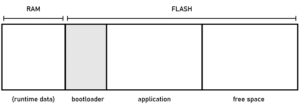
The author uses the delightful metaphor of bootloaders as “programming programs”, playing on the recursion inherent in embedded computing. In essence, a bootloader intercepts control of the microcontroller during power-up, checks for new firmware, and if present, loads it into program memory. Otherwise, it hands over control to the main application.
This dual-role architecture is fundamental in embedded system update mechanisms, particularly for consumer electronics, DIY projects, and field-upgradable devices like:
-
3D printers
-
IoT nodes
-
Wearable devices (e.g., Adafruit Gemma or Feather M4)
-
Educational kits and fab-lab creations
Special Function Registers
By this stage in our understanding of microcontroller programming, we are aware of the essential toolchain: we write human-readable code—typically in C or C++—which is then translated by a compiler into machine-level instructions. These instructions are finally transferred to the microcontroller’s non-volatile memory via specialized hardware interfaces such as In-System Programmers (ISPs), CMSIS-DAP interfaces, or bootloaders. However, an important question remains: how does this compiled code physically affect the behavior of the microcontroller’s pins and internal peripherals? Specifically, how do we programmatically set a digital pin to HIGH or LOW voltage, or transmit data via a UART interface?
The answer lies in the concept of Special Function Registers (SFRs). These are memory-mapped hardware registers through which the central processing unit (CPU) communicates with the various peripherals integrated into the microcontroller. To better appreciate this architectural interface, consider the schematic of a complex microcontroller like the Microchip SAMD51.
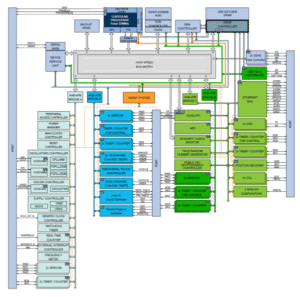
Microcontroller Architecture
In a block diagram of such a device, the CPU core (often ARM Cortex-M) occupies a relatively small section of the die—typically shown as a dark blue region near the top. The remainder of the chip consists of hardware peripherals: dedicated digital or analog circuits that implement specific tasks.
These peripherals operate independently from the CPU. Some perform rudimentary operations like controlling the logic level (voltage) of I/O pins, while others handle intricate functionalities:
-
SERCOMs (Serial Communication Modules) that manage protocols such as UART, SPI, and I²C,
-
Timers that enable time-keeping and Pulse Width Modulation (PWM),
-
ADCs/DACs for analog signal interfacing,
-
USB controllers, and many more.
These peripherals act almost like embedded Application-Specific Integrated Circuits (ASICs). While the CPU executes code, these peripherals autonomously process their respective operations, freeing CPU cycles for other tasks. For example, a UART peripheral can autonomously serialize and transmit a byte of data over a pin without CPU intervention during the actual bit transmission.
SFRs as the Hardware API
From a software developer’s perspective, SFRs are the definitive control mechanism for accessing these peripherals. Unlike standard software libraries that expose function calls and abstract interfaces, microcontroller peripherals are controlled through explicit read and write operations to fixed memory addresses—the locations of the SFRs. These addresses are predefined in the device’s memory map, and each SFR typically controls or reflects the state of one or more bits of hardware logic.
For example, setting bit 5 of a certain PORT.OUTSET register might drive a specific GPIO pin HIGH, while reading from a USART.DATA register may return the latest received UART byte. Conceptually, this interaction is not "writing to memory" in the traditional computing sense but interacting with a memory-mapped switchboard—where each bit corresponds to a hardware function.
An apt analogy is to view the CPU as a miniature operator navigating a massive control room filled with levers and switches. Every time it writes a 1 to a specific bit in an SFR, it is akin to flipping a physical switch—activating a timer, initiating a transmission, or toggling a pin.
Challenges of SFR-Based Programming
Despite its fundamental importance, SFR programming is inherently non-portable. Registers and their bit arrangements vary widely not only between different microcontroller families but even between models within the same family. As a result, code that directly manipulates SFRs is often tied to a specific device and must be rewritten for other platforms. Compilers provide no abstraction here—they see these interactions as simple memory accesses.
This lack of portability is one of the trade-offs for maximum performance and granular control. Developers seeking deterministic and low-overhead behavior often bypass higher-level Hardware Abstraction Layers (HALs) and interact directly with SFRs, especially in resource-constrained embedded systems.
To mitigate the complexity, many developer communities and educational platforms (such as those used in the fab lab network) maintain “hello-world” firmware repositories. These contain minimal examples for initializing and controlling specific peripherals on supported microcontroller families. They serve both as references and learning tools.
Conclusion
The microcontroller landscape is vast and rich with capability. While this primer has touched upon some core principles—compilation, flashing, and hardware interaction via SFRs—it merely scratches the surface of embedded systems design. A comprehensive understanding, especially of SFRs and memory-mapped I/O, evolves over time and with hands-on experience.
Yet, even this brief overview can demystify key mechanisms and provide a foundation for both beginners building their first embedded circuits and experienced developers needing a quick refresher or example on a new platform.
Source: Microcontroller Programming Basics: Toolchains & SFRs Explained
Quick Solutions to Questions related to Microcontroller Programming Basics: Toolchains & SFRs Explained:
- What is the difference between microcontrollers and general-purpose computers?
Microcontrollers have lower clock speeds and far less memory, are application-specific, and include embedded peripherals for real-world interfacing, unlike general-purpose computers that require large software stacks and OSes. - How does human-readable code become runnable on a microcontroller?
Code is compiled through layers (source, compiler, assembly, machine code, ISA, micro-architecture) into a binary (.hex or .bin) which is then flashed into the microcontroller's Flash memory. - Can I program a microcontroller over USB directly?
Not directly; most microcontrollers do not natively speak USB for programming and require bootloaders or external programmers/protocol bridges like CMSIS-DAP or USB-to-UPDI. - What protocols are commonly used to flash or debug microcontrollers?
Common protocols include JTAG, SWD, ISP, and UPDI, each embedded in the microcontroller silicon for programming and debugging. - What is a bootloader and why is it useful?
A bootloader is a small program on the microcontroller that checks for new firmware on interfaces like USB or UART and writes it to Flash, simplifying field updates and programming over standard links. - How do programs control microcontroller pins and peripherals?
Programs read and write Special Function Registers (SFRs), memory-mapped registers that directly control hardware peripherals and I/O behaviour. - Does SFR-based programming work across different microcontrollers?
No; SFR layouts and bit meanings vary across families and models, making direct SFR code non-portable. - What tools make up the embedded toolchain?
The toolchain includes an IDE and compiler to write and build code, a programmer to transfer the binary, and debugging/programming tools like CMSIS-DAP or Atmel-ICE to program the microcontroller. - What is flashing in microcontroller development?
Flashing is writing the compiled binary into the microcontroller's non-volatile Flash memory so the program persists across power cycles. - What practical value do example firmware repositories provide?
They offer minimal, device-specific examples for initializing and controlling peripherals, aiding learning and reducing complexity for new platforms.
Related projects
Calculator Test using PIC24FJ64GA006 with Proteus Simulation
Introduction The Calculator Test using EASYHDL is a practical microcontroller project built on the PIC24FJ64GA006 and simulated in Proteus. This project demonstrates...
Programmers & ICSPPID Controlled Oven using TMS320F28027PT with Proteus Simulation
IntroductionThis project demonstrates a PID controlled oven implemented using a PICCOLO TMS320F28027PT microcontroller and verified through Proteus simulation.It is a practical microcontroller...
Programmers & ICSPPICCOLO Motor Controller Sample Design using TMS320F28023PT with Proteus Simulation
IntroductionThis project demonstrates a PICCOLO motor controller sample design implemented using the TMS320F28023PT Piccolo microcontroller and tested through Proteus simulation. It focuses...
Programmers & ICSP · PIC16F84APIC Musical Doorbell using PIC16F84A with Proteus Simulation
IntroductionThis microcontroller project demonstrates a musical doorbell built around a PIC16F84A and a simple piezo sounder.Using two push buttons, the system allows...
Programmers & ICSP · PIC16F877AEPE PIC/LCD Demo using PIC16F877 with Proteus Simulation
IntroductionThe EPE PIC/LCD Demo is a classic microcontroller project that demonstrates how a PIC16F877 can fully control a PG12864F graphical LCD.Designed as...
Programmers & ICSP · PIC16F628ADHT11 Low Cost Humidity Sensor using PIC16F628A with Proteus Simulation
IntroductionThis microcontroller project demonstrates how to interface a low-cost DHT11 temperature and humidity sensor with a PIC16F628A using a Proteus simulation environment.The...

Ibrar Ayyub
I am an experienced technical writer holding a Master's degree in computer science from BZU Multan, Pakistan University. With a background spanning various industries, particularly in home automation and engineering, I have honed my skills in crafting clear and concise content. Proficient in leveraging infographics and diagrams, I strive to simplify complex concepts for readers. My strength lies in thorough...