


Summary of Blink LED with XC8 compiler using external Oscillator
Summary (under 100 words) This tutorial shows how to blink an LED with a PIC18F4550 using a 20 MHz external crystal and XC8 compiler delays. It explains oscillator wiring (20 MHz crystal with two 22 pF caps and a 0.1 µF decoupling cap), issues with XC8 __delay_ms/__delay_us (constant-only arguments, ms limits ~39 ms at 20 MHz), and workarounds: wrap __delay calls inside loops to achieve variable or longer delays. It also notes defining _XTAL_FREQ is required for __delay to work.Parts used in the Blink LED with XC8 compiler using external Oscillator:
- PIC18F4550 microcontroller
- 20 MHz crystal oscillator
- 22 pF capacitor
- 22 pF capacitor
- 0.1 uF decoupling capacitor
- LED
- Current-limiting resistor for LED
- Power supply (Vdd and Vss connections)
- Wiring/PCB or breadboard
In the simple tutorial we are going to blink few simple led with PIC18F microcontroller, using an external 20MHz crystal oscillator and the '__Delay ()' function of XC8 Compiler. Most of the previous tutorials here dealt with internal oscillator of pic18F4550 where mostly the delays were generated with simple for loops. However those who wish to directly use the default __delay function, it becomes an instant pain as the __Delay () function no longer accepts the variable data unlike the old C18 Compiler.
This simple tutorial is made on few requests and queries I recently received through mails, regarding the delay problems in xc8 compiler, along with configuration of the compiler directives used by pic18F4550 when it comes to using external oscillator. Hence I decided to put it together as tutorial to blink a simple led using external 20 MHZ Crystal oscillator on pic18F4550 with XC8 compiler and Mplab x ide
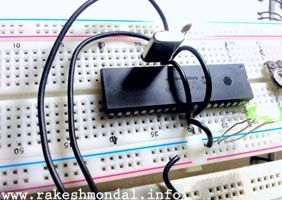
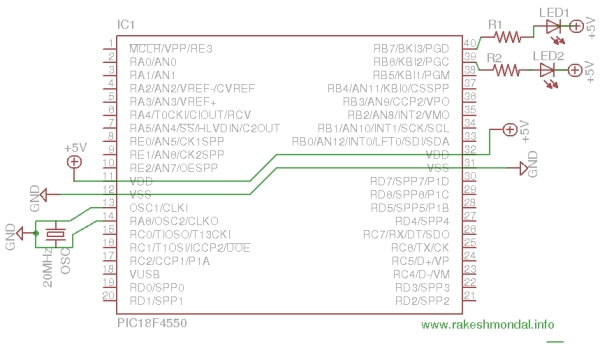
The 20 MHz crystal oscillator is interfaced with two 22p capacitor as explained in the oscillator section in the pic18F4550 datasheet. Please download the latest version of datasheet for pic18F4550 from the microchip website. A 0.1u cap is also added close to microcontroller.
The basic logic is to turn the led on and then turn off by setting registers, with some good delay in-between them, enough to catch the effect by human eye. There are many ways to generate such delays, such as using delays.h, making your own delay loops, etc.
The theory goes as, if you want to use xc8 delay function then you have include delays.h as a header (preprocessor) and then include __delay_us(); or __delay_ms(); (with double underscore) anywhere you wish to include a delay, with your desired constant value of delay such as ” __delay_ms(500);” which theoretically sounds simple , unlike my methods in previous tutorials where I have always generated delays in the code with simple “for loops”, enclosed within in a function prototype, which could be called anytime you wish to generate a delay in the main() code.
However if you wish to generate the delays in the code with like c18 Compiler, then you have certain limitations with xc8 compiler such as, limit of delays value and inability to assign a variable to delay function. For example __delays_ms(a) where int a is a variable (say the value generated by an ADC ). This is not possible with the new xc8 compiler to define variable delay value “directly”.
Variable delay value issue can be solved by creating a loop, and inclosing the __delay_ms or __delay_us function inside the loop. The number of cycles you would wish to call the loop with delay function in it can be a variable.
Another limitation is the value of the delay. The code I wrote below generates a delay of approximately 200ms, where for 20 MHz I have defined _XTAL_FREQ 20000000UL. Please note that XTAL_FREQ doesn’t really sets the frequency of the hardware, but it’s still required for __delay_ms. If you directly write the milliseconds values as __delay_ms(200); then immediately the compiler would throw an error on compiling the code. For the code below, the xc8 compiler doesn’t want to accept the ms value greater than 39. Hence creating for loop again can be helpful when the ms value can’t be more then 39 for _XTAL_FREQ 20000000UL.
For more detail: Blink LED with XC8 compiler using external Oscillator
Quick Solutions to Questions related to Blink LED with XC8 compiler using external Oscillator:
- How is the 20 MHz crystal connected to PIC18F4550?
With the 20 MHz crystal connected to the oscillator pins and two 22 pF capacitors as shown in the datasheet, plus a 0.1 uF cap close to the microcontroller. - Do I need to define _XTAL_FREQ when using __delay_ms or __delay_us?
Yes, you must define _XTAL_FREQ (for example 20000000UL for 20 MHz) for the __delay functions to work. - Can I pass a variable directly to __delay_ms in XC8?
No, XC8 requires a constant value for __delay_ms and does not accept a variable directly. - What is a workaround to create variable delays with XC8?
Place __delay_ms or __delay_us inside a loop and iterate the loop a variable number of times to achieve a variable delay. - Is there a limit to the ms value accepted by __delay_ms at 20 MHz?
Yes, the tutorial notes the compiler did not accept ms values greater than about 39 for _XTAL_FREQ 20000000UL, so longer delays require looping. - Does _XTAL_FREQ change the hardware oscillator frequency?
No, _XTAL_FREQ does not set the hardware frequency; it is required by the __delay macros to calculate timing. - What headers are required to use __delay_ms and __delay_us?
You must include delays.h as a preprocessor header to use __delay_ms and __delay_us.
Related projects
PICDEM FS USB CDC Evaluation Board using PIC18F4550 with Proteus Simulation
Introduction The PICDEM FS USB CDC Evaluation Board is a practical microcontroller project built around the PIC18F4550, designed to demonstrate USB communication...
Peripheral Tutorials · PIC18F4550PICDEM FS USB Mass Storage Device using PIC18F4550 with Proteus Simulation
Introduction This microcontroller project demonstrates how to simulate a USB Mass Storage Device (MSD) using the PIC18F4550 in a Proteus simulation environment....
Development Boards & Kits · PIC18F2550Pinguino Project: A PIC Microcontroller Based Arduino
This is a complete tutorial to make a PIC Microcontroller based Arduino. This is a complete tutorial to make PIC microcontroller based...
LED ProjectsAn Application-Driven Microcontroller Curriculum
Understanding how to apply microcontrollers lies at the core of modern embedded systems education. This student project takes an experiential approach to...
LED ProjectsBuild this microcontroller controlled rainbow flying disc – and then throw it!
Hello all and welcome to this super simple and inexpensive instructable. If you like throwing frisbees AND you like flashing lights AND...
LED ProjectsLED Scrolling Display Project Working With Circuit Diagram
We normally use a simple static LED display screen to convey a message. Earlier, when we want to display large data, we...

Ibrar Ayyub
I am an experienced technical writer holding a Master's degree in computer science from BZU Multan, Pakistan University. With a background spanning various industries, particularly in home automation and engineering, I have honed my skills in crafting clear and concise content. Proficient in leveraging infographics and diagrams, I strive to simplify complex concepts for readers. My strength lies in thorough...