
Summary of Interfacing and Communicating with the 68HC05/705 Microcontroller Family
This document explains how to interface the Andromeda Research EPROM+ programmer to Motorola/Freescale 68HC05/705 microcontrollers by uploading a small communication program into the part's RAM at $0050. It lists compatibility requirements (SCI, 176 bytes RAM at $0050, binary RAM-load support), upload prerequisites (power, reset pin/config, 4 MHz clock, ACOM1 connections), mode differences (EEPROM vs EPROM algorithms), upload sequence, memory access options, and cautions about RAM usage and custom test program structure.
Parts used in the68HC05/705 EPROM+ Interface Project:
- Andromeda Research EPROM+ programming system
- ACOM1 adapter
- Motorola/Freescale 68HC05/68HC705 microcontroller (example parts: 68HC705C8, 68HC05B16)
- 4 MHz crystal or 4 MHz crystal oscillator
- 5 V power supply
- External programming voltage supply for Vpp (example: 14.75 V for 68HC705C8)
- Connections/wiring for RST, XMT, RCV pins
- Optional pull-up/pull-down resistor connections for PD3, TCAP1, PD4, IRQ as required by specific parts
This document provides information necessary to interface the Andromeda Research EPROM+ programming system to certain members of the Motorola 68HC05/705 microcontroller family. The interface is accomplished using the ACOM1 adapter by uploading a small communication program into the RAM area of the 68HC05 device. Once uploaded, the program establishes a communication link between the 68HC05 and the EPROM+ system. The communication program allows the EPROM+ system access to the internal EPROM, EEPROM, ROM, RAM or I/O area of the part.
About the 68HC05 Family
The 68HC05 microcontroller family is composed of more than 100 different members (parts). These include limited function devices in small packages intended for simple applications plus complex devices intented for more sophisticated products. All family members use the same basic processor core and differ only in the amount of memory (ROM, EPROM, EEPROM and RAM) plus peripheral options such as I/O ports, timers, counters, pulse width modulators, comparitors, etc. NOTE: Motorola identifies parts containing user programmable EPROM with 705 in the part number as opposed to 05. For example, the 68HC705C8 microcontroller has user programmable EPROM where the 68HC05B16 has factory programmed mask rom. This document does not address the specific technical attributes of any member of the 68HC05 family. If you require information regarding a specific part it may be obtained from the Freescale website (www.freescale.com). Motorola spun off their microcontroller division and changed the name to Freescale. NOTE: This document uses the $ which is Motorola’s standard syntax for represending hexadecimal numbers. Example: $100 represents 100 hexadecimal.
Compatible family members
The EPROM+ system is compatible with members of the 68HC05 family which support the following internal architectural components and chip features:
1 – SCI port (Serial Communication Interface)
2 – 176 bytes of internal RAM mapped at $0050.
3 – Load program into RAM and execute function (binary image program only loaded at $0050).
NOTE: Some members of the 68HC05 family do not support the function which allows a binary program to be loaded into the RAM area at $0050 and executed. If this function is not supported, the communication program upload will fail. An example part which does not support the binary upload function is the 68HC705B5.
Requirements for successful upload and communication
In order for the 68HC05 microcontroller to accept and successfully upload the communication program the following conditions must exist:
1. The part must be powered on (5volts applied).
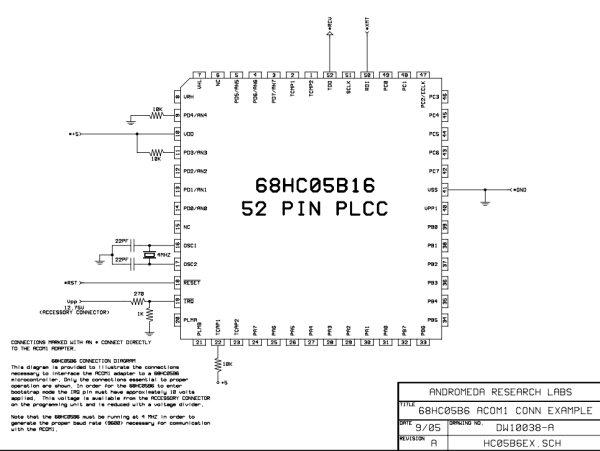
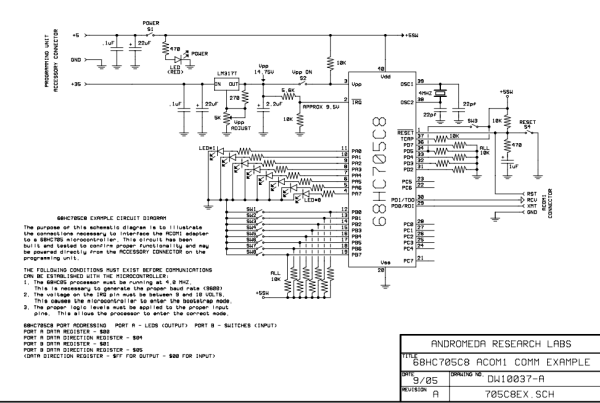
2. The part must be configured to accept the uploaded program. This differs depending on the part. There are two example schematic diagrams included with this document. One illustrates the necessary connections for the 68HC705C8 and the other the 68HC05B16. Example: The 68HC05B16 must have the following pins at logic 1 (+5) following reset. (PD3 and TCAP1). The PD4 pin must be at logic 0 (GND). The IRQ pin must have between 9 and 10 volts DC applied. If any of these conditions are not met, the part will not enter the bootstrap or upload mode following reset.
3. The part must be clocked or running from a 4 MHZ source. This can be an external crystal or a dedicated crystal oscillator. This frequency must be insured or the proper baud rate (9600) for communication will not be generated.
4. The ACOM1 must be connected such that the RST (reset), XMT (transmit) and RCV (receive) pins are connected to the proper pins on the 68HC05.
Selecting the part
The EPROM+ system requires that you choose a specific part number depending on the task you wish to perform. Due to the limited RAM in a 68HC05 device, it is not possible to provide a single communication program which allows programming of both the EEPROM and EPROM. To this end, there are two communication programs, one contains the algorithm which allows you to read and program the on-chip EEPROM area, the other contains the algorithm which allows you to read and program the EPROM area. The correct program is uploaded depending on the part number you choose. There are four part numbers available, two device specific and two generic. The device specific part numbers are the 68HC05B16 (EEPROM) and the 68HC705C8 (EPROM). The two generic part numbers are the 68HC05EE (EEPROM) and the 68HC705EP (EPROM). In the event that you are working with a part which is not a 68HC05B16 or a 68HC705C8, you may choose the corresponding generic number depending on the task you wish to perform (EEPROM or EPROM access and programming).
Understanding the EEPROM and EPROM Differences
EEPROM MODE (68HC05EE) – Choosing the 68HC05EE will upload the communication program which allows reading and programming of the EEPROM area of a 68HC05. In the normal 64K address range ($0-$FFFF) of a 68HC05 part with on-chip EEPROM, the EEPROM will be mapped between $100 and $1FF (256 bytes). The EPROM+ software makes this 256 byte block of memory appear to begin at address $0 and end at address $FF. This is done to allow you to work with the EEPROM area within the part unencumbered by the fixed offset of $100. When you instruct the system to read, the EEPROM area will be loaded into the system buffer beginning at 0 and ending at FF. Conversly, when you instruct the system to program, the buffer area between 0 and FF will automatically be placed into the part between $100 and $1FF.
EPROM MODE (68HC705EP) – Choosing the 68HC705EP will upload the communication program which allows reading and programming of any EPROM area of a 68HC705. You are actually permitted access to the entire 64K ($0-$FFFF) address range as there is no consistent block of memory allocated only to EPROM in the 68HC05 family. When accessing a 68HC705 or 68HC05 part, you may examine any address within the 64K range. In order to program the EPROM area you must apply the required external programming voltage to the Vpp pin on the processor. For the 68HC705C8 device, the is 14.75 volts. The buffer editor “W” (write) command must be used to write the data from the buffer into the 68HC705 over the desired address range.
Standard memory Read/Write
While in the EPROM MODE (68HC705EP), you may also perform standard memory read and write operations. These are the same as processor LOAD and STORE instructions. This allows you to exercise I/O ports or examine and change any address within the 64K range. To select this option press “Z” at the “SELECT COMMAND” prompt. Select “O” for options then press “3” to choose the entire 64K address range. Press “O” for options and choose “1” for memory write. Press “ESC” twice to return to the COMMAND PROMPT. You may now use any main or editor command to read or write the device. NOTE: If you wish to work with the EEPROM area (68HC05EE) while in the 64K mode, use the previous option selections except choose “2” “EEPROM ALGORITHM” instead of “1” (memory write).
Upload sequence and options
Before any operation can be performed on the 68HC05/705 the appropriate communication program must first be uploaded. To achieve a successful upload, the conditions listed under REQUIREMENTS FOR SUCCESSFUL UPLOAD AND COMMUNICATION must exist. Once these conditions are met, perform the following steps:
1 – From the COMMAND PROMPT press “Z” (device options)
2 – Press “1 – UPLOAD 68HCXX COMMUNICATION PROGRAM”
You will see: “BOOTSTRAP UPLOAD IN PROGRESS…”
3 – When the upload is finished your will see “* BUFFER UPLOAD COMPLETE *”
4 – The EPROM+ software will now attempt to confirm that communication can be established with the 68HC05.
If communications is established you will see (COMMUNICATION VERIFIED) displayed directly below * BUFFER UPLOAD COMPLETE *. Watch for it. If the COMMUNICATION VERIFIED message is not displayed, communication with the 68HC05 part has not been established and no system commands will function.
If this happens, you must determine the cause and correct the problem. Note: The * BUFFER UPLOAD COMPLETE * and (COMMUNICATION VERIFIED) messages are displayed for a short period and then automatically erased.
Additional consideration
1. The communication program will continue to run in the 68HC05 until power is removed or the processor is reset. Remember that if you temporarily remove power from the part, you must again upload the communication program.
2. The communication program loads and runs in the 68HC05 RAM area beginning at $0050. If you use the memory write function of the program to alter any addresses in this area, you will corrupt the program and communication will stop.
Upload any test program into the 68HC05 RAM area
If you have the technical skill to create your own test program and wish to upload it into the 68HC05 part, this can be accomplished by pressing “Z” and choosing option 2 or 3. Create your program with the ORIGIN at $51. Load the program into the buffer and then transfer it (“T” command) to buffer address 0001. Count the total number of bytes plus 1 and place this number (in binary) at buffer address 0 (byte count). Upload your program. NOTE: The binary image structure of the program follows:
$50 – byte count of program including this byte (if you have a five byte program this value will be $06)
$51 – First byte of program (execution starts here)
$52 through $FF (remaining bytes in 176 byte area)
NOTE: When the processor starts from reset, it places the STACK at $FF. Be aware of this as it can limit the available space for your program depending on the use of subroutines.
- What is required for the EPROM+ to upload a communication program to a 68HC05?
The part must be powered at 5 volts, configured to accept upload (specific pin states per part), clocked at 4 MHz, and ACOM1 connected to RST, XMT, and RCV. - Which 68HC05 family members are compatible with this interface?
Members that provide an SCI port, 176 bytes of internal RAM mapped at $0050, and support loading a binary program into RAM at $0050 and executing it. - How do you choose between EEPROM and EPROM communication programs?
Choose the EEPROM program (68HC05EE or 68HC05B16) to access on-chip EEPROM, or the EPROM program (68HC705EP or 68HC705C8) to access EPROM/entire 64K range. - How is the EEPROM mapped when using EEPROM MODE?
The on-chip EEPROM is mapped at $100–$1FF but the EPROM+ software presents it as $00–$FF in the buffer. - What must be applied to program EPROM areas on a 68HC705?
The required external programming voltage must be applied to the Vpp pin (for 68HC705C8 this is 14.75 volts). - How do you start the upload sequence from the EPROM+ command prompt?
Press Z, then choose 1 - UPLOAD 68HCXX COMMUNICATION PROGRAM, and watch for BUFFER UPLOAD COMPLETE and COMMUNICATION VERIFIED messages. - What happens to the communication program after upload?
It continues to run in the 68HC05 until power is removed or the processor is reset; removing power requires re-uploading. - Can you modify RAM addresses used by the communication program?
No; altering addresses in the RAM area beginning at $0050 will corrupt the program and stop communication. - How do you upload a custom test program into 68HC05 RAM?
Create a binary with origin at $51, load it into the buffer, transfer to buffer address 0001, place byte count at buffer address 0, then upload; execution starts at $51. - What must be ensured about clock frequency?
The part must be clocked at 4 MHz so the bootstrap generates the proper 9600 baud for communication.
