


Summary of PIC24 Speech Output of Temperature Reading using PIC24FJ128GA010 with Proteus Simulation
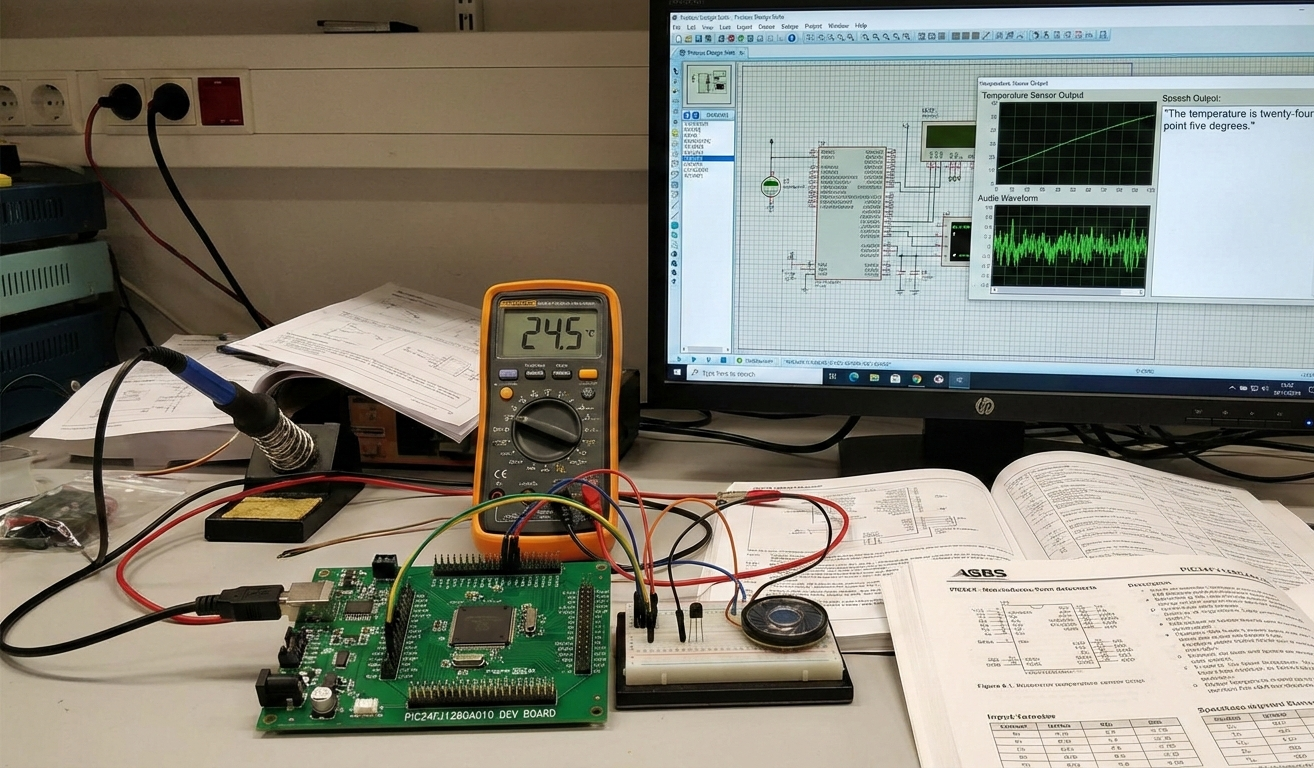
This project builds a speech-enabled talking thermometer using a PIC24FJ128GA010 microcontroller in Proteus. It reads analog temperature from a TC1047A via the ADC, converts the value to °C, selects pre-recorded ADPCM .dat speech clips from MPFS, decodes them, and generates audio with PWM (OC1 + Timer2). The PWM audio is filtered and amplified by two op-amp stages before driving a speaker. A push-button triggers readings; Proteus simulates ADC, PWM, and audio paths for testing.Parts used in the Talking Thermometer Project:
- PIC24FJ128GA010 microcontroller
- TC1047A temperature sensor
- Push button (RD13 input)
- Op-amps U1 and U2 (anti-aliasing and audio amplification)
- Capacitors: 100n, 3.3n, 2.7n, 5.6n (and others)
- Resistors: 9.31k, 19.1k, 8.45k, 12.4k, pull-ups (and others)
- PWM audio driver hardware (OC1, Timer2)
- Speaker / audio output
- MPFS file system storage with ADPCM .dat speech clips
Introduction
This project demonstrates how to build a speech-enabled temperature monitoring system using a PIC24F microcontroller and Proteus simulation. The system reads the temperature from an analog sensor (TC1047A), converts the data using the built-in ADC, and then plays back pre-recorded speech files representing the temperature value.
This is a practical and fun microcontroller project that blends embedded systems, ADC/DAC, audio playback, and digital signal processing (ADPCM decoding). It’s ideal for exploring DIY electronics, speech synthesis, and filter design using real hardware and simulation tools like Proteus.
PIC24 temperature speech output is demonstrated in this project using the PIC24FJ128GA010 microcontroller and a TC1047A temperature sensor. The PIC24 temperature speech output system reads analog temperature data, processes it through the ADC, and converts it into audible speech using ADPCM decoding and PWM output. Proteus simulation is used to verify the complete PIC24 temperature speech output design.
How the Project Works (Overview)
A temperature sensor (TC1047A) feeds an analog voltage into the ADC of the PIC24FJ128GA010.
The microcontroller reads the analog value, calculates the temperature in °C, and determines which pre-stored speech files correspond to the digits (hundreds, tens, ones).
It fetches
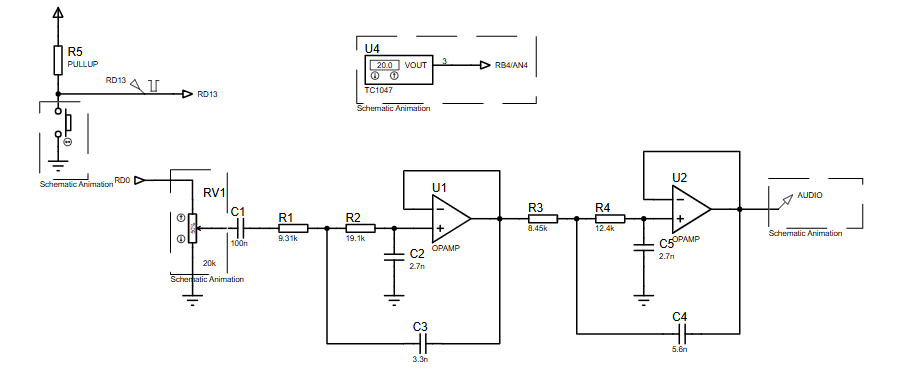
.dataudio files from MPFS storage, decodes them using an ADPCM decoder, and outputs audio using PWM (OC1 module).Two op-amp stages and passive filters (seen in the schematic) condition and amplify the signal before sending it to the speaker.
A push-button triggers a new reading and spoken temperature output.
Block Diagram / Workflow Explanation
Although the schematic is analog-focused, the full workflow from sensing to speech output is:
Temperature Sensor (TC1047A)
- ADC Conversion (PIC24F)
- Temperature Processing
- Filename Generation (.dat speech files)
- MPFS File Read
- ADPCM Decoder
- PWM Audio Generation (OC1 + Timer2)
- Analog Filter & Amplifier (U1, U2 stages)
- Speaker Output
The op-amp blocks (U1 & U2) implement anti-aliasing, smoothing, and audio amplification.
Key Features
Speech-based temperature readout using ADPCM-decoded audio clips
TC1047A analog temperature sensing with precise ADC reading
PWM-driven audio output with filtering and op-amp amplification
Push-button activated temperature playback
Modular speech file system (MPFS) for flexible audio storage
Proteus simulation-ready for testing without hardware
Uses PIC24FJ128GA010, a high-performance 16-bit MCU
Components Used
From schematic + code:
PIC24FJ128GA010 microcontroller
TC1047A temperature sensor
Push button (RD13 input)
Op-amps (U1, U2) for filtering & audio amplification
Capacitors: 100n, 3.3n, 2.7n, 5.6n, etc.
Resistors: 9.31k, 19.1k, 8.45k, 12.4k, pull-ups
PWM audio driver hardware
Speaker / audio output
MPFS file system with speech clips (.dat files)
Applications
Talking thermometers
Temperature announcement systems for visually impaired users
Smart home audio alerts
Industrial temperature reporting
Speech feedback systems in embedded devices
Educational DSP and microcontroller labs
Explanation of Code (High-Level)
1. Initialization Section
Configures digital I/O ports for ADC, PWM, amplifier control, and push-button input.
Sets up ADC to sample the TC1047A sensor on AN4/AN5.
Initializes PWM (OC1) at 16 kHz using Timer2.
Enables MPFS, which stores audio clips.
2. Main Loop
Waits for a push-button press.
Reads ADC data and converts it into a temperature value using:
Breaks the temperature into hundreds, tens, and units.
Loads corresponding speech files (e.g., “2.dat”, “15.dat”, “100.dat”).
Appends “deg.dat” and “cel.dat” to say “degrees Celsius.”
Audio files are played with small timing delays between each clip.
3. PlayClip() Function
Reads encoded ADPCM nibbles from MPFS.
For each nibble, decodes into PCM using ADPCMDecoder().
Writes the PCM sample to OC1RS, generating PWM audio.
Timer2 synchronizes audio playback at the correct sample rate.
4. Audio Path
PWM → Analog filter → Op-amps → Speaker
This ensures smooth and intelligible speech output.
Source Code
Download Author: Rodger Richey *
* Title: Senior Applications Manager *
* Company: Microchip Technology Incorporated *
* Revision: 1 *
* Date: 12-1-04 *
******************************************************************************
* Include files: *
* stdio.h - Standard input/output header file *
* string.h - Standard string header file *
* adpcm.h - ADPCM related information header file *
******************************************************************************
* This file contains the code to: *
* - Open the input and output files *
* - Read data from the input file *
* - Call the appropriate encode/decode routines *
* - Write data to the output file *
******************************************************************************
* Revision 0 1/11/96 *
* Original release supporting only ADPCM using signed raw data *
* Compiled with Borland C++ Version 3.1 *
* Revision 1 11/10/04 *
* Add CVSD, change ADPCM to support unsigned raw data *
* Compiled using Borland C++ 6.0 Complete Source Code
Proteus Simulation
In Proteus, pressing the push-button triggers:
ADC sampling of the TC1047A sensor.
Real-time temperature calculation.
Sequential playback of speech clips representing the digits and units.
The op-amp stages filter & amplify the PWM signal for clean audio output.
You can observe:
PWM waveform on OC1
Filter response through R-C and op-amp stages
Audio output amplitude envelope
Logical operation of MPFS file access
(FAQs)
Conclusion
This project is a great example of combining embedded systems, speech synthesis, and Proteus simulation to create a practical talking thermometer. Using the PIC24FJ128GA010, ADPCM decoding, and analog audio filtering, the system delivers real-time spoken temperature output — perfect for learning advanced microcontroller concepts and DSP basics.This project demonstrates PIC24 temperature speech output using a PIC24FJ128GA010 microcontroller and TC1047A sensor. The PIC24 temperature speech output system converts analog temperature data into spoken audio using ADC, ADPCM decoding, and PWM. Proteus simulation validates the complete PIC24 temperature speech output design.
If you want enhancements like smoother speech, SD card audio, or Bluetooth output, the structure here provides a solid foundation.
Complete File
PIC24 Speech Output of Temperature Reading using PIC24FJ128GA010 with Proteus Simulation
Quick Solutions to Questions related to the Talking Thermometer Project:
- Why is there no sound in Proteus?
Ensure PWM frequency, Timer2 settings, and the audio output model match the code configuration. - My speech files don’t play—why?
Filenames must match exactly as stored in MPFS, for example 0.dat, 15.dat, deg.dat, cel.dat. - Can I use another temperature sensor?
Yes; update the ADC scaling formula to match the new sensor’s voltage curve. - How do I modify the audio quality?
Change ADPCM parameters or increase PWM/sample rate and adjust Timer2 and OC1 settings accordingly. - Why is the audio distorted?
Check the analog filter network components (C1–C5, R1–R4) and ensure proper grounding in the simulation. - Can I switch the microcontroller to a PIC18 or dsPIC?
Yes, but you must rewrite PWM setup, file system support, and ADC configuration. - How do I add more spoken phrases?
Record audio, convert to ADPCM, and store new .dat files in MPFS. - Why is the temperature reading wrong?
Verify ADC pin configuration (AN4/AN5) matches the schematic wiring and code. - Can this output speech in Fahrenheit?
Yes; modify the temperature conversion formula and file-selection logic to use Fahrenheit speech clips. - Why does the playback pause between digits?
The code includes intentional delay loops to space speech clips.
Related projects
Calculator Test using PIC24FJ64GA006 with Proteus Simulation
Introduction The Calculator Test using EASYHDL is a practical microcontroller project built on the PIC24FJ64GA006 and simulated in Proteus. This project demonstrates...
Programmers & ICSPPID Controlled Oven using TMS320F28027PT with Proteus Simulation
IntroductionThis project demonstrates a PID controlled oven implemented using a PICCOLO TMS320F28027PT microcontroller and verified through Proteus simulation.It is a practical microcontroller...
Programmers & ICSPPICCOLO Motor Controller Sample Design using TMS320F28023PT with Proteus Simulation
IntroductionThis project demonstrates a PICCOLO motor controller sample design implemented using the TMS320F28023PT Piccolo microcontroller and tested through Proteus simulation. It focuses...
Programmers & ICSP · PIC16F84APIC Musical Doorbell using PIC16F84A with Proteus Simulation
IntroductionThis microcontroller project demonstrates a musical doorbell built around a PIC16F84A and a simple piezo sounder.Using two push buttons, the system allows...
Programmers & ICSP · PIC16F877AEPE PIC/LCD Demo using PIC16F877 with Proteus Simulation
IntroductionThe EPE PIC/LCD Demo is a classic microcontroller project that demonstrates how a PIC16F877 can fully control a PG12864F graphical LCD.Designed as...
Programmers & ICSP · PIC16F628ADHT11 Low Cost Humidity Sensor using PIC16F628A with Proteus Simulation
IntroductionThis microcontroller project demonstrates how to interface a low-cost DHT11 temperature and humidity sensor with a PIC16F628A using a Proteus simulation environment.The...

Ibrar Ayyub
I am an experienced technical writer holding a Master's degree in computer science from BZU Multan, Pakistan University. With a background spanning various industries, particularly in home automation and engineering, I have honed my skills in crafting clear and concise content. Proficient in leveraging infographics and diagrams, I strive to simplify complex concepts for readers. My strength lies in thorough...