


Summary of Determine capacitance by measuring the charging time using PIC16F688
Summary: This project measures an unknown capacitor by charging it and timing how long it takes to reach half the RA3 voltage (Vref) using a PIC16F88/688. RA3 is driven high by a TEST button; R2 and R3 create Vref at RA2. Timer2 interrupts count periods while the capacitor charges; the count times 10 gives capacitance in nF. The value is converted to a string and shown on a 1x16 LCD.Parts used in the Capacitance Meter:
- PIC16F88 (or PIC16F688) microcontroller
- Resistors R2 and R3 (voltage divider)
- Resistor R? or pull for TEST input (switch debounce/pull-down or pull-up as required)
- Pushbutton labeled TEST
- Capacitor under test (C under test)
- 1x16 character LCD display
- Oscillator or clock source (internal 8 MHz oscillator)
- Decoupling capacitors and basic PCB wiring
When TEST botton is pressed, RA3 pin is set to "1". R2 and R3 are divide the voltage to 1/2 Vra3 which is connected to RA2 pin to be a Vref for comparator. The C undertest is charging and the timer is start. When the voltage of C undertest is more than 1/2 or above Vref, the timer is stop. and a number of periods that elapsed multiply by 10 is the C value in nF. Convert C number to string and display to 1x16 LCD.
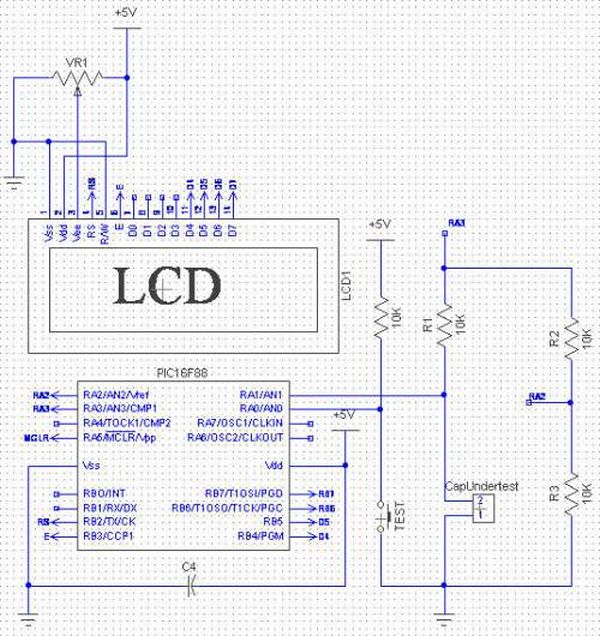
The code
/*
* Project name:
Capacitance Meter
* Copyright:
Nicholas Sirirak
* Description:
* Test configuration:
MCU: PIC16F88
Dev.Board: -
Oscillator: HS, 8.0000 MHz internal
Ext. Modules: -
SW: mikroC v8.1.0.0
* NOTES:
*/
#define Vappied PORTA.F3
#define TEST PORTA.F0
unsigned int gCap = 0;
char gOverTest = 0;
char gMessage[8];
char gCapstr[8];
void interrupt(){
if(PIR1.TMR2IF){
TMR2 = 0x87; // best value to create 69.3us
gCap++;
if(gCap > 65500) gOverTest = 1;
PIR1.TMR2IF =0; // Clear int bit
}
}
void main(){
char i,j;
char cap_size;
ANSEL = 0;
TRISB = 0;
PORTB = 0;
OSCCON = 0x7E; // 8Mhz, RC internal clock
OPTION_REG.T0CS = 0;
INTCON.GIE = 1; //Enable global interrupt
INTCON.PEIE = 1; //Enable peripheral interrupt
//------------ Set up Timer2 ------------
PIE1.TMR2IE = 1;
T2CON = 0; // timer2 off, prescaler 1:1
TMR2 = 0x87;
PIR1.TMR2IF =0; // Clear int bit
//----------------------------------------
For more detail: Determine capacitance by measuring the charging time using PIC16F688
Quick Solutions to Questions related to Capacitance Meter:
- How is Vref generated for the comparator?
Vref is generated by R2 and R3 as a voltage divider creating half of Vra3 applied to RA2. - How is the capacitor value determined?
The timer counts periods while the capacitor charges to Vref; the number of periods times 10 gives the capacitance in nF. - What triggers the start of the timing?
Pressing the TEST button sets RA3 high and starts charging the capacitor and the timer. - What stops the timer?
The timer stops when the capacitor voltage exceeds the Vref at RA2. - How is the measured value displayed?
The measured capacitance number is converted to a string and displayed on a 1x16 LCD. - Which timer and interrupt are used for counting?
Timer2 is used with its interrupt (PIR1.TMR2IF/PIE1.TMR2IE) to count timing periods. - What clock frequency is used in the code?
The code configures the internal oscillator for 8 MHz (OSCCON = 0x7E). - How is overflow of the count handled in the code?
gCap increments in the interrupt and if it exceeds 65500, gOverTest is set to 1.
Related projects
Exploring the PIC16F88 Microcontroller for Remote-Controlled Robotics
I. Design Summary The objective of this mechatronics system design project is to develop a straightforward control and interface platform for robotics...
Beginner Tutorials · PIC16F1827Breadboard module for 18-pin PIC16F microcontrollers (PCB version)
Because of their compact size, ease of use and many built-in peripherals, the 18-pin PIC16F series processors (PIC16F628A, PIC16F88, and now PIC16F1827/47)...
LED Projects · PIC16F88PIC 16F88 Microcontroller PIC based Tengu
Tengu derives its name from a mythical Japanese creature known for getting into mischief. Our Tengu, however is more earthly in nature....
Meters & Test InstrumentsFrequency Meter Using Microcontroller
This tutorial simply states how to calculate frequency of a pulse source using a microcontroller. Story https://youtu.be/NAoj-HLRIro This tutorial simply states how...
Meters & Test Instruments · PIC16F84ADigital thermometer with PIC16F84 circuit
This electronic project is a very simple thermometer that is based on the PIC16F84A microcontroller, designed by Microchip. Why to use a...
Meters & Test InstrumentsProjects on Speed Checker To Detect Rash Driving On Highways
While driving on highways, drivers should not exceed the maximum speed limit permitted for their vehicle. However, accidents keep on occurring due...

Ibrar Ayyub
I am an experienced technical writer holding a Master's degree in computer science from BZU Multan, Pakistan University. With a background spanning various industries, particularly in home automation and engineering, I have honed my skills in crafting clear and concise content. Proficient in leveraging infographics and diagrams, I strive to simplify complex concepts for readers. My strength lies in thorough...