


Summary of Download MPLAB IDE v8.92 from Microchip
MPLab IDE v8.92 is a 32-bit integrated development environment from Microchip that is part of a broad ecosystem of over 900 development tools, including compilers, debuggers, programmers, and boards. Microchip offers free downloads and trials for most tools. The article references screenshots, a video overview, links to download several v8.x releases (8.89–8.92), and points users to the newer MPLAB X IDE as the modern replacement.Parts used in theMPLab IDE v8.92:
- MPLAB IDE v8.92 software (32-bit)
- MPLAB IDE v8.91 software (32-bit)
- MPLAB IDE v8.90 software (32-bit)
- MPLAB IDE v8.89 software (32-bit)
- Compilers
- Debuggers
- Programmers
- Software development boards
- MPLAB X IDE (latest replacement)
- Video overview (YouTube link)
For a developer maintaining legacy hardware, the reason to use MPLAB IDE v8.92 is usually compatibility rather than preference.
An archived project may depend on the way MPLAB IDE 8.92 handled the project structure, compiler integration, device support, programmer configuration or other development settings available at the time.
If the original firmware was created with MPLAB IDE v8.92 and still needs maintenance, reproducing that environment can be useful before attempting any migration to newer software.
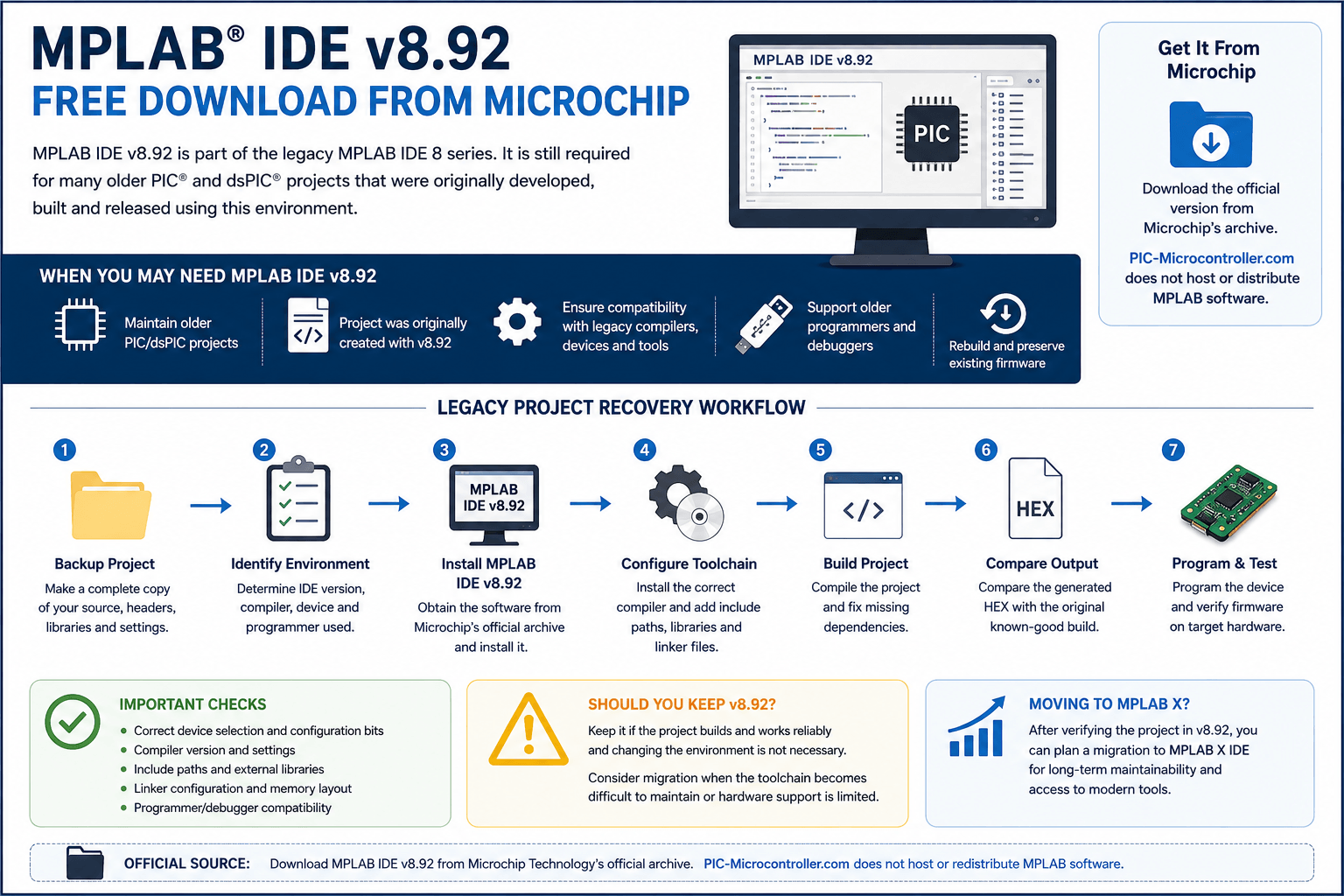
PIC-Microcontroller.com does not host, reproduce or distribute MPLAB IDE v8.92 installers. Legacy MPLAB software should be obtained from Microchip Technology's official resources.
When MPLAB IDE v8.92 May Still Be Required
MPLAB IDE v8.92 is mainly relevant to legacy projects.
You may still need this version when:
- An old project was originally created with MPLAB IDE v8.92
- The project documentation specifies v8.92
- Existing production firmware needs a maintenance update
- An archived project fails to open or build correctly in another environment
- The project depends on older compiler integration
- The development process uses older programmers or debuggers
- You need to reproduce the original build before migrating the project
If the project already has a known working development environment, avoid changing it until the current firmware has been successfully rebuilt and verified.
Get MPLAB IDE v8.92 From Microchip
Microchip maintains an official archive for previous MPLAB development software.
External resource: This link opens Microchip Technology's official software archive. PIC-Microcontroller.com does not host or redistribute MPLAB IDE v8.92.
Check Whether the Project Actually Requires v8.92
Do not install MPLAB IDE v8.92 only because the project appears old.
First look for evidence that the project was actually developed with this release.
Useful places to check include:
- Project documentation
- Engineering notes
- README files
- Archived build instructions
- Source-code comments
- Project metadata
- Original workstation backups
- Compiler logs
- File dates
- Previously generated HEX files
If you find a documented IDE version, compiler version and programmer configuration, preserve that information before making any changes.
The goal is to reproduce a known working setup rather than guessing which legacy version is closest.
Preserve the Original Project Before Opening It
Before opening an archived project in MPLAB IDE v8.92, make a complete copy.
Keep the original untouched.
Preserve:
- Source files
- Header files
- Project files
- Compiler configuration
- Linker files
- Libraries
- HEX files
- EEPROM data where applicable
- Configuration settings
- Programming notes
If you have a released HEX file from the original product, keep it separately.
That file can later be compared with a rebuilt image to determine whether the recreated development environment is producing noticeably different output.
Check the Compiler Used With the Project
MPLAB IDE v8.92 itself does not tell you everything about the original toolchain.
An older project may depend on a particular compiler generation.
Before rebuilding the code, identify:
- Compiler family
- Compiler version
- Compiler installation path
- Custom compiler options
- Include directories
- External libraries
- Linker configuration
A project may open correctly in MPLAB IDE v8.92 but still fail to compile because the original compiler or one of its dependencies is missing.
Avoid rewriting the source code immediately when this happens.
First confirm whether the expected compiler and libraries are available.
Missing Header Files and Libraries
Legacy projects often contain dependencies outside the main project folder.
The original development computer may have included shared files that were never copied into the archived project.
Common examples include:
- Device-specific headers
- Shared utility libraries
- Communication drivers
- Board-support files
- Bootloader code
- Custom peripheral libraries
- Locally modified vendor libraries
If the project reports missing includes or unresolved symbols, inspect the original search paths before modifying the application code.
Restoring a missing dependency is usually preferable to changing source that previously built successfully.
Check the Target Device Carefully
Make sure the project is configured for the correct PIC or dsPIC device.
A related processor may have similar peripherals and source-level code, but that does not make it an interchangeable build target.
Differences may include:
- Program memory
- RAM
- Register definitions
- Interrupt organization
- Oscillator options
- Peripheral configuration
- Programming interface
- Configuration bits
When restoring an older project, use the exact target device specified by the hardware design wherever possible.
Configuration Bits Can Prevent a Working Build From Running
A successful compile does not guarantee that the firmware will run correctly on the board.
Configuration settings may control fundamental device behavior such as:
- Oscillator source
- Watchdog timer
- Brown-out reset
- Programming mode
- Code protection
- Debug mode
- Reset behavior
If you are recreating a project from incomplete files, compare configuration settings against the original firmware documentation or working hardware.
An incorrect oscillator setting, for example, can make otherwise correct firmware appear completely nonfunctional.
Older Programmer and Debugger Hardware
Projects created around MPLAB IDE v8.92 may also reference development hardware from the same period.
Before attempting to program the board, identify the programmer or debugger that was originally used.
Check:
- Exact hardware model
- Target interface
- Hardware revision
- Driver requirements
- Device support
- Programming voltage requirements
If the old programmer is still available and the objective is simply to reproduce a known build, keeping the original setup initially may reduce the number of variables being changed.
A move to newer programming hardware can be evaluated after the legacy project is working.
Rebuilding a v8.92 Project for the First Time
A good recovery process is:
- Create a backup of the complete project.
- Identify the original target device.
- Confirm MPLAB IDE v8.92 was actually used.
- Identify the compiler and compiler version.
- Locate all external libraries.
- Confirm the linker configuration.
- Identify the programmer/debugger.
- Build without modifying the source unnecessarily.
- Compare the output with any known-good firmware image.
- Program and test the intended hardware.
Do not begin migration work until the original project has been reproduced as closely as practical.
What If the Project Does Not Build?
A failed build does not automatically mean the source code is damaged.
For a project this old, common causes include:
- Missing compiler
- Wrong compiler version
- Missing include path
- Missing library
- Incorrect target device
- Missing linker script
- Incorrect project directory
- Different configuration
- Files stored outside the original project folder
Read the first compiler or linker error carefully.
Later errors are often consequences of the first missing dependency.
Fixing the first genuine error can remove a large number of secondary messages.
Should You Use v8.92 for New Development?
MPLAB IDE v8.92 should generally be treated as a legacy environment.
If you are starting a completely new embedded project, review Microchip's current development software instead.
Microchip currently provides MPLAB X IDE v6.35 and also recommends MPLAB for VS Code for new and existing projects.
This does not mean an existing v8.92 project must immediately be migrated.
A stable legacy project and a new design have different requirements.
For an established product, maintaining the validated environment can be reasonable until there is a technical or support reason to move.
Need General Information About Legacy MPLAB IDE 8?
For a broader guide covering the legacy MPLAB IDE 8 family and recovering older projects generally, use the dedicated legacy article.
Need the Current MPLAB X IDE?
If the project has already been migrated or you are setting up a current development environment, use the dedicated MPLAB X article.
That article covers the modern MPLAB X environment, current project configuration and development workflow.
Moving an MPLAB IDE v8.92 Project to a Newer Environment
There is no requirement to migrate a stable v8.92 project simply because the development environment is old.
Migration becomes worth considering when the original workstation, compiler or programmer is becoming difficult to maintain, significant future firmware development is planned, or several developers need a more practical shared environment.
Before migration, reproduce the original v8.92 build and keep that working project unchanged.
Create a separate migration copy and review the target device, compiler, libraries, linker configuration, configuration bits, programmer/debugger and generated firmware as the project is moved.
Avoid changing application functionality during the initial toolchain migration. Keeping the source close to the original makes it much easier to determine whether a problem was introduced by the development environment rather than by an application change.
For a broader discussion of maintaining or replacing legacy MPLAB IDE 8 environments, see our: Legacy MPLAB IDE 8 download and project recovery guide
What About MPLAB IDE 8.91, 8.90 or 8.89?
Do not choose another version simply because it is close to v8.92.
If a project was developed and released using v8.92, start there whenever the required environment can still be reproduced.
A nearby version may work, but it introduces another variable. Use an earlier release only when there is a documented compatibility reason or the original version cannot be used.
Use Microchip's official archive to identify and obtain archived software.
Final Notes for MPLAB IDE v8.92 Projects
MPLAB IDE v8.92 is most useful today as a compatibility environment for older firmware rather than as a starting point for new development.
If an archived project specifically depends on it, preserve the project first, identify the original compiler and programming hardware, restore missing dependencies and verify the build before changing the toolchain.
Once a reliable legacy build exists, you can make an informed decision about whether the project should remain on v8.92 or move to a current development environment.
The main objective is reproducibility.
A project that can be rebuilt, programmed and verified using documented tools is much easier to maintain than one that depends on an undocumented historical workstation.
Trademark and Affiliation Notice
MPLAB®, PIC® and dsPIC® are trademarks or registered trademarks of Microchip Technology Incorporated.
PIC-Microcontroller.com is an independent educational website and is not affiliated with, authorized by, sponsored by, endorsed by or operated by Microchip Technology Incorporated.
MPLAB software referenced on this page is provided through Microchip Technology's official website and archive. PIC-Microcontroller.com does not host, reproduce or distribute MPLAB software or Microchip documentation.
Quick Solutions to Questions related toMPLab IDE v8.92:
- Can I download MPLab IDE v8.92 for free?
Yes, the article states MPLab IDE v8.92 is available for free download from the Microchip website. - Are MPLab IDE v8.92 and related tools 32-bit?
Yes, the article notes these are all 32-bit-based software. - Does Microchip provide trials for its software tools?
Yes, the article says most software tools have free download versions and a free trial. - Where can I find a video overview of MPLab IDE v8.92?
The article provides a YouTube link to a video overview: https://youtu.be/vc9t93r8GMM. - Is there a newer IDE than MPLab IDE v8.92?
Yes, the article directs readers to the newer MPLAB X IDE as the latest download. - Does Microchip offer multiple versions of MPLab IDE for download?
Yes, the article lists downloads for versions v8.89, v8.90, v8.91, and v8.92. - Are Microchip development tools compatible with their devices?
The article states the tools are engineered to be compatible with all of Microchip’s devices. - Does the MPLab ecosystem include hardware?
Yes, the article mentions software and development boards for specific applications.
Related projects
Download Legacy MPLAB IDE 8 from Microchip
The original MPLAB® IDE 8 series is still relevant when maintaining older PIC® and dsPIC® projects that were created before MPLAB X...
IDEs & CompilersHow to Download MPLAB X IDE Safely
MPLAB® X IDE is used for developing, building, debugging and programming embedded applications across several Microchip device families. For an active firmware...
IDEs & CompilersSoftware UART (SoftUART) using TMS320F28027 Piccolo with Proteus Simulation
IntroductionCreating reliable serial communication without a hardware UART might sound tricky, but this SoftUART project proves how flexible embedded systems can be....
IDEs & CompilersMastering PIC 24F Series: A Comprehensive Guide with MPLAB and Proteus
Introduction The field of embedded systems plays a crucial role in modern society, with a myriad of applications across various sectors such...
IDEs & CompilersDigital Clock using PIC Microcontroller Interrupt – XC8
A Real Time clock (Digital Clock) can be made easily by using Timer 1 of a PIC Microcontroller. The Timer1 module exists...
IDEs & CompilersMicrochip Mobile Product Selector
Platform: Android (Mobile Devices) - IOS (Apple Mobile Devices) Android (Mobile Devices Snapshots) Descriptions: A complete guide to all of Microchip’s products...

Ibrar Ayyub
I am an experienced technical writer holding a Master's degree in computer science from BZU Multan, Pakistan University. With a background spanning various industries, particularly in home automation and engineering, I have honed my skills in crafting clear and concise content. Proficient in leveraging infographics and diagrams, I strive to simplify complex concepts for readers. My strength lies in thorough...