
Summary of Hands-On Digital I/O Lab with PIC18F46K22 Microcontroller
This lab guides students in designing a Dual_MUX_4 digital multiplexer using the PIC18F46K22 microcontroller. It shifts from hardware-based logic to software-controlled embedded systems, emphasizing modular C programming and hardware abstraction. The project integrates structured coding with circuit design, utilizing tools like MPLAB X, XC8, and Proteus for simulation and debugging. Key learning outcomes include pin manipulation, bitwise operations, and system validation through incremental testing.
Parts used in the Dual_MUX_4 Project:
- PIC18F46K22 microcontroller (40-pin PDIP)
- External crystal oscillator
- RC reset circuit
- Manual push-button switch
- Digital input switches
- LED indicators
- Pull-down resistors
- MPLAB X IDE
- XC8 Compiler
- Proteus simulation software
PIC18F46K22 Microcontroller Digital I/O specifically explores the design of simple combinational circuits using the digital I/O capabilities of the PIC18F46K22 microcontroller. Moving from logic design that is hardware based to behavior-based logic design represents a notable shift in the learning outcomes for students and, more importantly, the embedded systems approach represents an interesting and powerful way to construct circuits, an abstraction mechanism for modelling behaviour and the ability to practice good modular programming practices. The central focus of the lab is teaching students how to design, build and test a complete digital system from the ground up, bringing together structured C programming methods with fundamental principles of electronic circuit design to create systems that are robust, portable, and easy to evaluate. This structure allows for students to develop a theoretical and practical knowledge base to build real-world digital systems.
Project Overview
The central aim of this lab is to reconstruct a digital multiplexer (Dual_MUX_4) entirely in software, utilizing a general-purpose microcontroller. This system is designed to precisely emulate the behavior of a commercial 74HCT153 chip through meticulous software-controlled manipulation of I/O pins. This project serves as a direct extension of previous digital design concepts, particularly those covered in Labs P2–P3, where students built multiplexers using discrete logic components and plan-based designs. Here, the challenge is reimagined, translating the same core functionality into an embedded C solution that interacts directly with programmable digital I/O pins. The major learning outcomes are to learn how to read and write from/to microcontroller pins with polling and bitwise logic. The importance of designing embedded code with hardware abstraction to support portability to a _____ _______ microcontroller is emphasized throughout the lab. It also reminds students of basic embedded hardware design practice with hands-on work with oscillators, reset lines, and outputs that can be tested for functionality. This practice should provide a full picture of embedded hardware and software development process.
Specifications and Planning
The success of the Dual_MUX_4 project hinges on meticulous planning and adherence to precise specifications, divided into functional and hardware aspects.
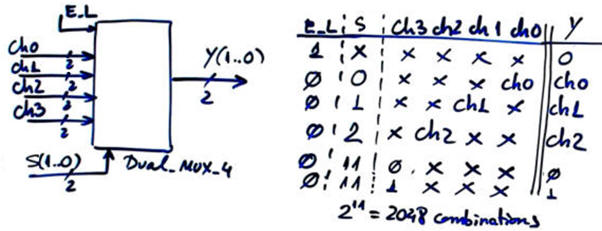
1. Functional Specifications
The behavioral model of the Dual_MUX_4 is rigidly defined by a truth table and symbolic logic schematic. These foundational documents are critical because they systematically lay out all potential logical inputs and deterministic outcomes. They are the only definitive reference point throughout the process of development, from writing code to testing and validating. One of the unique features of this lab is the assignment of pins on the microcontroller, which deviates from any fixed definition of pins. positions. Instead, inputs and outputs are strategically distributed across various ports of the PIC18F46K22. This configuration is a deliberate pedagogical choice, designed to compel students to engage with pin-level control, necessitating the proficient use of bit masking and register manipulation for selective reading and writing of I/O states. This hands-on approach builds crucial low-level programming skills.
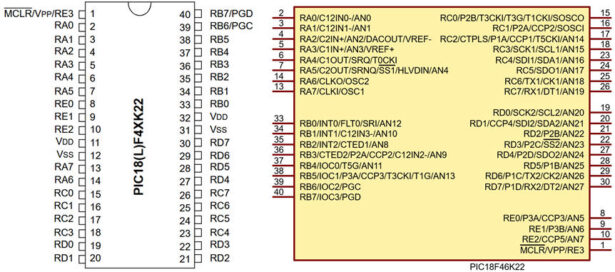
2. Hardware Planning
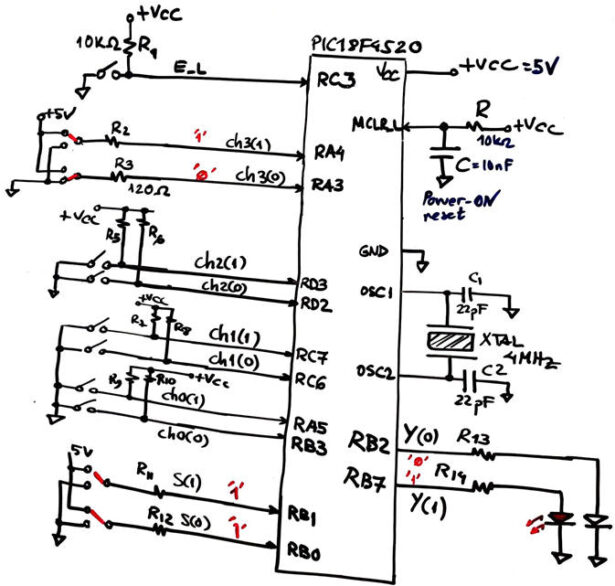
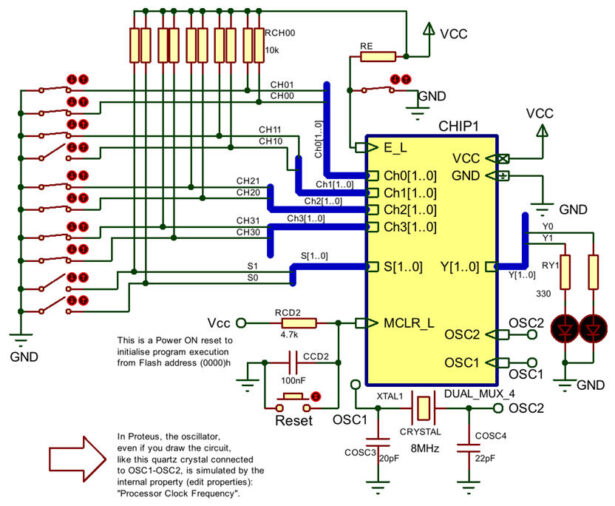
In terms of the hardware implementation, the PIC18F46K22 microcontroller with a 40-pin dual in-line package was selected for this project because of the broad I/O interfacing, and because it is compatible with popular development environments such as Proteus. However, it should be stressed that the laboratory requires students to think about hardware abstraction in order to develop their solutions. In particular, students should be encouraged to think about how their designs can be maintained under a different microcontroller, such as the ATmega328P. The most significant components in the circuit are the external crystal oscillator which is connected between OSC1 and OSC2. The external crystal oscillator feeds the precise system clock to provide consistent timing. The lab employs a robust reset mechanism using a reliable RC circuit that is connected to the MCLR_L pin. Occasionally, the reset pin is coupled with a manual push-button switch for ease of access for the programmer to administer a hardware-level reset and debugger restarts. The designed hardware solution interacts with users with switches (or push-buttons that simulate digital inputs) and uses LEDs as clear visual indicators of outputs allowing real-time awareness of the implemented logic. The schematic for the hardware intentionally disperse signals in order to take advantage of the multiple microcontroller ports. That is, by the deliberate design of the schematic, it will require the students to practise port addressing and bitwise access methods. If they are to complete an assignment implementing an embedded solution, they will face the real-world difficulties of port access and resource allocations and constraints.
3. Software Planning
Effective software planning is critical for building a robust and maintainable embedded system, with a focus on structured organization and clear data flow.
Software Structure
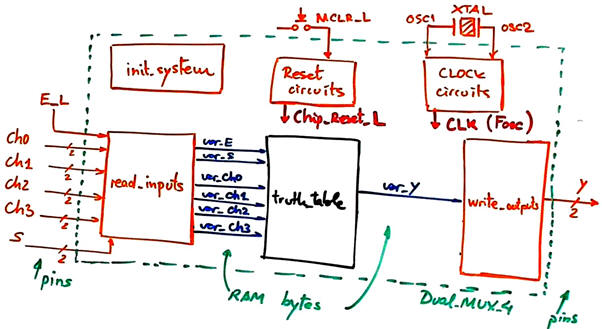
The software for this project is carefully structured as a collection of modular functions to improve clarity, maintainability, and reusability. The init_system() function is in charge of the initial setup of the microcontroller, regarding setting up the data direction registers (TRISx) which define whether each pin is an input or an output. The read_inputs() function polls and collects the voltage present on the input pins, and stores the raw values in RAM variables. The truth_table() function forms the core of the digital logic; it contains the algorithm that processes these input variables from RAM and deterministically calculates the appropriate output results based on the multiplexer’s specified behavior. Finally, the write_outputs() function applies the calculated output logic by writing the derived values to the appropriate LATx or PORTx registers. A crucial aspect of this function is its design to ensure that unused pins remain unaffected, which is vital for promoting modularity and preventing unintended side effects in larger, more complex systems.
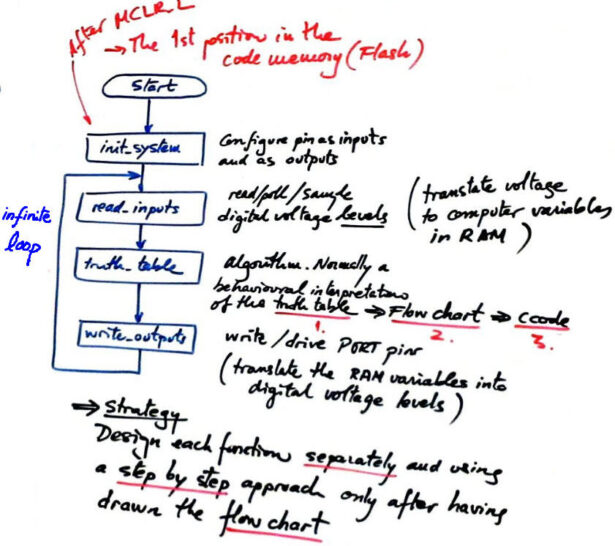
Hardware-Software Diagram
A hardware-software diagram serves as an indispensable conceptual bridge between the programmed code and the physical circuit. This contextual visual tool places the relationships between specific functions in the software, and the related hardware interactions in the appropriate context, providing a visual representation of data flow throughout the whole system. It is a useful tool for debugging complex logic, and for modularising code; it allows developers to distinguish which parts of the software interact with which hardware components.
RAM Variables
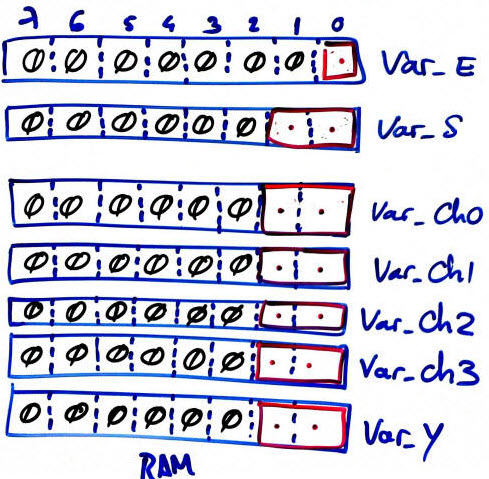
In this project, RAM variables function as a vital abstraction layer, effectively isolating the direct interaction with hardware pins from the core logic routines. For simplicity and transparency in this small-scale application, these variables are generally declared globally, allowing easy access across different functions. However, the planning also acknowledges that local variables can be effectively utilized for temporary or intermediate values during specific function executions, promoting good programming practices even within a smaller scope. This thoughtful approach to variable management aids in creating a cleaner and more manageable codebase.
Development and Testing
This section outlines a rigorous, methodical approach for developing, testing, and validating microcontroller-based digital logic applications using the PIC18F46K22. The strategy centers on interactive learning, simulation-led verification, and modular software construction, all framed within the MPLAB X + XC8 development environment. The structure is designed to encourage comprehension, correctness, and code modularity through stepwise design execution.
Installing the MPLAB X + XC8 Environment
The first prerequisite is to install MPLAB X IDE & XC8 Compiler which are the core pieces to build a C-based microcontroller toolchain. This IDE allows us to debug, simulate, monitor in real-time and upload onto hardware.
Step-by-Step Microcontroller Project Development
A tactical, sequential development methodology is emphasized to ensure a smooth learning curve. Students are encouraged to:
-
Read one input at a time: Simulate and verify the input’s digital conversion into RAM.
-
Write one output at a time: Confirm that LED indicators react correctly when variables are set.
-
Solve the truth table algorithmically and observe variable states via the watch window.
This modular validation prevents error propagation and simplifies troubleshooting.
Step #1: Minimal Hardware Testing
-
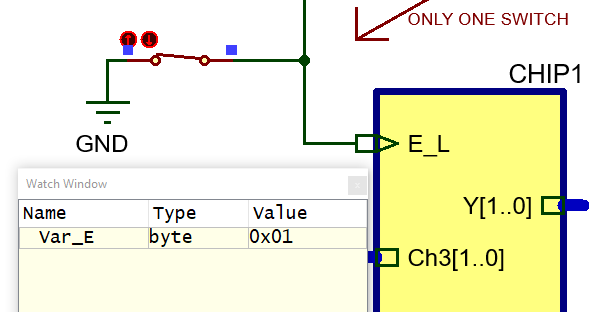
Hardware: Begin with the oscillator, system reset, and a single input pin
E_Lwired toRC3.
Project file:Dual_MUX_4.pdsprj -
Software: Strip the code to focus only on
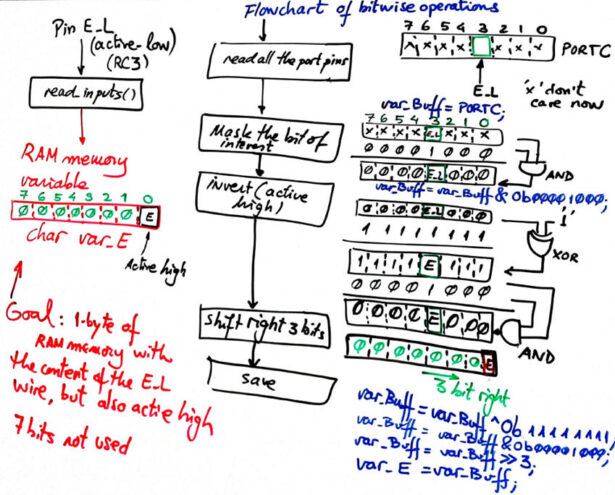
E_L. Use Fig. 9’s flowchart as a reference to write theread_inputs()function.
Files required:-
Dual_MUX_4.c -
config.h
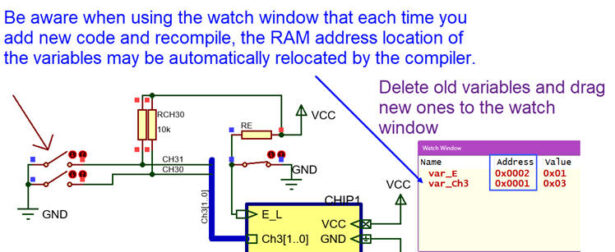
Set up a new project for PIC18F46K22, compile, and use watch windows to inspectvar_E.
-
Step #2: Adding More Inputs
-
Hardware: Extend the schematic by adding a new input channel (e.g.,
Ch3(1..0)) toDual_MUX_4.pdsprj. -
Software: Update the flowchart in
Dual_MUX_4.cto include logic for the newly introduced input.
Writing Outputs
Step #1: LED Output Verification
-
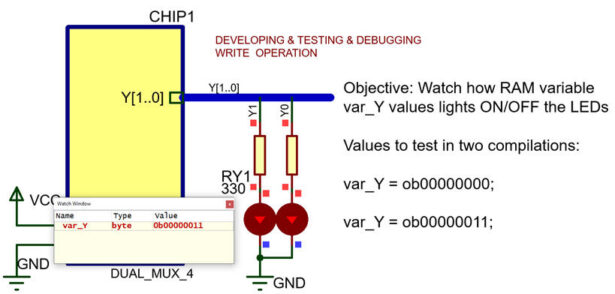
Hardware: Connect a pair of LEDs to the output pins
Y(1..0)using the same Proteus fileDual_MUX_4.pdsprj. -
Software: Remove unrelated logic and translate Fig. 10 into the
write_outputs()function inDual_MUX_4.c. -
Testing: Compile, simulate, and check that
var_Ycorrelates with LED states via the watch window.
Truth Table Implementation
-
Hardware: Only oscillator and reset circuitry is necessary for this step.
-
Software: Replace dynamic input reading with hardcoded values, simulating input combinations for each test run. Translate the truth table logic from Fig. 11 into C code within
Dual_MUX_4.c.
Proteus Schematic Capture
A) Developing Hardware
-
The full circuit is captured in Proteus under the file
Dual_MUX_4.pdsprj. -
Inputs are generated using physical switches and pull-down resistors, avoiding idealized logic blocks like
LOGICSTATE, which may misbehave with actual TRIS register logic.
MPLAB X Project Setup
Compilation and Configuration Files
B) Developing Software
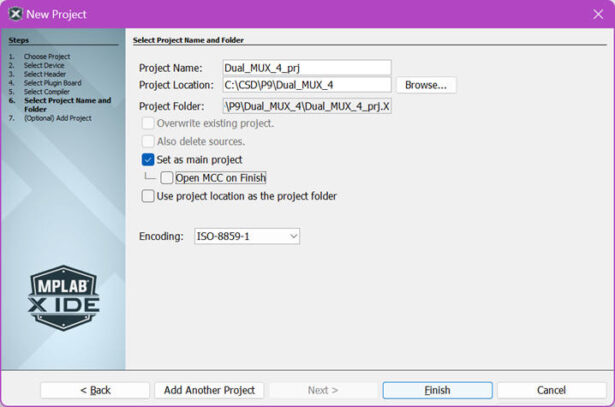
Open MPLAB X IDE and start a new project using target PIC18F46K22.
-
Dual_MUX_4.c(source code) -
config.h(configuration header) -
Set this project as main in the workspace (Fig. 18).
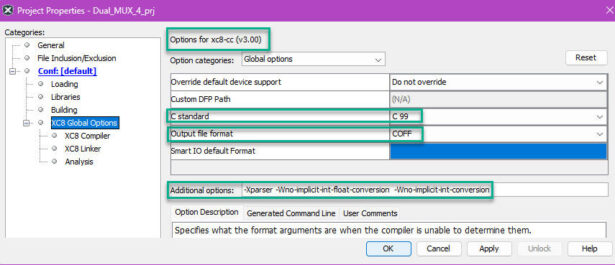
Compile to generate
-
-
HEX file (to be flashed onto the MCU)
-
COF file (used for Proteus debugging)
-
-
Configuration files are attached to Proteus microcontroller properties to synchronize behavior between simulation and actual code.
Proteus Simulation and Debugging
C) Step-by-Step Testing
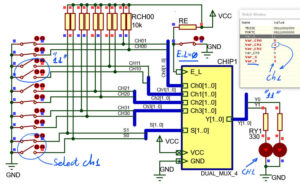
-
Run Proteus simulation using:
-
Step-by-step execution
-
Breakpoints
-
Watch windows to monitor specific RAM variables
-
Software Execution Time
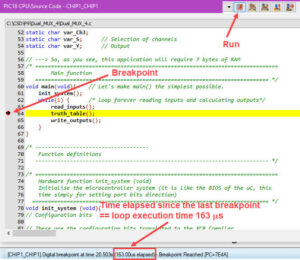
D) Execution Speed Measurements
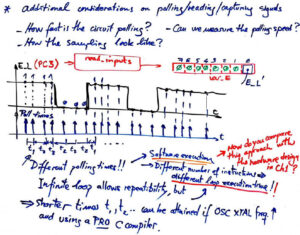
-
Use single breakpoints to measure the duration of a full execution loop (Fig. 24).
-
Use two breakpoints to measure individual function runtimes, such as
write_outputs()(Fig. 25). -
Oscillator Frequency Tuning:
Adjust the simulated oscillator (e.g., 4 MHz vs. 16 MHz) in Proteus to observe how frequency scaling affects execution time and, consequently, power consumption. -
Instruction Cycle Insight:
Understand that most instructions take 4 TOSC to complete. Knowing this helps translate execution time into instruction count and power estimation.
Practical Tips and Recommendations
To enhance development efficiency and ensure successful project completion, several practical tips and recommendations are provided.
Development Efficiency
Incremental development is identified as an important practice encouraging students to test each input/output pair before sumulating the entire system. This iterative approach can help the student identify and fix problems as they are encountered, rather than introduce additional errors on top of problems. In a team situation, division of responsibility between the three high-level functions–the read, the logic and the write–will allow a team to move in parallel, helping the team move faster when in collaboration.
Debugging
Extensive use of Proteus simulation tools is strongly recommended to preempt hardware errors before physical prototyping begins. Monitoring RAM variables within the simulation serves as an effective proxy for signal validation, enabling students to ensure that logic operations behave as expected even prior to committing to physical hardware. This proactive debugging approach saves significant time and resources.
Performance
It is important to understand the implications of the clock frequency (e.g. 4 MHz compared to 16 MHz) because clock frequency affects the speed of each instruction and total power consumption. Developers will need to carefully consider the pros and cons of lower versus higher frequency, particularly in applications where power is an issue or timing is critical. The lab underscored that breakpoints give a dependable way to measure code execution times empirically providing hard data for performance or tuning optimization.
Reporting and Documentation
Thorough reporting and meticulous documentation are integral components of the lab exercise, reflecting professional engineering standards.
Report Structure
Each lab report consists of a specific structural format that fully represents the project. This comprises a complete specifications list that defines the requirements of the project, the hardware and software planning artifacts that capture design decisions, a detailed account of all the development and testing processes undertaken, the results achieved from the prototype that show the performance of the system, and concluding reflections that are definitive regarding the discussion of the learning experience and outcomes.
Code Listings
For final submissions, it is mandatory to include properly annotated and color-highlighted code files, ensuring readability and clarity. These must be accompanied by printed flowcharts and circuit diagrams, visually representing the system’s logic and hardware layout. The lab explicitly states that documentation is not supplemental; it is an integral part of the evaluation process, underscoring its critical importance in both academic and professional contexts for understanding and maintaining complex embedded systems.
Conclusion
Laboratory 9 masterfully synthesizes theoretical knowledge and practical application, providing a structured and well-guided exploration into the intricacies of embedded system design. By seamlessly integrating the principles of combinational logic modeling with hands-on microcontroller I/O operations, students gain proficiency in both low-level coding and high-level system thinking. The strong emphasis on modular programming, simulation-based testing, and hardware abstraction ensures that the lessons learned within this lab are highly extensible, preparing students for more complex platforms and real-world engineering challenges. Ultimately, this lab embodies a comprehensive educational philosophy: it’s not just about building functional systems, but about cultivating the cognitive tools and professional habits that are indispensable for a successful career in embedded systems and digital electronics.
Source: Hands-On Digital I/O Lab with PIC18F46K22 Microcontroller
- What is the central aim of this lab?
The central aim is to reconstruct a digital multiplexer (Dual_MUX_4) entirely in software using a general-purpose microcontroller. - How does the software structure improve maintainability?
The software uses modular functions like init_system, read_inputs, truth_table, and write_outputs to ensure clarity and reusability. - Can the design be ported to other microcontrollers?
Yes, the lab emphasizes hardware abstraction so designs can be maintained under different microcontrollers like the ATmega328P. - What role do RAM variables play in this project?
RAM variables act as an abstraction layer that isolates direct hardware pin interaction from core logic routines. - How are inputs generated in the Proteus schematic?
Inputs are generated using physical switches and pull-down resistors rather than idealized logic blocks. - Does clock frequency affect execution time?
Yes, adjusting the oscillator frequency changes instruction speed and total power consumption. - What is the recommended approach for debugging?
Extensive use of Proteus simulation tools with watch windows to monitor RAM variables is recommended before physical prototyping. - How many instructions typically take to complete most operations?
Most instructions take 4 TOSC to complete.
