PIC Stepper Motor Controller using PIC16F84A with Proteus Simulation

Summary of PIC Stepper Motor Controller using PIC16F84A with Proteus Simulation


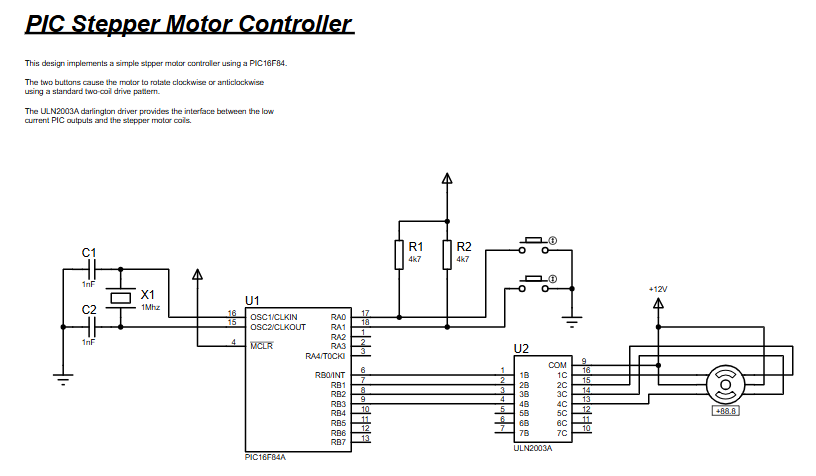
This project uses a PIC16F84A microcontroller and ULN2003A driver to control a stepper motor bidirectionally via two push buttons (RA0 clockwise, RA1 counter-clockwise). The PIC generates four-bit stepping patterns on RB0–RB3, with a software delay controlling speed. Implemented and tested in Proteus, the design demonstrates bit-rotation step sequencing, driver interfacing for higher currents, and is suitable for learning embedded motor-control fundamentals without physical hardware.

Parts used in the PIC Stepper Motor Controller using PIC16F84A with Proteus Simulation:

  • PIC16F84A Microcontroller
  • ULN2003A Darlington Driver IC
  • Stepper Motor
  • Push Buttons (2)
  • Crystal Oscillator (1 MHz)
  • Capacitors (1 nF ×2)
  • Resistors (4.7kΩ ×2)
  • Power Supply (+12V for motor)

Introduction

Stepper motors are widely used in embedded systems and DIY electronics projects where precise position control is required. This PIC Stepper Motor Controller microcontroller project uses a PIC microcontroller to control the direction of a stepper motor through simple push-button inputs. The project demonstrates how a PIC16F84A microcontroller can generate the required stepping sequence to rotate the motor clockwise or anticlockwise.

The system is implemented and tested using Proteus simulation, making it ideal for learning practical electronics and motor control fundamentals without needing physical hardware. The design also illustrates how driver circuits are used to interface microcontrollers with higher-current devices such as motors.

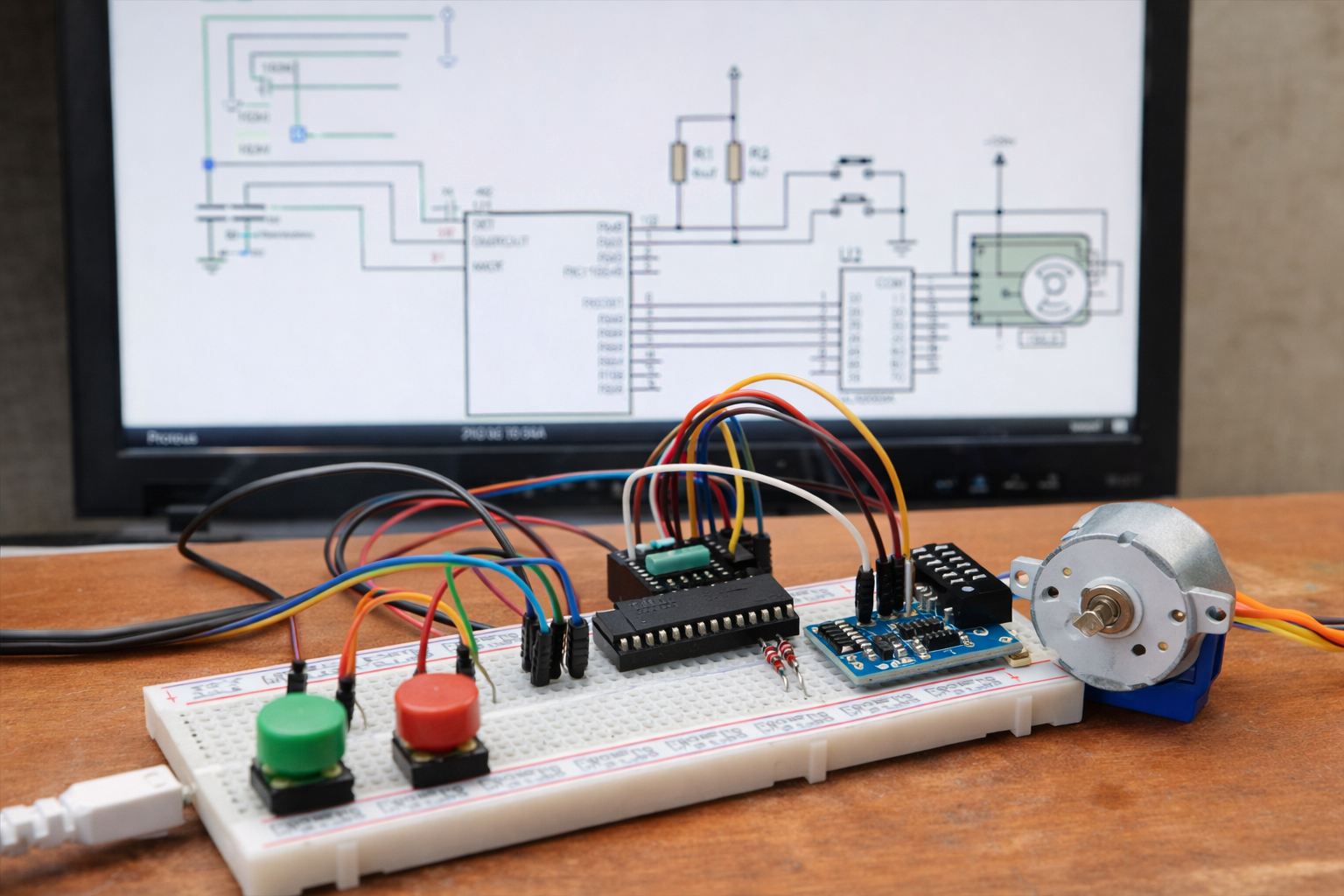
PIC stepper motor breadboard control setup
Illustrative View of the Concept.

How the Project Works (Overview)

The project uses a PIC16F84A microcontroller to control a stepper motor through a ULN2003A Darlington driver array.

Two push buttons connected to the microcontroller determine the motor direction:

  • Button 1 (RA0) → rotates the motor clockwise

  • Button 2 (RA1) → rotates the motor counter-clockwise

The PIC generates a stepping sequence on four output pins (RB0–RB3). These signals are sent to the ULN2003A driver which amplifies the current and drives the stepper motor coils.

A delay routine controls the stepping speed, allowing the motor to rotate smoothly. Each time a button is pressed, the microcontroller shifts the output pattern to move the motor one step at a time.

Workflow Explanation

The project follows a simple embedded control workflow.

  1. User Input

    • Two push buttons provide direction commands.

    • RA0 → clockwise

    • RA1 → counter-clockwise

  2. Microcontroller Processing

    • PIC16F84A reads button states.

    • A stepping pattern is generated in software.

    • The pattern is rotated left or right depending on the selected direction.

  3. Motor Driver Stage

    • ULN2003A driver receives the signals from PORTB.

    • It amplifies current to safely drive the stepper motor.

  4. Stepper Motor Operation

    • Motor coils are energized sequentially.

    • This creates controlled rotation in either direction.

Key Features

  • Stepper motor control using PIC16F84A microcontroller

  • Bidirectional motor rotation using push buttons

  • ULN2003A driver interface for safe motor control

  • Software-based step sequence generation

  • Adjustable motor speed through delay routine

  • Demonstrates bit rotation logic for motor stepping

  • Fully testable in Proteus simulation

Components Used

  • PIC16F84A Microcontroller

  • ULN2003A Darlington Driver IC

  • Stepper Motor

  • Push Buttons (2)

  • Crystal Oscillator (1 MHz)

  • Capacitors (1 nF ×2)

  • Resistors (4.7kΩ ×2)

  • Power Supply (+12V for motor)

Applications

Projects like this are commonly used in many embedded systems and automation applications, including:

  • CNC machines

  • 3D printers

  • Robotics movement systems

  • Automated positioning systems

  • Camera slider mechanisms

  • Industrial control systems

  • Educational microcontroller learning platforms

Explanation of Code

The firmware is written in PIC assembly language using MPASM.

The program performs the following tasks:

Port Initialization

The code configures PORTB pins RB0–RB3 as outputs to drive the stepper motor through the ULN2003 driver.

Motor Position Tracking

A variable called pos stores the current stepping pattern representing the energized motor coil.

Direction Control

The program continuously monitors PORTA inputs:

  • RA0 triggers clockwise rotation

  • RA1 triggers counter-clockwise rotation

Step Generation

Two routines manage motor movement:

  • stepcw – rotates the bit pattern left for clockwise motion

  • stepccw – rotates the bit pattern right for counter-clockwise motion

These bit rotations generate the sequence required for stepper motor coil activation.

Speed Control

A delay routine determines the stepping interval, which directly affects motor speed.

Source Code

                 LIST    p=16F84 ; PIC16F844 is the target processor

              #include "P16F84.INC" ; Include header file

              CBLOCK 0x10   ; Temporary storage                 
                 pos
                 dc1
                 dc2
              ENDC
              LIST    p=16F84 ; PIC16F844 is the target processor

              #include "P16F84.INC" ; Include header file

              CBLOCK 0x10   ; Temporary storage
              ENDC

Proteus Simulation

Simulation behavior:

  • Pressing the clockwise button rotates the motor step-by-step in the forward direction.

  • Pressing the anticlockwise button rotates the motor in reverse.

  • The stepping pattern generated on PORTB pins energizes the motor coils sequentially.

  • The delay routine determines the speed of rotation.

This simulation demonstrates how a microcontroller project can be verified in Proteus before building real hardware.

Conclusion

This PIC stepper motor controller project demonstrates the fundamentals of motor control using embedded systems and Proteus simulation. By combining a PIC16F84A microcontroller with a ULN2003A driver, the system generates accurate stepping sequences that rotate the motor in both directions.

The project is simple enough for beginners yet practical for understanding real-world microcontroller interfacing techniques. It also serves as a great learning platform for exploring motion control, firmware development, and Proteus-based circuit simulation.

Quick Solutions to Questions related to PIC Stepper Motor Controller using PIC16F84A with Proteus Simulation:

  • How does the project control motor direction?
    Two push buttons on RA0 and RA1 select clockwise and counter-clockwise; the PIC shifts the output pattern left or right accordingly.
  • What microcontroller is used?
    The project uses a PIC16F84A microcontroller.
  • How are the motor coils driven safely?
    The ULN2003A Darlington driver amplifies current from PORTB before driving the stepper motor coils.
  • Which pins produce the stepping sequence?
    PORTB pins RB0–RB3 output the stepping pattern.
  • How is motor speed adjusted?
    Speed is controlled by a delay routine in software that sets the stepping interval.
  • Can this project be tested without physical hardware?
    Yes, it is implemented and tested using Proteus simulation.
  • What language is the firmware written in?
    The firmware is written in PIC assembly language using MPASM.
  • What does the pos variable do in the code?
    pos stores the current stepping pattern representing the energized motor coil.
  • Which button rotates the motor clockwise?
    Button on RA0 rotates the motor clockwise.
  • Which button rotates the motor counter-clockwise?
    Button on RA1 rotates the motor counter-clockwise.

About The Author

Ibrar Ayyub

I am an experienced technical writer holding a Master's degree in computer science from BZU Multan, Pakistan University. With a background spanning various industries, particularly in home automation and engineering, I have honed my skills in crafting clear and concise content. Proficient in leveraging infographics and diagrams, I strive to simplify complex concepts for readers. My strength lies in thorough research and presenting information in a structured and logical format.

Follow Us:
LinkedinTwitter