


Summary of NETWORK EQUIPMENT RESETTER using PIC16F628
This project is a network power resetter using a PIC16F628 microcontroller to control a solid-state relay that interrupts 110VAC power to satellite receivers and routers. It automatically cuts power for 10 seconds every 24 hours (first reset occurs eight hours after power-up). An LED flashes once per second. A pushbutton allows immediate reset (hold 2 seconds) or setting the initial delay in hours by a long-press calibration sequence. The design can be replicated with a mechanical timer but offers electronic control and configurability.Parts used in the Network Equipment Resetter:
- PIC16F628 microcontroller
- 6 MHz crystal oscillator
- Solid-state relay (SSR)
- LED
- Pushbutton switch (SW)
- Resistors and capacitors for PIC and LED circuits
- Power supply providing +5 VDC
- Programming header pins (PROG_CLK, PROG_DAT, MCLR)
- PCB or perfboard and connectors for 110VAC wiring
Introduction
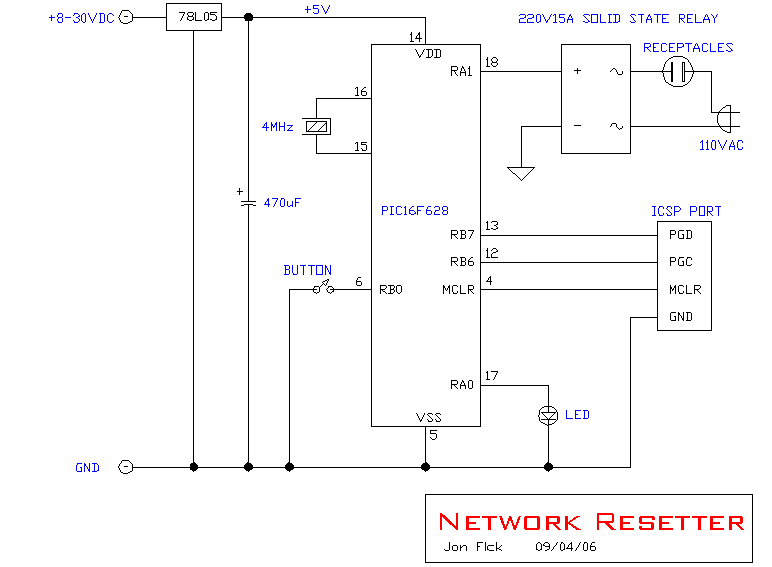
This program is a network power resetter. It controls a solid-state-relay that is in series with 110VAC that supplies power to a satellite internet receiver, various routers, etc. Once every 24 hours it drops power for 10 seconds to allow the receiver and routers to start clean, something that seems to be necessary to keep receivers and routers from "losing themselves" after running too long!
Features
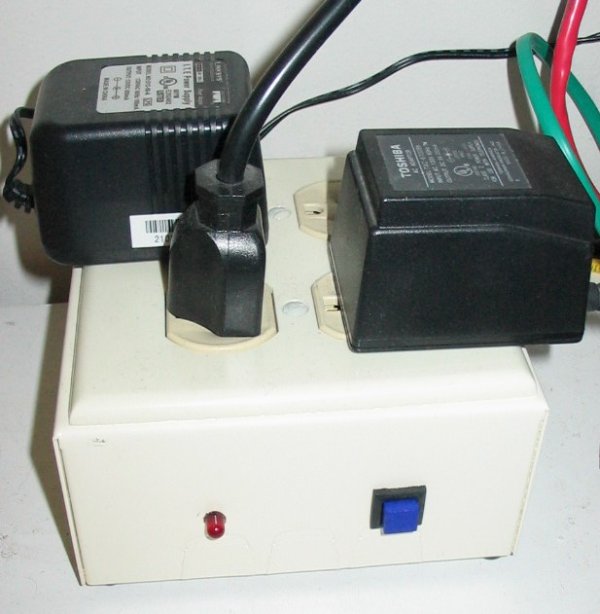
This is simply an electronic solution with a couple of features, but the same thing can be accomplished by the use of a mechanical "home" timer that drops power once per day, as illustrated in the image below.
Operation
- Power is dropped automatically for 10 seconds once every 24 hours, starting eight hours after the unit is powered up.
Code:
/****************************************************************************
NETWORK_RESET_01.C

This program is a network reseter.  It controls a solid-state-relay that
is in series with 110VAC.  It supplies power to a satellite receiver,
various routers, etc.  Once every 24 hours it drops power for 10 seconds
to allow the receiver and routers to start clean.

The LED flashes once per second.

The 24 hour reset occurs eight hours from the time the unit is powered on.
If it is desired to changed that delay, decide how many hours (from now)
that you want the unit to reset.  Press and hold the button for
greater than five seconds, and release it.  The LED will stop flashing.
Immediately press and hold the button until the LED starts flashing.  Count
the flashes as you hold the button.  Release the button when the LED has
flashed the number of hours you want to delay.  Normal operation will
occur after three seconds.

To drop power immediately, press and hold the button for two seconds.

                 +5
                  |
                  14
                ----------
     SW  ----6-|          |-17-- LED
               |          |-18-- SSR
               |          |
               |          |
               |  16F628  |
               |          |
               |          |-13--PROG_CLK
               |          |-12--PROG_DAT
  6MHz XTAL-15-|          |-4---MCLR
       XTAL-16-|          |     GND
                ----------
                     5
                     |
                    Gnd

***************************************************************************/
For more detail: NETWORK EQUIPMENT RESETTER using PIC16F628
Quick Solutions to Questions related to Network Equipment Resetter:
- What does the network resetter do?
It controls an SSR to drop 110VAC power to receivers and routers for 10 seconds once every 24 hours. - When does the first 24 hour reset occur?
The first reset occurs eight hours after the unit is powered up. - How long does the power stay off during a reset?
Power is dropped for 10 seconds during each reset. - How can I trigger an immediate reset?
Press and hold the button for two seconds to drop power immediately. - How do I change the initial delay before the daily reset?
Press and hold the button for more than five seconds, release, then press and hold again while counting LED flashes; release when it has flashed the number of hours desired. - What indicates normal operation?
The LED flashes once per second during normal operation. - Can a mechanical timer achieve the same result?
Yes, the article notes a mechanical home timer can accomplish the same once-per-day power drop. - Which microcontroller is used in the project?
The project uses a PIC16F628 microcontroller.
Related projects
DHT11 Low Cost Humidity Sensor using PIC16F628A with Proteus Simulation
IntroductionThis microcontroller project demonstrates how to interface a low-cost DHT11 temperature and humidity sensor with a PIC16F628A using a Proteus simulation environment.The...
LCD & Display Projects · PIC16F628AFrequency Counter by PIC16F628
In this project we are building a basic and low cost frequency counter circuit . It can measure from 16Hz to 100Hz...
Games, Toys & Calculators · PIC16F628ATIC TAC TOE game using PIC16F628
This project is not to introduce Tic Tac Toe. Everyone knows this game. It's to introduce two features. Bi-coloured LEDs, microcontrollers and...
Communication & Interfacing · PIC18F4520CAN FD Node based on a PIC18 Microcontroller
The introduction sets the stage for an embedded systems project that involves developing a Embedded C CAN FD project using the MCP2517FD...
Communication & InterfacingLAN9662 Gigabit Switch: Optimized for Industrial Ethernet
Introduction It should come as little surprise therefore that one element of what is now more commonly referred to in some circles...
Communication & InterfacingPIC Microcontroller: Fundamentals & Applications for Students
Introduction Microcontrollers are the key components in the embedded systems market. A variety of embedded systems was formed and developed after the...

Ibrar Ayyub
I am an experienced technical writer holding a Master's degree in computer science from BZU Multan, Pakistan University. With a background spanning various industries, particularly in home automation and engineering, I have honed my skills in crafting clear and concise content. Proficient in leveraging infographics and diagrams, I strive to simplify complex concepts for readers. My strength lies in thorough...