PIC16F877 Driving LCD in 4-Bit Mode using PIC16F877 with Proteus Simulation

Summary of PIC16F877 Driving LCD in 4-Bit Mode using PIC16F877 with Proteus Simulation


This article describes a beginner-friendly embedded systems project where a PIC16F877 microcontroller drives an alphanumeric LCD in 4-bit mode using Proteus simulation. By utilizing only four data lines instead of eight, the design conserves I/O pins while supporting text and custom character display. The workflow covers firmware initialization, command handling, and virtual testing via IAR C compiler code, making it ideal for learning circuit design and microcontroller interfacing before physical assembly.

Parts used in the PIC16F877 Driving LCD in 4-Bit Mode:

  • PIC16F877 Microcontroller
  • Alphanumeric LCD Module
  • IAR C Compiler
  • Proteus VSM Simulation Software
  • LCD Control Pins
  • LCD Data Pins (4-bit bus)

Introduction

This microcontroller project shows how a PIC16F877 can drive an LCD display using 4-bit mode inside a Proteus simulation.
The project demonstrates LCD control with fewer data pins, making it useful for embedded systems where I/O pin saving is important.
It is a practical electronics example for learning how a PIC microcontroller communicates with an alphanumeric LCD.
The simulation also demonstrates writing text and displaying custom graphics characters on the LCD.
For anyone learning DIY electronics, circuit diagram design, firmware testing, and source code workflow, this is a clean beginner-friendly LCD interface project.

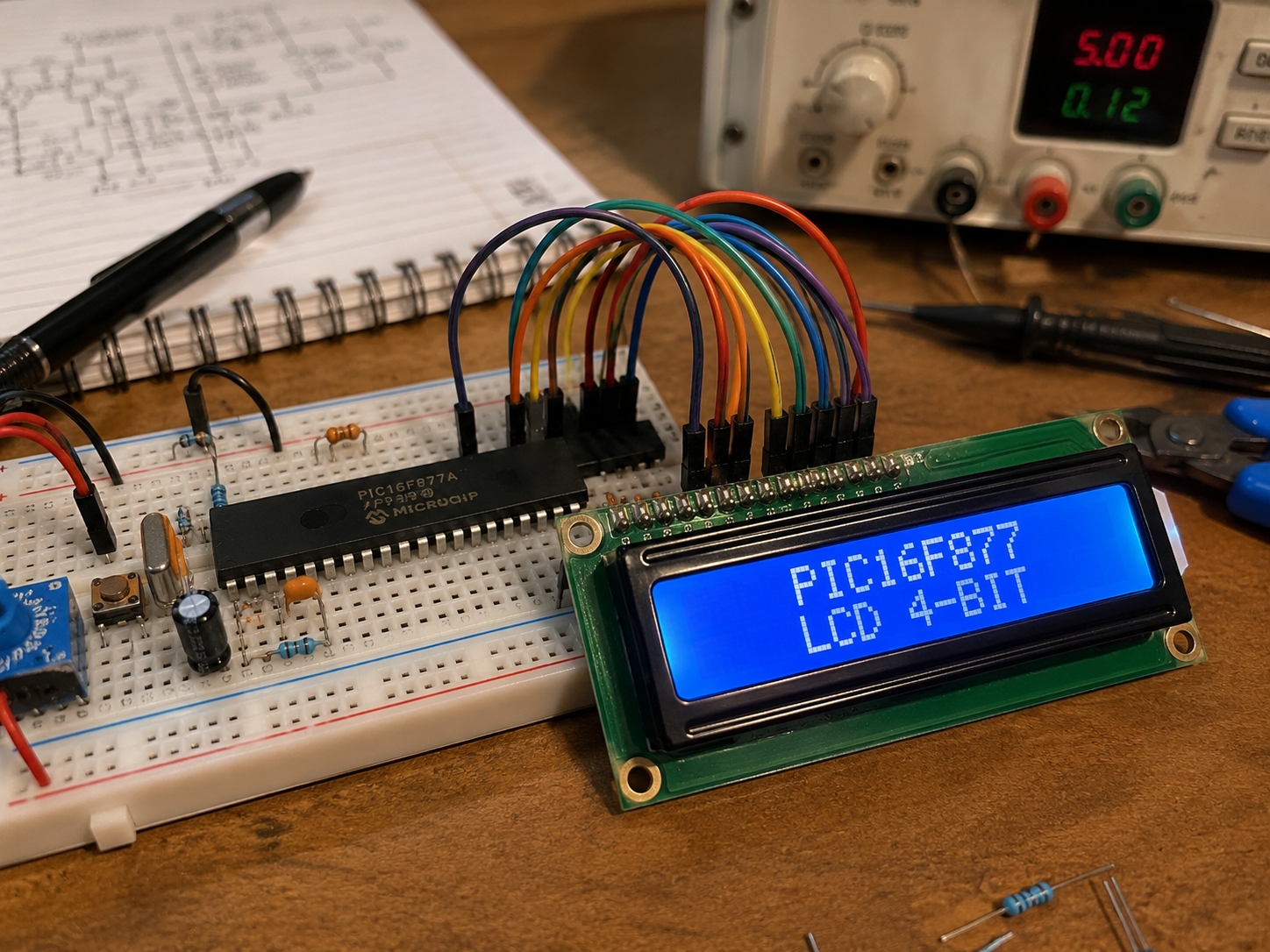
PIC16F877 breadboard LCD 4-bit mode prototype setup
Illustrative View of the Concept.

How the Project Works

This project uses a PIC16F877 microcontroller to control an LCD module in 4-bit mode.

In normal 8-bit LCD mode, the microcontroller needs eight data lines to send commands and characters. In this project, only four LCD data lines are used, which saves microcontroller pins while still allowing the LCD to display text and custom characters.

The PIC16F877 sends control signals to the LCD, then sends data in two parts: the higher nibble and the lower nibble. This allows the LCD to receive complete 8-bit commands or character data through only four physical data connections.

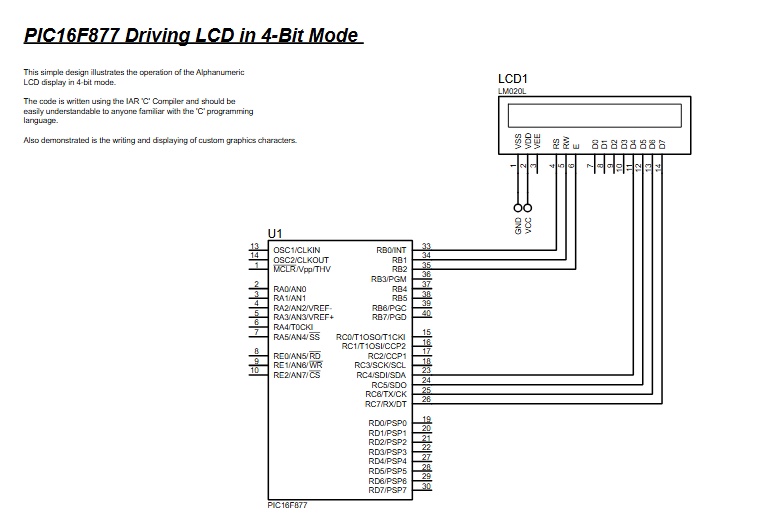
The schematic shows the PIC16F877 connected directly to an LCD module, with the LCD control and data pins wired to the microcontroller I/O pins. The project is designed as a simple LCD control demonstration inside Proteus VSM for PICMICRO.

Workflow Explanation

Workflow

PIC16F877 Firmware → LCD Control Pins → LCD Data Pins → LCD Display Output

The working principle is simple:

  1. The PIC16F877 starts the firmware.
  2. The LCD is initialized in 4-bit mode.
  3. The microcontroller sends LCD commands such as clear display, cursor setup, and display enable.
  4. Character data is sent through the 4-bit data bus.
  5. The LCD displays text or custom graphics characters.
  6. Proteus simulation shows the output behavior virtually.

This makes the project useful for understanding LCD interfacing before building the actual hardware.

Key Features

  • PIC16F877-based microcontroller project
  • LCD control using 4-bit communication mode
  • Saves microcontroller I/O pins compared to 8-bit LCD mode
  • Proteus simulation for testing the circuit diagram virtually
  • Demonstrates alphanumeric LCD operation
  • Supports writing and displaying custom graphics characters
  • Suitable for embedded systems learning
  • Code written using the IAR C compiler
  • Useful for beginners learning PIC firmware and LCD interfacing

Applications

This type of LCD microcontroller project is useful in many practical electronics and embedded systems applications, such as:

  • Digital measurement displays
  • Sensor-based display systems
  • Temperature sensor monitoring projects
  • DIY electronics dashboards
  • Microcontroller learning kits
  • Menu-based embedded systems
  • Industrial status display panels
  • Control system user interfaces
  • Educational Proteus simulation projects

Explanation of Code

The provided project description mentions that the code is written using the IAR C Compiler and is understandable for users familiar with the C programming language.

At a high level, the firmware would handle:

LCD Initialization

The PIC16F877 configures the LCD to work in 4-bit mode. This setup allows the LCD to receive commands and data using only four data lines.

LCD Command Handling

The firmware sends commands to configure the LCD display behavior, such as clearing the display, setting cursor position, and enabling display output.

LCD Data Writing

Text characters are sent from the PIC16F877 to the LCD so they can be shown on the screen.

Custom Character Display

The project also demonstrates custom graphics character writing and display. This means the firmware can define special character patterns and show them on the LCD.

Port Control

The PIC16F877 I/O pins are used to control the LCD’s control pins and data pins. The schematic shows direct connections between the controller and the LCD module.

Lorem ipsum dolor sit amet, consectetur adipiscing elit. Ut elit tellus, luctus nec ullamcorper mattis, pulvinar dapibus leo.

Proteus Simulation

The Proteus simulation shows the PIC16F877 connected to an LCD display module. The project demonstrates how the microcontroller drives the LCD in 4-bit mode, reducing the number of required data connections.

During simulation, the PIC16F877 firmware controls the LCD, sends commands, and displays characters on the LCD screen. The project also demonstrates custom graphics characters, making it useful for learning both basic and slightly advanced LCD control in embedded systems.

This simulation is especially helpful for students and electronics learners because it allows the LCD circuit and firmware behavior to be tested before building the physical hardware.

Conclusion

The PIC16F877 Driving LCD in 4-Bit Mode project is a simple and useful embedded systems example for learning LCD control with a PIC microcontroller. It shows how to reduce LCD wiring, test firmware in Proteus simulation, and understand the working principle of display interfacing.

This project is a good starting point for DIY electronics learners who want to build display-based microcontroller projects and later expand them with sensors, menus, or real-time monitoring features.

Quick Solutions to Questions related to PIC16F877 Driving LCD in 4-Bit Mode:

  • How does this project save microcontroller pins?
    The project uses 4-bit communication mode, requiring only four data lines instead of the eight needed for standard 8-bit mode.
  • Can this simulation be used before building hardware?
    Yes, the Proteus simulation allows users to test the circuit diagram and firmware behavior virtually before physical construction.
  • What compiler is used for the code in this project?
    The code for the PIC16F877 is written using the IAR C compiler.
  • Does the LCD support custom graphics characters?
    Yes, the firmware demonstrates writing and displaying custom graphics characters alongside standard alphanumeric text.
  • How are 8-bit commands sent if only four data lines exist?
    The microcontroller sends data in two parts, transmitting the higher nibble first and then the lower nibble through the four physical connections.
  • What are some practical applications for this project?
    Applications include digital measurement displays, temperature sensor monitoring, DIY electronics dashboards, and industrial status display panels.
  • Is this project suitable for beginners?
    Yes, it is described as a clean, beginner-friendly example for learning DIY electronics, circuit design, and source code workflows.

About The Author

Ibrar Ayyub

I am an experienced technical writer holding a Master's degree in computer science from BZU Multan, Pakistan University. With a background spanning various industries, particularly in home automation and engineering, I have honed my skills in crafting clear and concise content. Proficient in leveraging infographics and diagrams, I strive to simplify complex concepts for readers. My strength lies in thorough research and presenting information in a structured and logical format.

Follow Us:
LinkedinTwitter