
Summary of Simple mass storage for your microcontroller project
This project demonstrates uDrive, a simple micro SD card interface that appears as a PC drive and provides five serial commands (Read, Write, Dir, Erase, Initialise) so microcontrollers can access gigabytes of storage via a 3–5V UART link. Files are transferred by swapping the micro SD into a PC USB SD adaptor; a MAX232 can convert levels for RS232 testing; 4D Systems test software helps debug communications.
Parts used in the uDrive project:
- uDrive micro SD card interface module
- micro SD card
- micro-to-standard SD adaptor
- USB to SD card adaptor
- Microcontroller (PICAXE, Arduino, or other)
- Connections: Gnd, Power (3–5V), TX, RX, optional Reset
- MAX232 level converter (for RS232 testing)
- USB to serial adaptor (optional, for PC serial connection)
- PC running 4D Systems test software
Do you want gigabytes of storage for your microcontroller? Would you like a simple way to tranfer files from your PC to your picaxe or arduino or other micro project?
This little projects demonstrates the uDrive that can be set up as an extra drive on a PC. Copy files to and from the SD card, then put it in the uDrive and talk to it with 5 simple commands:
Read – Read a file off the drive
Write – Write a file to the drive
Dir – get the directory listing of files on the drive
Erase – erase a file
Initialise – send 1 byte at your preferred baud rate 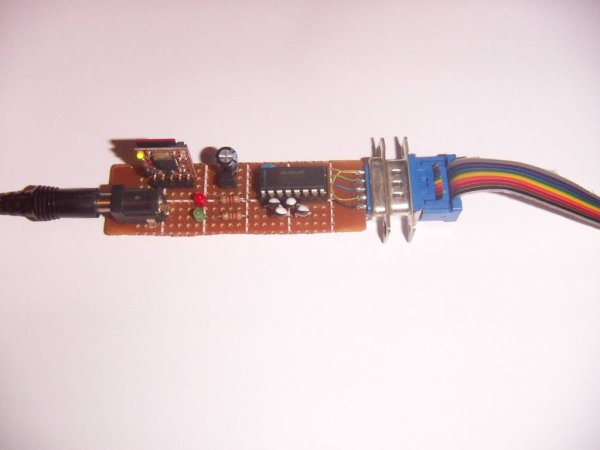
Step 1: Connecting to your microcontroller
Connection uses 5 wires: Gnd, Power, Tx, Rx and an optional reset line. The reset line can be left unconnected if no reset is needed.
The uDrive works from 3 to 5V so can interface to a wide range of controllers.
Step 2: Copying files across
Copying involves taking the micro SD card out of the uDrive and putting it into a micro-to-standard SD adaptor. This goes into a USB adaptor that plugs into the PC and then the SD card appears as another drive on the PC. The micro SD is the small purple part seen on the left of this picture. The USB to SD adaptor cost $5 including shipping on ebay. Most micro SD cards come with micro to standard adaptors and the total cost of the package is under $10 for gigabytes of storage.
Step 3: Accessing the files from a microcontroller
Microcontrollers all have different languages; assembly, C, Basic, Spin etc. You will have to write your own exact code, but below is an example using vb.net. This is still a bit complicated, but it is a lot easier than trying to talk to a SD card using bit-bang SPI code.
For the purposes of testing, we have built a little uDrive to RS232 converter. We are actually talking back to a PC via the PC serial port (or via a USB to serial adaptor), which seems a bit pointless, but it at least enables the device to be tested quickly and code debugged.
The Max232 converts the 0V/5V levels from the uDrive into valid RS232 voltage levels. 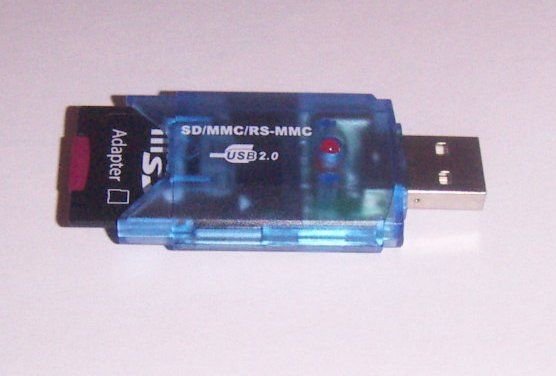
Step 4: Testing using 4dsystems’ software
The first test is to run some testing software from 4dsystems http://www.4dsystems.com.au/prod.php?id=22
This has pre-written test routines that not only check the device is working, but also indicate the bytes going back and forth. This makes it much easier to work out how to write your own code.
You can also talk to the card in raw mode, but using DOS mode that a PC can understand is a lot simpler. A file can be tiny – just 1 byte if you wish.
For more detail: Simple mass storage for your microcontroller project
- What commands does the uDrive support?
The uDrive supports Read, Write, Dir, Erase, and Initialise commands. - How do you transfer files between PC and uDrive?
Remove the micro SD, place it in a micro-to-standard SD adaptor, insert that into a USB SD adaptor, and copy files using the PC. - What connections are required to interface a microcontroller to the uDrive?
Gnd, Power (3–5V), Tx, Rx, and an optional reset line. - Can the uDrive operate at different voltages?
Yes, the uDrive works from 3 to 5V. - Is a level converter needed for RS232 testing?
Yes, a MAX232 converts the 0V/5V levels to valid RS232 voltage levels for testing. - How can I debug communication with the uDrive?
Use 4D Systems testing software which provides pre-written routines and shows bytes exchanged for easier debugging. - Does the uDrive support raw and DOS file modes?
Yes, you can talk to the card in raw mode, but using DOS mode that a PC can understand is simpler. - Do I need to write custom code for my microcontroller?
Yes, you must write code for your specific microcontroller language, though example code (vb.net) is provided.
