


Summary of PIC16F1847 and AR1010 Based FM Radio Music Box
This project details the construction of a portable Digital FM Radio using a PIC16F1847 microcontroller and an AR1010 receiver module. The author chose the PIC chip over Arduino due to existing inventory, despite the prevalence of Arduino tutorials. The device features a MAX7219 7-segment display for frequency output and a PAM8403 audio amplifier. It is powered by a salvaged 18650 battery via a boost converter, housed in a custom 3D-printed enclosure, and controlled by three push buttons.Parts used in the Digital FM Radio Box:
- PIC16F1847 Microcontroller
- AR1010 FM Radio Receiver Module
- MAX7219 8 Digit 7 Segment Led Module
- PAM8403 5V DC Audio Amplifier Board
- 3V to 5V 1A Step Up Module USB Charger Boost Converter
- 18650 Battery (salvaged from old laptop)
- 3 pcs. Push button micro switches
- AMS1117-3.3 Voltage Regulator
- 4.7Kohm Resistors
- 10uf / 16v electrolytic capacitor
- Custom 30mm x 30mm perf board
- 3D Printed Box Enclosure
This is my first Instructable post. I made a Digital FM Radio box using this cheap AR1010 FM Radio receiver module that I bought from Ebay and a PIC16F1847 Microcontroller from MICROCHIP. Why PIC's? Why not use Arduino? Because i have bunch of these IC's stocked in the parts bin. And also because most of the Digital FM Radio instructables and tutorials use the arduino.
Let's Make it.....
Step 1: Parts and Tools Needed...
The Basic parts are the Following:
- The Brain - Microchip Pic16F1847
- Digital FM Radio Receiver - AR1010 Module
- Display - MAX7219 8 Digit 7 Segment Led Module
- Audio Amplifier - PAM8403 5V DC Audio Amplifier Board 2 Channel 2*3W Volume Control
- Power/Charging - 3V to 5V 1A Step Up Module USB Charger Boost Converter w/ 1pc. 18650 battery salvaged from old laptop battery pack.
- Interface - 3 pcs. push button micro switches
- 3D Printed Box Enclosure - STL files link here
Tools to Use:
- Soldering Iron
- Long Nose Pliers
- Digital Multi tester
- Exacto Knife
- Cutter Plier
- Glue Gun
- 3D Printer
- Microchip PICKIT 3 Programmer/Debugger
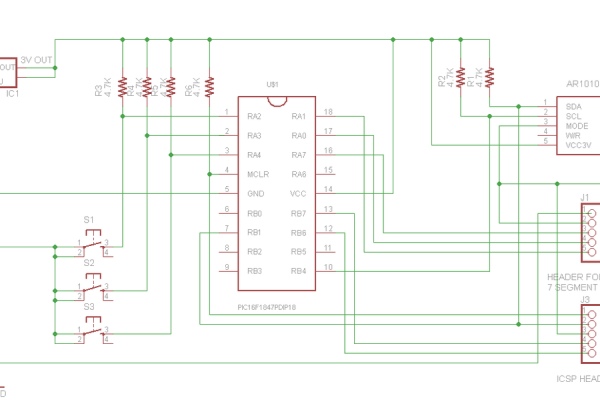
The Schematic is drawn using the Free version of Autodesk Eagle PCB design software.
The parts list for the main board are the following:
1 pc. PIC16F1847 MCU PDIP-18
1 pc. AMS1117-3.3 Voltage Regulator SOT223
6 pcs. 4.7Kohm / 0.5 watt Resistors
1pc. 10uf / 16v electrolytic capacitor
All these parts are mounted on a custom cut 30mm x 30mm single sided perf board to fit it inside the casing. The PIC Mcu is mounted on the top side the board. The AMS1117-3.3 SMD regulator and the AR1010 module are soldered on the copper side .
There is no external Oscillator because i used the internal 32 mhz clock of the PIC16F1847 MCU. I didn't use any headers and connectors to connect the modules, they are soldered with jumper wires. The headers are for serial debugging and ICSP programming.
Step 3: CODE
The code is written and compiled using the Code Limited version of the MikroC for PIC.
I used the Ar1010 Arduino Library of adamjansch/AR1010lib and ported it to be compatible with the MikroC for PIC IDE.
I wrote my own Max7219 library.
Step 4:
Updated the Source File to include the MAX7219 library...
Attachments
Source: PIC16F1847 and AR1010 Based FM Radio Music Box
Quick Solutions to Questions related to Digital FM Radio Box:
-
Why did the author choose a PIC microcontroller instead of Arduino?
The author had a stockpile of these ICs in their parts bin and noted that most existing digital FM radio tutorials use Arduino. -
What software was used to write and compile the code?
The code was written and compiled using the Code Limited version of MikroC for PIC. -
How was the AR1010 library adapted for the PIC microcontroller?
The author used the Ar1010 Arduino Library by adamjansch/AR1010lib and ported it to be compatible with the MikroC for PIC IDE. -
Does this design require an external oscillator?
No, the design uses the internal 32 mhz clock of the PIC16F1847 MCU. -
How are the modules connected to the main board?
The modules are soldered together using jumper wires rather than headers and connectors. -
What tools are required to build this project?
Tools include a soldering iron, long nose pliers, digital multi tester, exacto knife, cutter plier, glue gun, 3D printer, and a Microchip PICKIT 3 Programmer/Debugger. -
What type of power source is used for the radio?
A 18650 battery salvaged from an old laptop battery pack is used in conjunction with a 3V to 5V step-up USB charger boost converter.
Related projects
Breakout board for PIC16F1847 microcontroller
This is an improved version of my 18-pin PIC16F series breadboard module that I have used in many of my PIC tutorials...
Sensors & Temperature · PIC16F1847A brief overview of Allegro ACS712 current sensor using PIC16F1847 (Part 2)
In the first part of this discussion, the features of ACS712 device were briefly discussed. Now we will use that theory to...
Communication & Interfacing · PIC16F1847A brief overview of Allegro ACS712 current sensor. Part 2 – Interface the sensor with a PIC microcontroller
In the first part of this discussion, the features of ACS712 device were briefly discussed. Now we will use that theory to...
Audio, Sound & RadioAudio Spectrum Analyzer
We developed an audio spectrum analyzer as our final project for ECE 4760. This analyzer presented a histogram-style representation of audio signals....
Audio, Sound & Radio · PIC12F675Audio CRO using PIC12F675 Microcontroller
This project is a miniature Audio CRO. For those not familiar with the abbreviation "CRO," it means "Cathode Ray Oscilloscope" and this...
Audio, Sound & RadioBuild a musical EKG with the Freescale FRDM-KL05
Short Introduction: I have been following the Battle of the DreamBoards Championship with interest and I enjoyed the variation of functionality features...

Muhammad Bilal
I am a highly skilled and motivated individual with a Master's degree in Computer Science. I have extensive experience in technical writing and a deep understanding of SEO practices.