


Summary of LCD MENU INTERFACE PROJECT PIC18F2620 C18 NOKIA6100
This project demonstrates creating a graphic LCD menu interface for the Nokia 6100 screen using a PIC18F2620 microcontroller and C18 compiler. It features a main menu with settings and an "About" section, utilizing a simple user interface structure. The implementation includes PCB diagrams, C source code, and the "LCD Bitmap FontCreator" program for generating images, though this tool is noted as incompatible with certain picture formats.Parts used in the PIC18F2620 Nokia 6100 LCD Menu Interface:
- PIC18F2620 Microcontroller
- Nokia 6100 LCD Screen
- C18 Compiler
- PCB Diagram
- C Source Code
- LCD Bitmap FontCreator Program
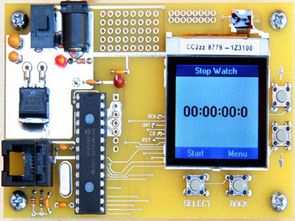
PIC18F2620 Nokia 6100 lcd screen has a lot of Menu interface examples made with made with applications typically microchip PIC series popular in this application is a useful example of how to create a menu with graphic lcd. Main menu settings, about, has a simple user interface, such as sections. To display images with the “LCD Bitmap And FontCreator” is incompatible with pictures to used
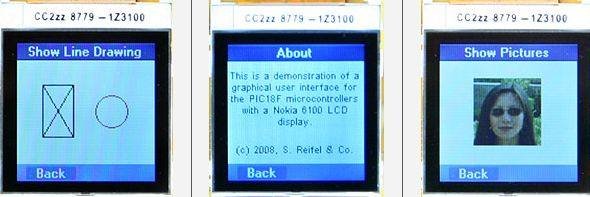
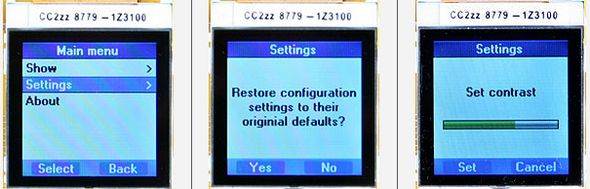
The project started pcb diagram of the C source code, “LCD Bitmap FontCreator” program. source: LCD MENU INTERFACE PROJECT PIC18F2620 C18 NOKIA6100 alternative lcd-menu-interface-project-pic18f2620-c18-nokia6100.RAR
Quick Solutions to Questions related to PIC18F2620 Nokia 6100 LCD Menu Interface:
- What is the primary purpose of this project?
The project provides examples of how to create a menu with a graphic LCD using the PIC18F2620. - Which microcontroller is utilized in this application?
The project uses the Microchip PIC18F2620 microcontroller. - What programming language is used for the source code?
The source code is written in C18. - Does the LCD Bitmap FontCreator work with all pictures?
No, it is incompatible with some pictures to be used. - What components are included in the project files?
The project includes a PCB diagram, C source code, and the LCD Bitmap FontCreator program. - Can I use this example to create a menu with a graphic LCD?
Yes, this is a useful example of how to create a menu with a graphic LCD. - What sections are available in the simple user interface?
The interface includes sections such as Main menu settings and About. - Is this project popular within the Microchip PIC series applications?
Yes, this application is typically popular in the Microchip PIC series.
Related projects
Leveraging Blockout Banners for Effective Electronics and Tech Product Displays
Blockout banners have become a popular and effective tool for displaying electronics and tech products in various settings, from trade shows and...
LCD & Display Projects · PIC18F4520Interfacing PIC18F4520 microcontroller with an HD44780 LCD
Introduction Being able to display data from a microcontroller visually has many advantages. It allows for menus, status indicators, and instructions to...
LCD & Display ProjectsVideo Project Development in the Midst of an Impromptu Online Semester
Receiving robot parts in the mail was an unexpected conclusion to the Winter 2020 semester for students. However, when faced with a...
LCD & Display Projects · PIC16F628AFrequency Counter by PIC16F628
In this project we are building a basic and low cost frequency counter circuit . It can measure from 16Hz to 100Hz...
LCD & Display ProjectsWHAT IS A PIC MICROCONTROLLER? WHAT CAN IT DO?
PIC microcontrollers ( Programmable Interface Controllers), are electronic circuits that can be programmed to carry out a vast range of tasks. They...
LCD & Display Projects · PIC16F877ASerial Data Received from PC and Displayed on 16×2 Using USART of Pic16f877 Microcontroller
Here is a simple tutorial on how to receive serial data from PC(Personal Computer) Hyperterminal and display it on 16x2 lcd using...

Ibrar Ayyub
I am an experienced technical writer holding a Master's degree in computer science from BZU Multan, Pakistan University. With a background spanning various industries, particularly in home automation and engineering, I have honed my skills in crafting clear and concise content. Proficient in leveraging infographics and diagrams, I strive to simplify complex concepts for readers. My strength lies in thorough...