


Summary of How to Interface LCD with PIC16F877A Slicker
The PIC16F/18F Slicker board is an educational development kit for PIC microcontrollers (like PIC16F877A) that supports in-system USB programming and exposes MCU features for learning. It includes a 2x16 character LCD interface (4-/8-bit modes) connected via 11 header pins to PORTE.0–PORTE.3 and PORTD.0–PORTD.7, enabling simple text display for debugging and user interfaces.Parts used in the PIC16F/18F Slicker Board:
- PIC microcontroller (e.g., PIC16F877A)
- PIC16F/18F Slicker development board
- 2x16 character LCD module
- LCD interface header (11-pin)
- Trim potentiometer for contrast adjustment
- USB port for in-system programming (ISP)
- Connections to PORTE.0 – PORTE.3
- Connections to PORTD.0 – PORTD.7
- Power supply (on-board or external)
PIC16F/18F Slicker Board
The PIC16F/18F Slicker board is specifically designed to help students to master the required skills in the area of embedded systems. The kit is designed in such way that all the possible features of the microcontroller will be easily used by the students. The kit supports in system programming (ISP) which is done through USB port.
Microchip’s PIC (PIC16F877A), PIC16F/18F Slicker Kit is proposed to smooth the progress of developing and debugging of various designs encompassing of High speed 8-bit Microcontrollers.
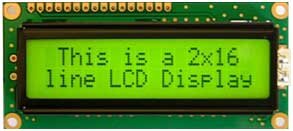 LCD (Liquid Crystal Display)
Liquid Crystal Display also called as LCD is very helpful in providing user interface as well as for debugging purpose. A liquid crystal display (LCD) is a flat panel display that uses the light modulating properties of liquid crystals (LCs). LCD Modules can present textual information to user.
Interfacing LCD
Fig. 1 shows how to interface the LCD to microcontroller. The 2x16 character LCD interface card with supports both modes 4-bit and 8-bit interface, and also facility to adjust contrast through trim pot. In 8-bit interface 11 lines needed to create 8-bit interface; 8 data bits (D0 – D7), three control lines, address bit (RS), read/write bit (R/W) and control signal (E).
nterfacing LCD with PIC16F877A
We now want to display a text in PIC16F/18F Slicker Board by using LCD module. In PIC16F/18F Slicker Board contains the LCD connections in a single header.
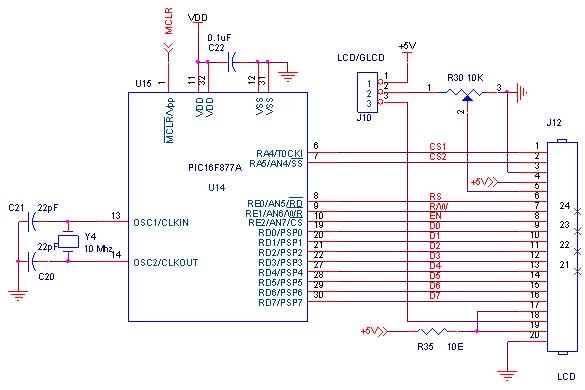 The PIC16F/18F Slicker board has eleven numbers of LCD connections, connected with I/O Port lines (PORTE.0 – PORTE.3 && PORTD.0 – PORTD.7) to make LCD display.
Source Code
The Interfacing LCD with PIC16F877A program is very simple and straight forward, which display a text in 2 X 16 LCD modules. Some delay is occurring when a single command / data is executed.
For more detail: How to Interface LCD with PIC16F877A Slicker
Quick Solutions to Questions related to PIC16F/18F Slicker Board:
- What is the PIC16F/18F Slicker board designed for?
It is designed to help students master embedded systems skills and to make microcontroller features easily usable. - Which PIC microcontroller is mentioned for the Slicker kit?
The PIC16F877A is mentioned as an example microcontroller. - Does the Slicker board support in system programming?
Yes, it supports in system programming through the USB port. - What type of LCD is used with the Slicker board?
A 2x16 character liquid crystal display module is used. - How many LCD connections does the Slicker board expose?
It exposes eleven LCD connections on a single header. - Which microcontroller ports connect to the LCD on the Slicker board?
The LCD is connected to PORTE.0–PORTE.3 and PORTD.0–PORTD.7. - Does the LCD interface support 4-bit and 8-bit modes?
Yes, the 2x16 LCD interface supports both 4-bit and 8-bit modes. - Is there a way to adjust the LCD contrast on the kit?
Yes, a trim potentiometer is provided to adjust contrast. - Is the sample source code for displaying text on the LCD complex?
No, the article states the program is very simple and straightforward for displaying text on the 2x16 LCD.
Related projects
PIC16F877 Driving LCD in 4-Bit Mode using PIC16F877 with Proteus Simulation
Introduction This microcontroller project shows how a PIC16F877 can drive an LCD display using 4-bit mode inside a Proteus simulation.The project demonstrates...
Programmers & ICSP · PIC16F877AEPE PIC/LCD Demo using PIC16F877 with Proteus Simulation
IntroductionThe EPE PIC/LCD Demo is a classic microcontroller project that demonstrates how a PIC16F877 can fully control a PG12864F graphical LCD.Designed as...
Motors & Robotics · PIC16F877AEfficient Sun-Following Robot: A Solar Tracker with Microcontroller Control
Abstract The impending global challenge of dwindling non-renewable fuel resources underscores the urgency of transitioning towards renewable energy alternatives like solar power....
Communication & Interfacing · PIC18F4520CAN FD Node based on a PIC18 Microcontroller
The introduction sets the stage for an embedded systems project that involves developing a Embedded C CAN FD project using the MCP2517FD...
Communication & InterfacingLAN9662 Gigabit Switch: Optimized for Industrial Ethernet
Introduction It should come as little surprise therefore that one element of what is now more commonly referred to in some circles...
Communication & InterfacingPIC Microcontroller: Fundamentals & Applications for Students
Introduction Microcontrollers are the key components in the embedded systems market. A variety of embedded systems was formed and developed after the...

Ibrar Ayyub
I am an experienced technical writer holding a Master's degree in computer science from BZU Multan, Pakistan University. With a background spanning various industries, particularly in home automation and engineering, I have honed my skills in crafting clear and concise content. Proficient in leveraging infographics and diagrams, I strive to simplify complex concepts for readers. My strength lies in thorough...