


Summary of PIC Microcontroller Based Electronic Lock
This article describes a PIC16F877A microcontroller–based electronic door lock that uses a 4x3 keypad and 16x2 LCD. A default password (*2345#) unlocks the door and can be changed by entering the master-change sequence (*23455#new 4 digit code). Passwords are stored in EEPROM; successful entry energizes a relay (simulated on PORTA bit 0/LED). The project is modular and demonstrates keypad input, LCD output, EEPROM storage, and relay control for access control.Parts used in the Electronic Code Lock:
- PIC16F877A microcontroller
- 4x3 matrix keypad
- 16x2 LCD
- EEPROM (internal to PIC16F877A)
- Relay (lock actuator)
- LED (used for simulation on PORTA bit 0)
- Power supply
- Connecting wires and supporting passive components (resistors, capacitors)
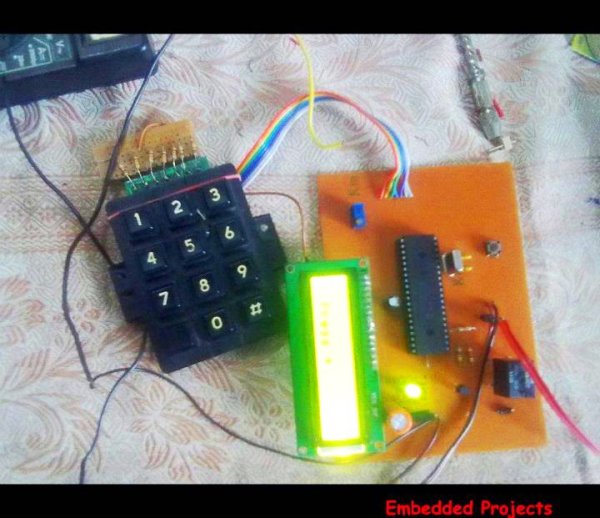 An electronic lock or digital lock is a device which has an electronic control assembly attached to it. They are provided with an access control system. This system allows the user to unlock the device with a password. The password is entered by making use of a keypad.
The user can also set his password to ensure better protection. The major components include a Keypad, LCD and the controller PIC16F877A. This article describes the making of an electronic code lock using the 16F877A microcontroller.
The system is fully controlled by the 8 bit microcontroller 16F877A which has a 8Kbytes of ROM for the program memory. The password is stored in the EPROM so that we can change it at any time. The system has a Keypad by which the password can be entered through it. When the entered password equals with the password stored in the memory then the relay gets on and so that the door is opened.
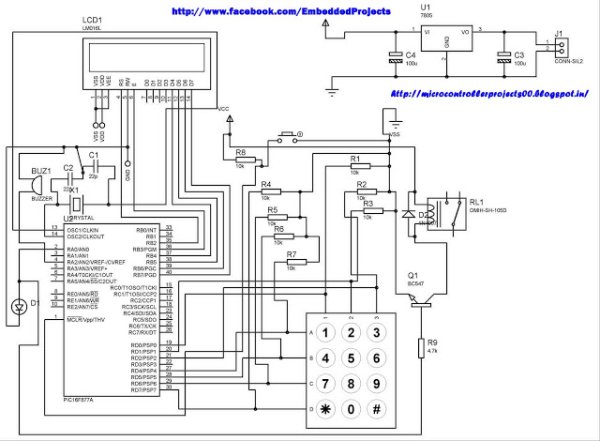
The code is built in a modular style to allow a user to find ways to modify project. In start the D Lock programs loads with a default code of "2345" format is *2345# which can be enter to unlock the door, the code cam be change by entering the master code in the format *23455#new 4 digit code. In this program i only display the result on LCD and lock will be placed at PORTA bit 0 where i put led for simulation.
A 4x3 matrix keypad and a 16x2 LCD have been used here. Keypad and LCD are very commonly used input & output devices, respectively. The password is stored in the system EEPROM.
For more detail: PIC Microcontroller Based Electronic Lock
Quick Solutions to Questions related to Electronic Code Lock:
- What microcontroller is used in the project?
The PIC16F877A microcontroller is used. - How is the password entered?
The password is entered using a 4x3 matrix keypad in the format *2345# for the default code. - Can the password be changed and how?
Yes, the code can be changed by entering the master change sequence *23455# followed by the new 4 digit code. - Where is the password stored?
The password is stored in the EEPROM of the PIC16F877A. - How does the system indicate a successful unlock?
When the entered password matches the stored password the relay gets on and the door is opened; in the project the lock is simulated with an LED on PORTA bit 0. - What output device displays status and messages?
A 16x2 LCD is used to display results and status. - Is the code modular and can it be modified?
Yes, the code is built in a modular style to allow users to modify the project. - What default code does the program load at start?
The program loads a default code of 2345, entered as *2345# to unlock.
Related projects
PIC16F877 Driving LCD in 4-Bit Mode using PIC16F877 with Proteus Simulation
Introduction This microcontroller project shows how a PIC16F877 can drive an LCD display using 4-bit mode inside a Proteus simulation.The project demonstrates...
Programmers & ICSP · PIC16F877AEPE PIC/LCD Demo using PIC16F877 with Proteus Simulation
IntroductionThe EPE PIC/LCD Demo is a classic microcontroller project that demonstrates how a PIC16F877 can fully control a PG12864F graphical LCD.Designed as...
Motors & Robotics · PIC16F877AEfficient Sun-Following Robot: A Solar Tracker with Microcontroller Control
Abstract The impending global challenge of dwindling non-renewable fuel resources underscores the urgency of transitioning towards renewable energy alternatives like solar power....
LCD & Display ProjectsLeveraging Blockout Banners for Effective Electronics and Tech Product Displays
Blockout banners have become a popular and effective tool for displaying electronics and tech products in various settings, from trade shows and...
LCD & Display Projects · PIC18F4520Interfacing PIC18F4520 microcontroller with an HD44780 LCD
Introduction Being able to display data from a microcontroller visually has many advantages. It allows for menus, status indicators, and instructions to...
LCD & Display ProjectsVideo Project Development in the Midst of an Impromptu Online Semester
Receiving robot parts in the mail was an unexpected conclusion to the Winter 2020 semester for students. However, when faced with a...

Ibrar Ayyub
I am an experienced technical writer holding a Master's degree in computer science from BZU Multan, Pakistan University. With a background spanning various industries, particularly in home automation and engineering, I have honed my skills in crafting clear and concise content. Proficient in leveraging infographics and diagrams, I strive to simplify complex concepts for readers. My strength lies in thorough...