


Summary of Parallel Port Microchip PIC Micro Controller Programmer
This article describes a DIY Parallel Port PIC Programmer used for programming Microchip PIC microcontrollers via Windows software like WinPicProg and Oshonsoft. The hardware consists of a double-sided PTH PCB, a 40-pin IC socket supporting 8, 18, or 28-pin chips, and an adaptor PCB with male/female headers. Users must exercise caution to avoid damaging chips by applying power only after launching the software.Parts used in the Parallel Port PIC Programmer:
- Double sided PTH board
- 0.3 Inch IC socket (40pin)
- Adaptor PCB with male/Female header
- Micro-controller chip
This programmer is built using Free Windows Software called WinPicProg and other similar software from PICALLW or Oshosoft
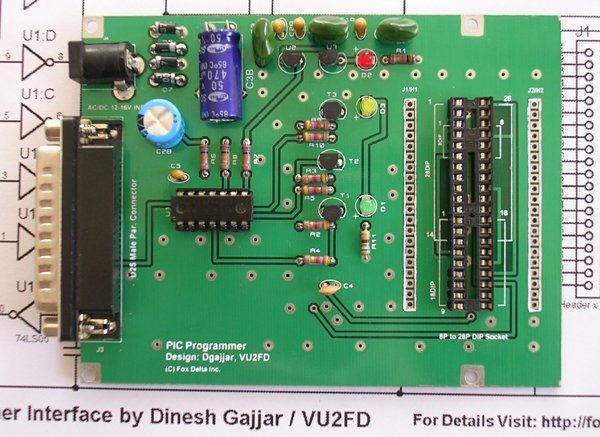 Programmer PCB is double sided PTH board. In this programmer, you have a 0.3 Inch IC socket (40pin) on the main board, where you can place either 8, 18 or 28pin ICS for programming. An adaptor PCB with male/Female header is supplied with this kit for 40pin DIP. (without 40pin DIL Socket)
However, make sure that you insert PIC ICs at the proper location on this 40Pin socket. Suitable markings of placement are made on the PCB.
I have included required hardware settings in the DOC for Oshonsoft parallel programming software
| Warning: This programmer is controlled from Parallel Printer Port of your PC.
If you keep Micro-controller chip on this powered programmer & try to PRINT from any application, it would damage the micro-controller. Apply power to this programmer only after running the programming software. |
||
Programmer Documents & Schematics
| Free Programming Software | ||
 |
OSHONSOFT - Free Windows Parallel Port PIC Programming Software by Vladimir Soso. | |
|
Download Free Software for PIC16Fxx | |
|
Download Free Software for PIC18Fxx | |
|
|
||
|
Odyssey 0.4 Software for LINUX | |
|
|
||
|
PICALL - Free programming software | Visit PICALL Website |
|
P16PRO DOS software ver 3.64 September 2000 works also under Windows 3.1x and 9x | |
|
P16PRO DOS LIGHT software ver 1.0 April 1999 is provided as FREEWARE, but only for private, non-commercial use !!! (that means at home). You may also use windows software in P16PRO FREE MODE for programming PIC16x84x. | |
|
|
||
|
WINPICPRO - Free programming software for MicroChip PICs by Nigel Goodwin.Please refer to Product Doc for settings for this software | Visit WINPICPRO Website |
|
Download Winpicpro | |
|
Download Drivers | |
| Buy Kits & PCBs On-Line | |||
|
|
|||
| Kits no longer available. | |||
|
If you still need a Parallel Port PIC Programmer, consider ICP Programmer |
For more detail: Parallel Port Microchip PIC Micro Controller Programmer
- What software is required to operate this programmer?
The programmer uses free Windows software such as WinPicProg, Oshonsoft, PICALL, or P16PRO. - How do I program different sized chips on this device?
You place 8, 18, or 28pin ICs into the main 40pin socket using the supplied adaptor PCB. - Can I use this programmer on a Linux system?
Yes, you can use Odyssey 0.4 Software for LINUX to program the device. - Does the kit include a 40pin DIL Socket?
No, the kit supplies an adaptor PCB but does not include a 40pin DIL Socket. - What happens if I print while the chip is powered?
Attempting to print from any application while the chip is on the powered programmer will damage the micro-controller. - When should I apply power to the programmer?
You must apply power to the programmer only after running the programming software. - Is the P16PRO DOS LIGHT software free for commercial use?
No, it is provided as freeware only for private, non-commercial use at home.
Related projects
Calculator Test using PIC24FJ64GA006 with Proteus Simulation
Introduction The Calculator Test using EASYHDL is a practical microcontroller project built on the PIC24FJ64GA006 and simulated in Proteus. This project demonstrates...
Programmers & ICSPPID Controlled Oven using TMS320F28027PT with Proteus Simulation
IntroductionThis project demonstrates a PID controlled oven implemented using a PICCOLO TMS320F28027PT microcontroller and verified through Proteus simulation.It is a practical microcontroller...
Programmers & ICSPPICCOLO Motor Controller Sample Design using TMS320F28023PT with Proteus Simulation
IntroductionThis project demonstrates a PICCOLO motor controller sample design implemented using the TMS320F28023PT Piccolo microcontroller and tested through Proteus simulation. It focuses...
Programmers & ICSP · PIC16F84APIC Musical Doorbell using PIC16F84A with Proteus Simulation
IntroductionThis microcontroller project demonstrates a musical doorbell built around a PIC16F84A and a simple piezo sounder.Using two push buttons, the system allows...
Programmers & ICSP · PIC16F877AEPE PIC/LCD Demo using PIC16F877 with Proteus Simulation
IntroductionThe EPE PIC/LCD Demo is a classic microcontroller project that demonstrates how a PIC16F877 can fully control a PG12864F graphical LCD.Designed as...
Programmers & ICSP · PIC16F628ADHT11 Low Cost Humidity Sensor using PIC16F628A with Proteus Simulation
IntroductionThis microcontroller project demonstrates how to interface a low-cost DHT11 temperature and humidity sensor with a PIC16F628A using a Proteus simulation environment.The...

Ibrar Ayyub
I am an experienced technical writer holding a Master's degree in computer science from BZU Multan, Pakistan University. With a background spanning various industries, particularly in home automation and engineering, I have honed my skills in crafting clear and concise content. Proficient in leveraging infographics and diagrams, I strive to simplify complex concepts for readers. My strength lies in thorough...