


Summary of Simple Project on LED blinking by PIC 16 Microcontroller using pic Microcontroller
This article guides beginners in building a blinking LED project using the PIC 16 microcontroller. It outlines the necessary software tools, Proteus 7 Professional for hardware simulation and MikroC for writing Embedded C code. The guide explains connecting components like the PIC 16, crystal oscillator, and LEDs to Port D, and details how to configure ports as inputs or outputs using the TRIS command. Finally, it demonstrates controlling individual LEDs by sending specific binary values (1, 2, 4) to Port D with delays.Parts used in the Blinking LED Project:
- PIC 16 Microcontroller
- Crystal Oscillator
- Traffic Light (LEDs)
- Proteus 7 Professional Software
- MikroC Compiler
- 1 Proteus 7 Professional (where we Make your hardware arrangement our project and simulate it to see the result)
- 2 Mikcro C. (here we write the Embedded C Program and build the hex file of that)
Start with Proteus
- Click on new file it will open blank work pace.
- Now to make our project we need and add PIC 16, Crystal, Traffic light.
- Now place this on workplace and connect them
Now question is how to do that? For that see the video which will make you understand easily.
Now last and main question is how to write your program?
See in PIC16 four ports are available Port A, Port B, Port C, Port D. Now you have to know the procedure to define those ports as an input or output. For defining ports you can use TRIS command. Let suppose you have to define port D then your command will be TRISD.
Now how to define port D as a input or output for that the format will be
TRISD = 1 (input)
TRISD = 0 (output)
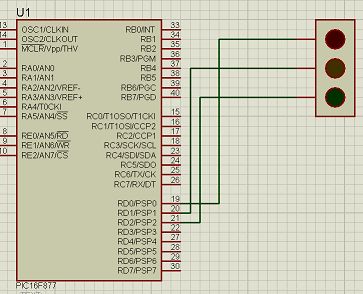
Now see the hardware connection, three LEDs are connected in Port D bit 0, bit 1 and bit 2 positions. So now for glow the
Upper led we have to send 00000001 = 1
Middle LED we need to send 00000010 = 2
Lower LED we need to send 00000100 = 4
So for our Simple Project on LED blinking by PIC 16 Microcontroller we have to send the number Port D =1, Port D= 2 and Port D = 4 with some delay .
For more detail: Simple Project on LED blinking by PIC 16 Microcontroller
Quick Solutions to Questions related to Blinking LED Project:
- What software is needed to simulate the hardware arrangement?
Proteus 7 Professional is required to make the hardware arrangement and simulate the project. - Which tool is used to write the Embedded C Program?
MikroC is used to write the program and build the hex file. - How do you define a port as an input in PIC 16?
You define a port as an input by setting the TRIS command to 1, such as TRISD = 1. - How do you define a port as an output in PIC 16?
You define a port as an output by setting the TRIS command to 0, such as TRISD = 0. - Which ports are available on the PIC16 microcontroller?
The four available ports are Port A, Port B, Port C, and Port D. - How do you glow the upper LED connected to Port D bit 0?
To glow the upper LED, you must send the value 1 to Port D. - What value is sent to light the middle LED on Port D bit 1?
The value 2 is sent to Port D to light the middle LED. - How do you activate the lower LED connected to Port D bit 2?
You need to send the value 4 to Port D to activate the lower LED.
Related projects
An Application-Driven Microcontroller Curriculum
Understanding how to apply microcontrollers lies at the core of modern embedded systems education. This student project takes an experiential approach to...
LED ProjectsBuild this microcontroller controlled rainbow flying disc – and then throw it!
Hello all and welcome to this super simple and inexpensive instructable. If you like throwing frisbees AND you like flashing lights AND...
LED ProjectsLED Scrolling Display Project Working With Circuit Diagram
We normally use a simple static LED display screen to convey a message. Earlier, when we want to display large data, we...
LED Projects8051 MICROCONTROLLER
8051 Microcontroller based electronic locker system CIRCUIT DESCRIPTION Security is a prime concern in our day-today life. Everyone wants to be as...
LED ProjectsDigital Temperature Sensor Circuit
Temperature sensors are widely used in electronic equipments to display the temperature. You can see the digital clock displaying the room temperature...
LED ProjectsPassword Based Door Lock System using 8051 Microcontroller
Traditional lock systems using mechanical lock and key mechanism are being replaced by new advanced techniques of locking system. These techniques are...

Ibrar Ayyub
I am an experienced technical writer holding a Master's degree in computer science from BZU Multan, Pakistan University. With a background spanning various industries, particularly in home automation and engineering, I have honed my skills in crafting clear and concise content. Proficient in leveraging infographics and diagrams, I strive to simplify complex concepts for readers. My strength lies in thorough...