


Summary of GSM module Interfacing with PIC Microcontroller – Make and Receive Calls
This tutorial explains interfacing a SIM900A GSM module with a PIC16F877A microcontroller to enable call and SMS functionality. The setup establishes a serial connection by linking the module's Tx/Rx pins to the microcontroller's Rx/Tx pins, while ensuring a common ground. An LCD display is integrated to monitor the system status, allowing users to make and receive calls directly through the microcontroller interface.Parts used in the GSM Interfacing with PIC Microcontroller Project:
- SIM900A GSM Module
- PIC16F877A Microcontroller
- LCD Display
- Microphone
- Speaker
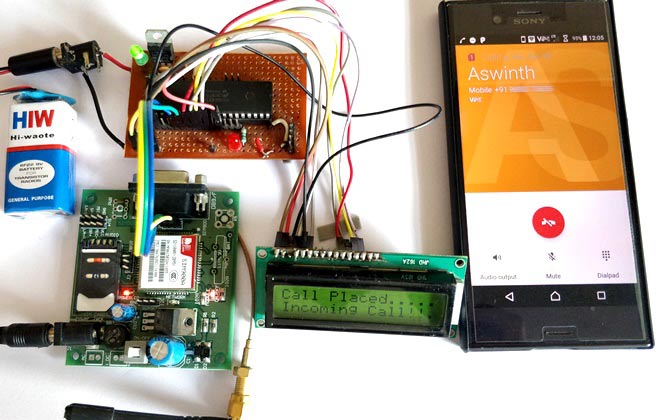
GSM modules are fascinating to use especially when our project requires remote access. These modules could make all actions that our normal mobile phone could do, like making/receiving a call, sending/receiving a SMS, connecting to internet using GPRS etc. You can also connect a normal microphone and speaker to this module and converse on your mobile calls. This will open doors to lot of creative projects if it could be interfaced with a Microcontroller. Hence in this tutorial we will learn how we can Interface the GSM module (SIM900A) with our PIC microcontroller and will demonstrate it by making and receiving call using GSM Module. We have previously interfaced it with Arduino and Raspberry Pi for calling and messaging
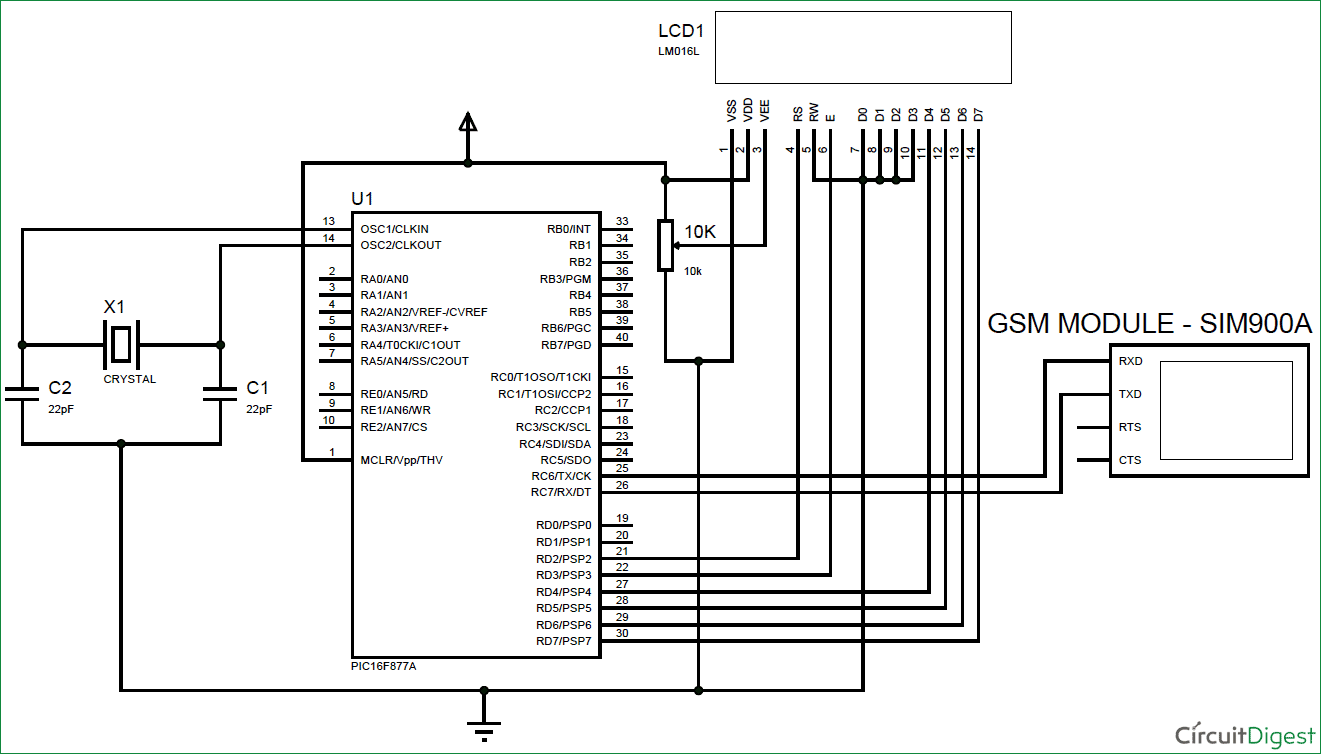
We have simply interfaced the Tx and Rx pins of the GSM module with the Rx and Tx pins of the PIC MCU PIC16F877A respectively. This will establish a Serial connection between both. Also, so do not forget to common ground both the GSM and PIC module. We have also used a LCD display to know the status of our GSM module. Once the connections are done your hardware will look like something below.
for more detail: GSM module Interfacing with PIC Microcontroller - Make and Receive Calls
Quick Solutions to Questions related to GSM Interfacing with PIC Microcontroller Project:
- What actions can GSM modules perform in a project?
GSM modules can make or receive calls, send or receive SMS messages, connect to the internet using GPRS, and allow conversation via connected microphone and speaker. - How are the GSM module and PIC MCU connected?
The Tx pin of the GSM module connects to the Rx pin of the PIC MCU, and the Rx pin of the GSM module connects to the Tx pin of the PIC MCU. - Why is it necessary to common ground both modules?
Common grounding is required between the GSM module and the PIC module to establish a proper electrical reference for the serial connection. - What component is used to know the status of the GSM module?
An LCD display is used to indicate the status of the GSM module during operation. - Can this project be used for remote access?
Yes, GSM modules are suitable for projects requiring remote access as they replicate mobile phone actions. - Does this tutorial cover making and receiving calls?
Yes, the tutorial demonstrates how to make and receive calls using the GSM module interfaced with the microcontroller. - Has this module been interfaced with other devices previously?
Yes, the SIM900A has previously been interfaced with Arduino and Raspberry Pi for calling and messaging.
Related projects
PIC16F877 Driving LCD in 4-Bit Mode using PIC16F877 with Proteus Simulation
Introduction This microcontroller project shows how a PIC16F877 can drive an LCD display using 4-bit mode inside a Proteus simulation.The project demonstrates...
Programmers & ICSP · PIC16F877AEPE PIC/LCD Demo using PIC16F877 with Proteus Simulation
IntroductionThe EPE PIC/LCD Demo is a classic microcontroller project that demonstrates how a PIC16F877 can fully control a PG12864F graphical LCD.Designed as...
Motors & Robotics · PIC16F877AEfficient Sun-Following Robot: A Solar Tracker with Microcontroller Control
Abstract The impending global challenge of dwindling non-renewable fuel resources underscores the urgency of transitioning towards renewable energy alternatives like solar power....
Wireless & IoTExploring Various Applications of Microcontrollers: A World of Tiny Brains
Exploring Various Applications of Micro Controller Microcontrollers have become ubiquitous in the modern world with applications in nearly every industry. This student...
Wireless & IoTIntelligent Sips: Revolutionizing Dining with the SmartCup
Abstract The SmartCup Attachment is a comprehensive system designed for restaurants to monitor the liquid levels in their customers' cups. This system...
Wireless & IoTMaximizing Wi-Fi Capabilities with the Explorer 16 Development Board
As society progresses, the necessity for wireless communication is evolving from a mere luxury to an essential requirement. Wi-Fi, extending beyond conventional...

Ibrar Ayyub
I am an experienced technical writer holding a Master's degree in computer science from BZU Multan, Pakistan University. With a background spanning various industries, particularly in home automation and engineering, I have honed my skills in crafting clear and concise content. Proficient in leveraging infographics and diagrams, I strive to simplify complex concepts for readers. My strength lies in thorough...