


Summary of IR On/Off Switch Using Microcontroller
This article describes building an IR On-Off Switch (IR-switch) to control electrical devices using a TV or video remote. The receiver memorizes a specific button press from the remote to toggle a relay state, indicated by an LED. The project is beginner-friendly and requires only a few components to implement simple infrared communication for switching power.Parts used in the IR On-Off Switch:
- PIC12F629 microcontroller
- TSOP1738 IR receiver
- Any type of 12V coil relay
- LED diode
Turn ON or OFF electrical devices using remote control is not a new idea and you can find so many different devices doing that very well. For realization of this type of device, you must make a receiver, a transmitter and understand their way of communication. Here you will have a chance to make that device, but you will need to make only the receiver, because your transmitter will be the remote controller of your tv, or video …This is one simple example of this kind of device, and I will call it IR On-Off or IR-switch.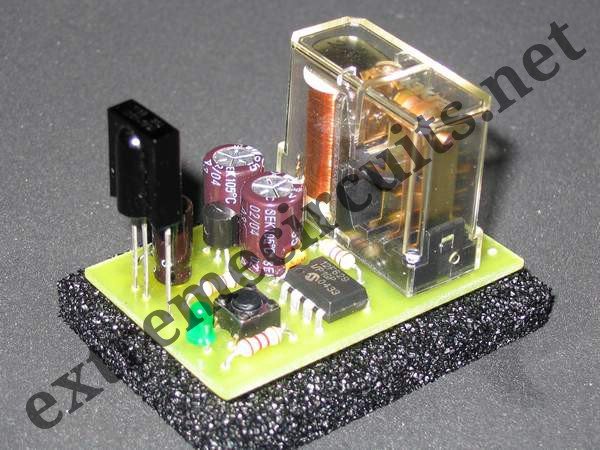
How it works:
Choose one key on your remote controller (from tv, video or similar), memorized it following a simple procedure and with that key you will able to turn ON or OFF any electrical device you wish. So, with every short press of that key, you change the state of relay in receiver (Ir-switch). Memorizing remote controller key is simple and you can do it following this procedure: press key on Ir-switch and led-diode will turn ON. Now you can release key on Ir-switch, and press key on your remote controller. If you do that, led-diode will blink, and your memorizing process is finished.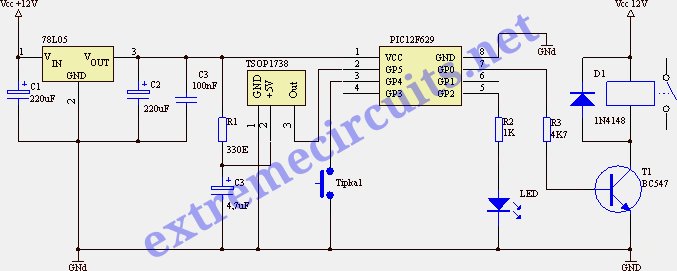
Instructions:
To make this device will be no problem even for beginners in electronic, because it is a simple device and uses only a few components. On schematic you can see that you need microcontroller PIC12F629, ir-receiver TSOP1738 (it can be any type of receiver TSOP or SFH) and for relay you can use any type of relay with 12V coil.
For more detail: IR On/Off Switch Using Microcontroller
Quick Solutions to Questions related to IR On-Off Switch:
- What is the main purpose of this device?
To turn ON or OFF electrical devices using a remote controller. - Which component acts as the transmitter?
The remote controller of your TV or video player serves as the transmitter. - How do you memorize a key on the Ir-switch?
Press a key on the Ir-switch until the LED turns ON, then press the desired key on your remote controller until the LED blinks. - What happens when you press the memorized key?
Every short press changes the state of the relay in the receiver. - Is this project suitable for beginners?
Yes, it is a simple device that uses only a few components. - Can I use other types of IR receivers?
Yes, any type of TSOP or SFH receiver can be used instead of the TSOP1738. - What voltage coil should the relay have?
You can use any type of relay with a 12V coil.
Related projects
Voice Activated Power Sockets (Home Automation)
Yet another voice controlled home automation system! As shown in the picture, the system can control any electrical appliance, by turning ON...
Home Automation & SecurityHome Security System with GSM Using 8051 Microcontroller
Security is a big challenge everywhere because thefts are increasing day by day owing to the unsafe and insecure security systems in...
Home Automation & SecurityHome Automation and Security System using Microcontroller ATMEGA8 with Arduino Programming
Home automation and security systems have become very popular these days, today industrial automation techniques are widely adopted by luxurious homes and...
Home Automation & Security · PIC16F84ABicycle Persistence of Vision Light Display using PIC16F84
In February of 2007 I spent a little while prototyping a board that turns any bicycle wheel into a moving display billboard...
Home Automation & SecurityFTS-8 subtone encoder
Many Yaesu transceivers from the 1990s and thereabouts could use an optional FTS-8 module, that provided subtone generation for transmission, and subtone...
Home Automation & SecurityHand Sign Lock
Introduction Security using technology is a growing and expanding field to protect against the user's identity or property. As more advanced tools...

Ibrar Ayyub
I am an experienced technical writer holding a Master's degree in computer science from BZU Multan, Pakistan University. With a background spanning various industries, particularly in home automation and engineering, I have honed my skills in crafting clear and concise content. Proficient in leveraging infographics and diagrams, I strive to simplify complex concepts for readers. My strength lies in thorough...