


Summary of All pic programmer using 16F87X microcontroller
This article outlines a DIY PIC programmer circuit designed to program various PIC microcontrollers using an ISP interface. It begins with a brief introduction to microcontrollers and ICSP headers, followed by a detailed list of electronic components required for assembly. The project involves creating a PCB to house these parts, enabling the user to program nearly all PIC chips.Parts used in the All pic programmer:
- Ic1 - 78L05
- T1,T3 - bc547 npn
- T2,T4 - bc557 pnp
- D1,D2 - 1n4148
- D3 - zener 13v
- D4 - zener 12v
- D5,D6 - zener 5v1
- R1 - 1k2
- R10- 270
- R15- 1k
- R7,R8 - 10k
- R4,R5,R13,R14 - 1k8
- R2,R3,R6,R9,R11,R12-5k6
- c1,c2,c3 - 100nF
- c4-10uF/16v
- c5-100uF/25v
- Led1 - red 5mm led
- Led2 - green 5mm led
- 2x8pin,18pin,28pin i 40pin
- con1-1x5pin header
- jp2-1x3 pin header
- jp1-1x jumper
- db9 female header
- pcboardx1
1.Intro to microcontrolers
2 How to use the icsp headers
3 How to chose a microcontroler
And if you have some(more) time sing up on eRepublik
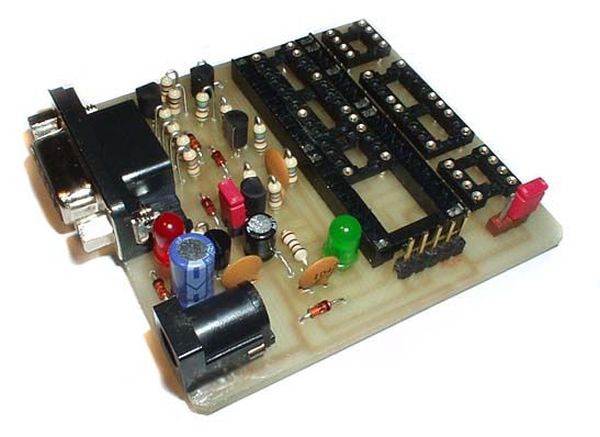
Step 2: Parts
Ic1 - 78L05
T1,T3 - bc547 npn
T2,T4 - bc557 pnp
D1,D2 - 1n4148
D3 - zener 13v
D4 - zener 12v
D5,D6 - zener 5v1
R1 - 1k2
R10- 270
R15- 1k
R7,R8 - 10k
R4,R5,R13,R14 - 1k8
R2,R3,R6,R9,R11,R12-5k6
c1,c2,c3 - 100nF
c4-10uF/16v
c5-100uF/25v
Led1 - red 5mm led
Led2 - green 5mm led
2x8pin,18pin,28pin i 40pin
con1-1x5pin header
jp2-1x3 pin header
jp1-1x jumper
db9 female header
pcboardx1
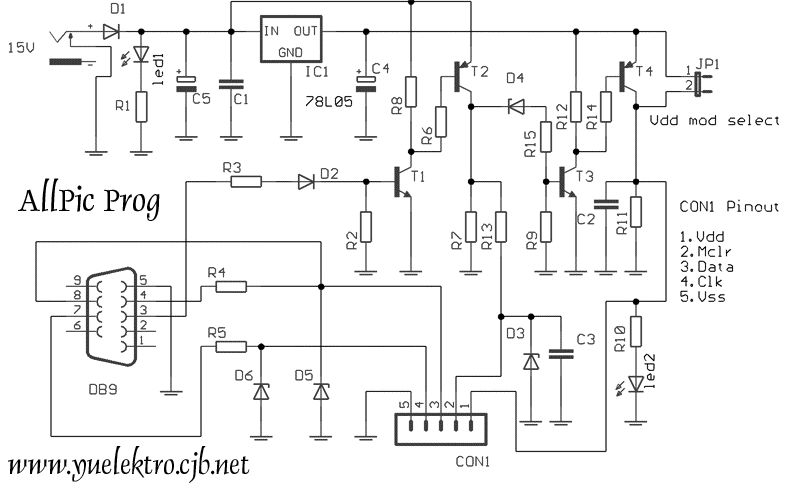
Schematics
With this tiny thing you can program nearly evry pic you want
Step 4: PCB making
Here is the PCB
For more detail: All pic programmer using 16F87X microcontroller
Quick Solutions to Questions related to All pic programmer:
-
What is the primary function of this device?
With this tiny thing you can program nearly every pic you want. -
Which microcontroller series is specifically mentioned for the schematics?
The details refer to the 16F87X microcontroller. -
How do you choose the correct microcontroller for this project?
The article suggests learning how to choose a microcontroller as part of the introductory steps. -
What voltage regulator is used in the circuit?
The circuit uses an Ic1 - 78L05 voltage regulator. -
Can this programmer work with different PIC sizes?
Yes, it includes support for 2x8pin, 18pin, 28pin, and 40pin configurations. -
What type of connector is used for the serial interface?
A db9 female header is used in the design. -
Are there specific transistors listed for the build?
Yes, the project lists bc547 npn and bc557 pnp transistors.
Related projects
Calculator Test using PIC24FJ64GA006 with Proteus Simulation
Introduction The Calculator Test using EASYHDL is a practical microcontroller project built on the PIC24FJ64GA006 and simulated in Proteus. This project demonstrates...
Programmers & ICSPPID Controlled Oven using TMS320F28027PT with Proteus Simulation
IntroductionThis project demonstrates a PID controlled oven implemented using a PICCOLO TMS320F28027PT microcontroller and verified through Proteus simulation.It is a practical microcontroller...
Programmers & ICSPPICCOLO Motor Controller Sample Design using TMS320F28023PT with Proteus Simulation
IntroductionThis project demonstrates a PICCOLO motor controller sample design implemented using the TMS320F28023PT Piccolo microcontroller and tested through Proteus simulation. It focuses...
Programmers & ICSP · PIC16F84APIC Musical Doorbell using PIC16F84A with Proteus Simulation
IntroductionThis microcontroller project demonstrates a musical doorbell built around a PIC16F84A and a simple piezo sounder.Using two push buttons, the system allows...
Programmers & ICSP · PIC16F877AEPE PIC/LCD Demo using PIC16F877 with Proteus Simulation
IntroductionThe EPE PIC/LCD Demo is a classic microcontroller project that demonstrates how a PIC16F877 can fully control a PG12864F graphical LCD.Designed as...
Programmers & ICSP · PIC16F628ADHT11 Low Cost Humidity Sensor using PIC16F628A with Proteus Simulation
IntroductionThis microcontroller project demonstrates how to interface a low-cost DHT11 temperature and humidity sensor with a PIC16F628A using a Proteus simulation environment.The...

Ibrar Ayyub
I am an experienced technical writer holding a Master's degree in computer science from BZU Multan, Pakistan University. With a background spanning various industries, particularly in home automation and engineering, I have honed my skills in crafting clear and concise content. Proficient in leveraging infographics and diagrams, I strive to simplify complex concepts for readers. My strength lies in thorough...