


We are now in the fourth part of the microcontroller tutorial. We have a microcontroller circuit diagram ready. It’s time to make a circuit board. I love this part. This is the “magical” step that takes the idea we started with and turns it into something real.
But let’s recap. So far we have learned:
- Part 1: What is a microcontroller?
- Part 2: How to choose your microcontroller?
- Part 3: How to design a circuit diagram for your microcontroller?
 In this fourth part, we are going to create a circuit board for our circuit, then get this board created in one way or another. This can be done in several ways, as we’ll see later.
To design our circuit board we’ll use Cadsoft Eagle. It’s available in a free version and works on Windows, Mac and Linux.
Designing Schematics For Our Microcontroller Circuit
The first thing we need to do, is to put our schematic design into Eagle’s schematic editor. If you are not familiar with this process, check this out: How to create schematics with Eagle
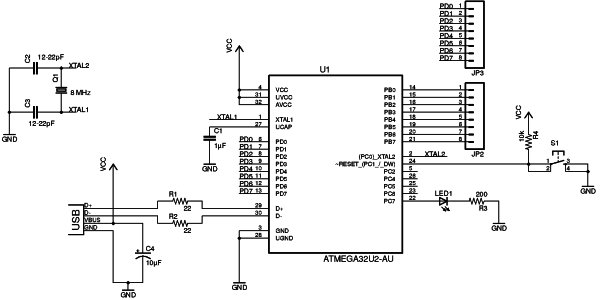
In the previous part of this microcontroller tutorial, we decided on which components to use and how to connect them.
The ATmega32U2 microcontroller, is not in Eagle’s default library. I could have designed my own custom component, but to save time I used a library that I found here: https://github.com/civanovici/roduino/tree/master/eagle/eagleLibrary
For the USB connector, I used one from Sparkfun’s library here: https://github.com/sparkfun/SparkFun-Eagle-Libraries
Designing Out Board Layout
The next step is to design the board.
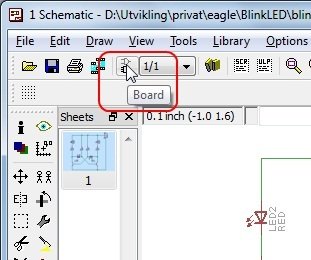
In Eagle, we can click on the «Board» button in the toolbar to open the design editor. If no board design exists for your schematics, you will be asked if you want to create one. Answer «Yes» to this.
 I always start out by defining my board size. I know that I can get really cheap prototypes if I stick to 5cm x 5cm (1.9685 in x 1.9685 in), so I will set my board size to this.
Now it’s time to place the components onto the board and draw the connections.
In this design, I wanted to draw only on one side, so that it would be easier to mill or etch the board – just in case I wanted to do this.
For more detail: Microcontroller Tutorial 4/5: Creating a Microcontroller Circuit Board
Related projects
Voltage Measurement with A PIC Microcontroller
Voltage Measurement with PIC Microcontroller articulates a methodical framework for facilitating analog voltage measurement using the PIC18F4520, an advanced member of Microchip’s...
Development Boards & KitsUltra-Low Power: Microcontroller Standby Current to 130uA with OPEnS Power Control Board
At the OPEnS Lab, a key focus for our projects is achieving exceptionally long battery life. This was particularly true for the...
Development Boards & KitsAn Integrated Approach to Developing Applications with Microchip PIC Microcontrollers
1. Introduction In our daily lives, a variety of devices such as telephones, household appliances, and cars incorporate "smart" electronics, typically manifested...
Development Boards & KitsMicrocontroller-Driven AC Voltage Control with Soft Start Feature
1. INTRODUCTION PWM-based AC voltage controllers find extensive application in uninterruptible power supplies (UPS) and high-power flexible AC transmission systems. This variable...
Development Boards & KitsPIC Microcontroller-Based IC Tester for Efficient Integrated Circuit Verification
1. INTRODUCTION Within the electronics industry[1], as circuit complexity undergoes a drastic increase and the demand for higher reliability rises, a significant...
Development Boards & Kits · PIC16F887Hands-On Microcontroller Projects: BK300 Development Board Featuring PIC16F887 Chip Lab
1. INTRODUCTION The study of microcontroller systems is experiencing a global surge across various fields within science, engineering, and technology departments of...

Ibrar Ayyub
I am an experienced technical writer holding a Master's degree in computer science from BZU Multan, Pakistan University. With a background spanning various industries, particularly in home automation and engineering, I have honed my skills in crafting clear and concise content. Proficient in leveraging infographics and diagrams, I strive to simplify complex concepts for readers. My strength lies in thorough...