


Summary of How to implement free running counter in PIC16F84A using seven segment display
This article describes implementing a free-running hexadecimal counter (0–F) on a PIC16F84A using C. A 20 MHz crystal provides 5 MIPS; PORTB pins RB0–RB6 drive a common-cathode seven-segment display to show digits 0–9 and A–F, incrementing once per second. Code (HI-TECH C) and Proteus simulation files are provided for download; MPLAB v8.85 and Proteus v7.10 were used for development and simulation.Parts used in the Free Running Counter project:
- PIC16F84A microcontroller
- 20 MHz crystal (or any 0–20 MHz crystal)
- Common cathode seven-segment display
- Resistors for seven-segment current limiting
- Connections/cabling and protoboard or PCB
- Power supply (suitable Vdd for PIC16F84A)
- MPLAB v8.85 (for compiling)
- HI-TECH C v9.83 compiler (used to compile code)
- Proteus v7.10 (for simulation)
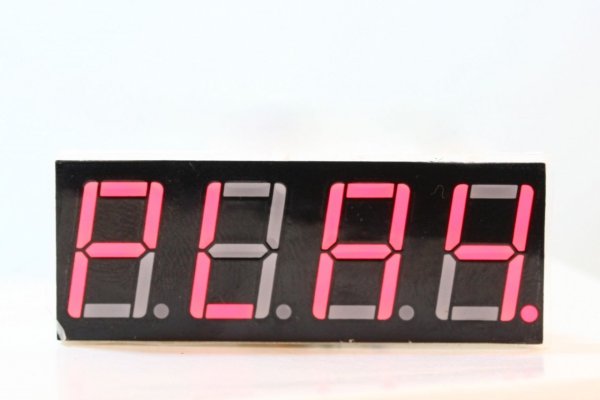
This post provides the implementation of free running counter ( using c language ) for PIC16F84A micro-controller. This code is written in such a way that, the counter starts from a value of '0' ( displayed on the seven segment ) and then increments this value after every second. So, the seven segment display starts from '0' and then displays '1', '2', '3', '4', '5', '6', '7', '8', '9', 'A', 'b', 'C', 'd', 'E', and in the end 'F'. After displaying 'F', counter starts from '0' again and this pattern repeats forever.
The code and Proteus simulation is given in the 'Downloads' section at the bottom of this page. It is assumed that you know how to make an LED blink with PIC16F84A micro-controller. If you don't, then please read this post first.
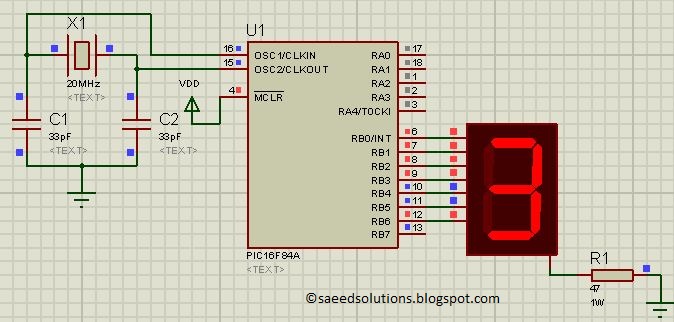
The following figure shows the circuit of free running counter in Proteus.
A crystal of 20 MHz is used here. You can use any crystal value from 0 to 20MHz with PIC16F84A. As we know that PIC16F84A microcontroller has an architecture which executes an instruction in 4 CPU cycles [1], hence this 20Mhz crystal makes this PIC16F84A run at 5.0 MIPS (Million of instructions per second).
PORTB is used here to connect PIC16F84A with the seven segment display. RB0 pin is attached with the 'a' segment of the seven segment display. Similarly, RB1 pin is connected with 'b' segment, RB2 pin is connected with 'c' segment and so on.
Common cathode seven segment display is used in this example. You can easily modify this circuit and code for the common anode seven segment display as well.
Code
The following function is used in the code to display values on the seven segment display.
Downloads
Free running counter code using PIC16F84A was compiled in MPLAB v8.85 with HI-TECH C v9.83 compiler and simulation was made in Proteus v7.10. To download code and Proteus simulation click here.
For more detail: How to implement free running counter in PIC16F84A using seven segment display
Quick Solutions to Questions related to Free Running Counter:
- What does the project implement?
A free-running counter that displays hexadecimal digits 0 to F on a seven-segment display, incrementing every second. - Which microcontroller is used?
The PIC16F84A microcontroller is used. - Which port of PIC16F84A drives the seven-segment display?
PORTB is used, with RB0 to RB6 connected to segments a to g of the display. - Is the seven-segment display common anode or common cathode?
The example uses a common cathode seven-segment display. - What crystal frequency is used and why?
A 20 MHz crystal is used, giving 5.0 MIPS because PIC16F84A executes one instruction in four CPU cycles. - How often does the counter increment?
The counter increments once every second. - Which tools were used to compile and simulate the project?
Code was compiled with MPLAB v8.85 using HI-TECH C v9.83 and simulated in Proteus v7.10. - Can the circuit/code be modified for common anode displays?
Yes, the article states the circuit and code can be easily modified for a common anode display. - Where can I get the code and simulation files?
The article provides a Downloads section with links to the code and Proteus simulation files. - Does the implementation assume prior knowledge?
Yes, it assumes familiarity with making an LED blink on PIC16F84A; it refers readers to another post if not.
Related projects
PIC Stepper Motor Controller using PIC16F84A with Proteus Simulation
Introduction Stepper motors are widely used in embedded systems and DIY electronics projects where precise position control is required. This PIC Stepper...
Programmers & ICSP · PIC16F84APIC Musical Doorbell using PIC16F84A with Proteus Simulation
IntroductionThis microcontroller project demonstrates a musical doorbell built around a PIC16F84A and a simple piezo sounder.Using two push buttons, the system allows...
Beginner Tutorials · PIC16C84Exploring the World of PIC Microcontrollers: An Architectural Overview
A Peripheral Interface Microcontroller (PIC), developed by General Instruments Microcontrollers in 1993, operates under software control and is programmed to execute various...
LCD & Display ProjectsLeveraging Blockout Banners for Effective Electronics and Tech Product Displays
Blockout banners have become a popular and effective tool for displaying electronics and tech products in various settings, from trade shows and...
LCD & Display Projects · PIC18F4520Interfacing PIC18F4520 microcontroller with an HD44780 LCD
Introduction Being able to display data from a microcontroller visually has many advantages. It allows for menus, status indicators, and instructions to...
LCD & Display ProjectsVideo Project Development in the Midst of an Impromptu Online Semester
Receiving robot parts in the mail was an unexpected conclusion to the Winter 2020 semester for students. However, when faced with a...

Ibrar Ayyub
I am an experienced technical writer holding a Master's degree in computer science from BZU Multan, Pakistan University. With a background spanning various industries, particularly in home automation and engineering, I have honed my skills in crafting clear and concise content. Proficient in leveraging infographics and diagrams, I strive to simplify complex concepts for readers. My strength lies in thorough...