


Summary of How to interface keypad with PIC16F877
This tutorial shows how to interface a matrix keypad (4x4 or 4x3) with a PIC16F877 microcontroller using C (MPLAB + HI-TECH C). It uses PORTB for keypad rows and columns, and RD0, RD1, RD4–RD7 for an LCD to display the pressed key. The code scans columns/rows to detect key presses; simulation in Proteus demonstrates the LCD showing the pressed key. Downloads include the C code and Proteus simulation files.Parts used in the Keypad with PIC16F877 Project:
- PIC16F877 microcontroller
- Matrix keypad (4x4 or 4x3)
- 16x2 LCD (interfaced via RD0, RD1, RD4-RD7)
- Proteus simulation software (for testing)
- MPLAB IDE (MPLAB v8.85 used)
- HI-TECH C compiler (v9.83 used)
- Connection wires / breadboard (or circuit in Proteus)
- Power supply for PIC and peripherals
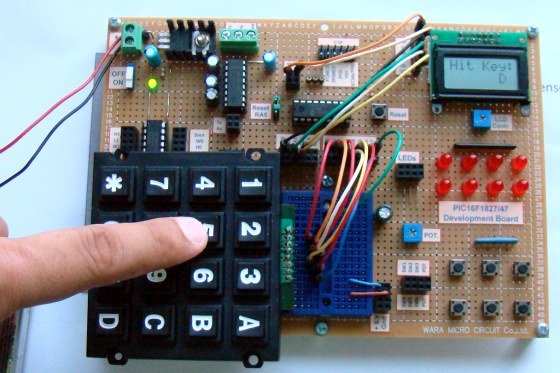
This code is written in C language using MPLAB with HI-TECH C compiler. You can download this code from the 'Downloads' section at the bottom of this page.
In this post, it is assumed that you know, how to interface LCD with PIC16F877 microcontroller, If you don't then please read this page.
The circuit required to interface keypad with PIC16F877[1] is shown below.
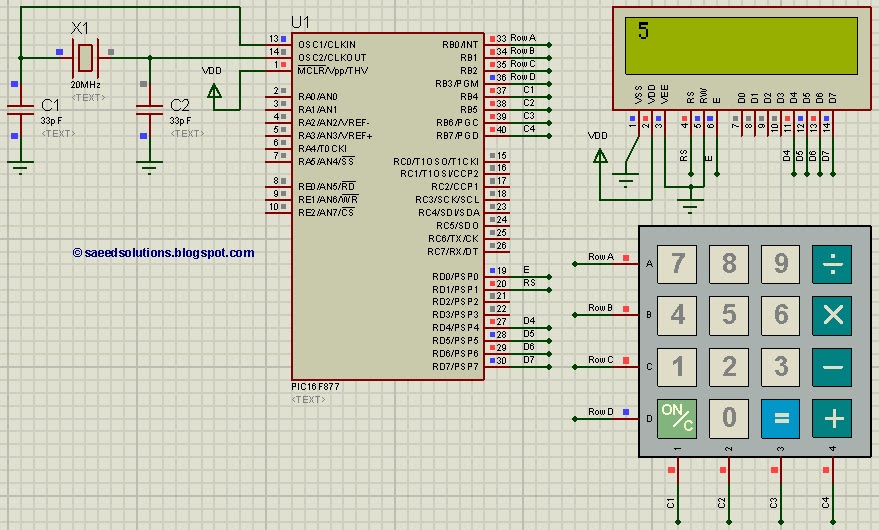
The result of simulating the code in Proteus is shown above in the figure. This code is written in such a way that when you press any key from the keypad, then the value of that key is displayed on the LCD. For example, in the above figure LCD screen is displaying '5', because this picture was taken after pressing '5' from the keypad.
In the above circuit, RD0, RD1 and RD4:7 pins are used to interface LCD with PIC16F877. LCD is used here just to show the pressed key value. 8 pins of PORTB are used to interface 4x4 keypad. 4 pins are used to attach columns and 4 pins are used to attach rows and scanning algorithm code is used to check for any pressed key.
Code
The main function code is shown below.
Downloads
Keypad interfacing code using PIC16F877 was compiled in MPLAB v8.85 with HI-TECH C v9.83 compiler and simulation was made in Proteus v7.10. To download code and Proteus simulation click here.
For more detail: How to interface keypad with PIC16F877
Quick Solutions to Questions related to Keypad with PIC16F877:
- How is the keypad connected to the PIC16F877?
Eight pins of PORTB are used: four for columns and four for rows, using a scanning algorithm to detect presses. - How is the pressed key shown to the user?
An LCD is connected (RD0, RD1, RD4-RD7) and displays the value of the pressed key. - Can both 4x4 and 4x3 keypads be used with this code?
Yes, the method supports any matrix keypad such as 4x4 or 4x3. - What compiler and IDE were used to develop the code?
The code was compiled with HI-TECH C v9.83 and developed in MPLAB v8.85. - Was the project tested in simulation?
Yes, the project was simulated in Proteus v7.10, showing the LCD displaying pressed keys. - Does this tutorial include the complete code and simulation files?
Yes, the code and Proteus simulation files are available for download from the Downloads section. - Do I need prior knowledge to follow this tutorial?
Yes, it is assumed you know how to interface an LCD with PIC16F877; the page links to LCD interfacing details if needed.
Related projects
PIC16F877 Driving LCD in 4-Bit Mode using PIC16F877 with Proteus Simulation
Introduction This microcontroller project shows how a PIC16F877 can drive an LCD display using 4-bit mode inside a Proteus simulation.The project demonstrates...
Programmers & ICSP · PIC16F877AEPE PIC/LCD Demo using PIC16F877 with Proteus Simulation
IntroductionThe EPE PIC/LCD Demo is a classic microcontroller project that demonstrates how a PIC16F877 can fully control a PG12864F graphical LCD.Designed as...
Motors & Robotics · PIC16F877AEfficient Sun-Following Robot: A Solar Tracker with Microcontroller Control
Abstract The impending global challenge of dwindling non-renewable fuel resources underscores the urgency of transitioning towards renewable energy alternatives like solar power....
Communication & Interfacing · PIC18F4520CAN FD Node based on a PIC18 Microcontroller
The introduction sets the stage for an embedded systems project that involves developing a Embedded C CAN FD project using the MCP2517FD...
Communication & InterfacingLAN9662 Gigabit Switch: Optimized for Industrial Ethernet
Introduction It should come as little surprise therefore that one element of what is now more commonly referred to in some circles...
Communication & InterfacingPIC Microcontroller: Fundamentals & Applications for Students
Introduction Microcontrollers are the key components in the embedded systems market. A variety of embedded systems was formed and developed after the...

Ibrar Ayyub
I am an experienced technical writer holding a Master's degree in computer science from BZU Multan, Pakistan University. With a background spanning various industries, particularly in home automation and engineering, I have honed my skills in crafting clear and concise content. Proficient in leveraging infographics and diagrams, I strive to simplify complex concepts for readers. My strength lies in thorough...