


Summary of How to configure EUSART in PIC18F4550
This article explains serial communication concepts and details the PIC18F4550 microcontroller’s EUSART (Enhanced USART), covering asynchronous/synchronous and full-/half-duplex modes. It highlights EUSART features such as automatic baud-rate detection and describes key EUSART registers—focusing on the TXSTA transmit control register and its bits (TRMT, BRGH, SYNC, TXEN, TX9) and their functions for configuring serial transfer.Parts used in the PIC18F4550 EUSART Project:
- PIC18F4550 microcontroller
Both, Parallel and Serial modes of communication have certain advantages and disadvantages over one another. The serial communication is a preferred option due to its ability of long distance communication with error detection capability. The microcontrollers consist of an inbuilt hardware unit known as USART (Universal Synchronous Asynchronous Reception and Transmission) to facilitate serial transfer of data. For more details, refer to USART in AVR section.
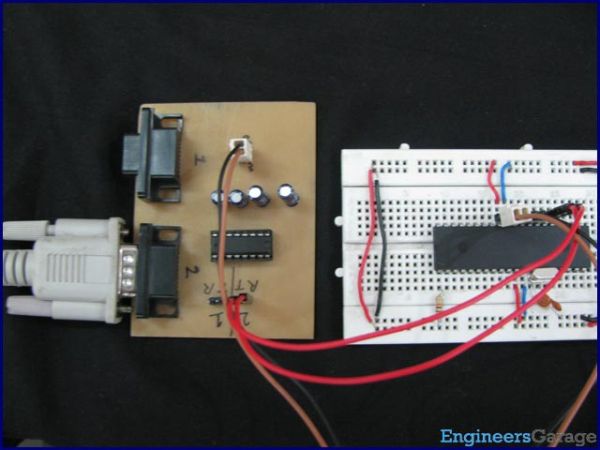
Before starting USART, some general terms related to communication need to be understood. These terms are explained below.
|
Bit 7
|
Bit 6
|
Bit 5
|
Bit 4
|
Bit 3
|
Bit 2
|
Bit 1
|
Bit 0
|
|
CSRC
|
TX9
|
TXEN
|
SYNC
|
SENDB
|
BRGH
|
TRMT
|
TX9D
|
Quick Solutions to Questions related to PIC18F4550 EUSART:
- What types of serial communication modes are described?
The article describes asynchronous and synchronous serial communication modes. - What is asynchronous communication?
Asynchronous communication uses different clocks for transmitter and receiver and sends start and stop bits with each data byte. - What is synchronous communication?
Synchronous communication has transmitter and receiver synchronized with the same clock and does not use start or stop bits. - What is full-duplex communication?
Full-duplex communication allows devices to send and receive data simultaneously. - What is half-duplex communication?
Half-duplex communication allows a device to either transmit or receive at an instant, not both. - What enhanced feature does EUSART provide over USART?
EUSART provides automatic baud-rate detection among other enhanced capabilities. - Which EUSART register is detailed in the article?
The TXSTA transmit status and control register is detailed. - What does the TRMT bit indicate?
TRMT indicates the transmit shift register status: 1 means empty, 0 means full. - How does the BRGH bit affect communication?
BRGH selects asynchronous speed: 1 for high speed and 0 for low speed. - What do the SYNC and TXEN bits do?
SYNC selects synchronous (1) or asynchronous (0) mode; TXEN enables transmission when set high.
Related projects
PICDEM FS USB CDC Evaluation Board using PIC18F4550 with Proteus Simulation
Introduction The PICDEM FS USB CDC Evaluation Board is a practical microcontroller project built around the PIC18F4550, designed to demonstrate USB communication...
Peripheral Tutorials · PIC18F4550PICDEM FS USB Mass Storage Device using PIC18F4550 with Proteus Simulation
Introduction This microcontroller project demonstrates how to simulate a USB Mass Storage Device (MSD) using the PIC18F4550 in a Proteus simulation environment....
Development Boards & Kits · PIC18F2550Pinguino Project: A PIC Microcontroller Based Arduino
This is a complete tutorial to make a PIC Microcontroller based Arduino. This is a complete tutorial to make PIC microcontroller based...
Beginner Tutorials · PIC16F877APIC16F877 Driving LCD in 4-Bit Mode using PIC16F877 with Proteus Simulation
Introduction This microcontroller project shows how a PIC16F877 can drive an LCD display using 4-bit mode inside a Proteus simulation.The project demonstrates...
Beginner TutorialsPIC12CE518 I2C EEPROM using PIC12CE518 with Proteus Simulation
Introduction This microcontroller project demonstrates how to write and read data using the internal I2C EEPROM of the PIC12CE518 and visualize the...
Beginner TutorialsPico Timer Project using Pico with Proteus Simulation
Introduction Timers are one of the most important features in embedded systems because they allow microcontrollers to perform tasks at precise intervals...

Ibrar Ayyub
I am an experienced technical writer holding a Master's degree in computer science from BZU Multan, Pakistan University. With a background spanning various industries, particularly in home automation and engineering, I have honed my skills in crafting clear and concise content. Proficient in leveraging infographics and diagrams, I strive to simplify complex concepts for readers. My strength lies in thorough...