
Summary of Easy 16F84 Microcontroller Programmer – JDM
This article guides users in building a JDM Microcontroller Programmer circuit for PIC 16F84A chips. It emphasizes using a PC with a standard RS-232 serial port, as USB converters are incompatible due to power requirements. The project involves assembling the circuit on a copper or breadboard, then testing it by downloading an LED flasher firmware using IC-Prog software.
Parts used in the JDM Microcontroller Programmer:
- JDM programmer circuit components
- Copper board or breadboard
- PIC 16F84A Microcontroller chip
- LED
- HiTech-PIC software
- Proteus 7 simulation software
- IC-Prog Programming software
- RS-232 serial port
In this instructable , I ‘ll show you how I built and tested this simple yet powerful circuit .
The JDM Programmer is my favorite Microcontroller programmer. It is a simple circuit and compatible with many software loaders.
I ‘ve built this circuit many years ago and learned Microcontroller programming using it and built many projects based on 16F84A Microcontroller.
This is the website of the JDM programmer
This Microcontroller is easy to program and powerful to use.
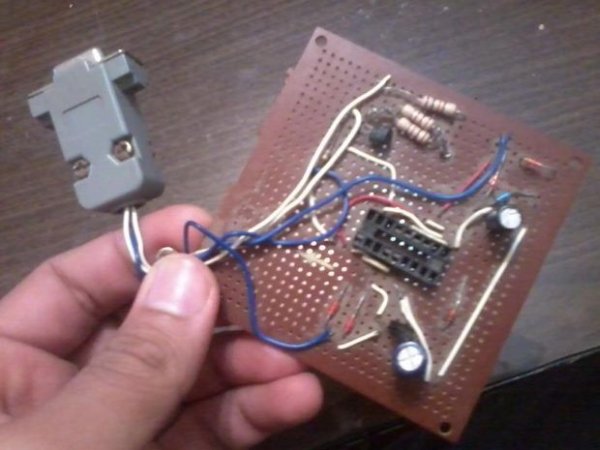
The photo above shows the programmer circuit after completion.
 Note:
Note:
This circuit uses the serial port on the PC . You must use this circuit on a PC having a standard RS-232 serial port.
The USB-to-RS-232 converter will not work as this circuit is power from the +12 volts form the serial port
Step 1: Assemble the circuit
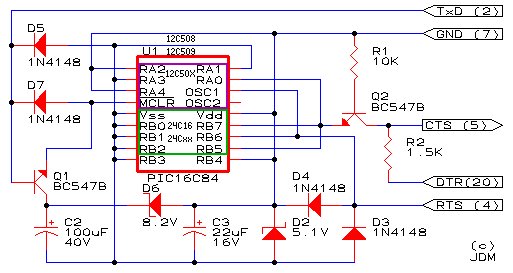
Here is the programming circuit. It is very simple and easy to build. It is called JDM
I got it from that website.
http://www.jdm.homepage.dk/newpic.htm
The website contains the programming circuit and the programming software.
The circuit and the software supports many Microcontroller chips other than PIC 16F84A. You may try it with other chips.
Just build the circuit on a copper board or on a bread board.
Start welding the components together as shown on the schematics.
Step 2: Download Your First Application
Now , after you ‘ve completed your circuit . You must start to test it with a programming software.
The circuit would be working fine if you could download any sample Firmware on your chip.
I made a flasher program that flashes an LED using the Microcontroller.
The LED flasher program in embedded systems world is comparable to ” Hello World ” in PC programming world.
The flasher program is written in C language and compiled with HiTech-PIC software.
The simulation model is made with Proteus 7 simulation software.
The Firmware is saved in the flasher.HEX file.
If you could start the IC-Prog software and download the flasher.HEX file on the Microcontroller chip using the circuit , then you ‘ve just completed the circuit successfully.
 You may proceed to the next step if you like to see the Firmware running on the Microcontroller
I used the IC-Prog Programming software , but this JDM circuit is supported by many software loader. You may search and try to find your favorite loader software.
As your first start of the software , change the interface to Windows API. If you couldn’t make it , press F3 so you can change the hardware settings.
For more detail: Easy 16F84 Microcontroller Programmer – JDM
- What type of computer port is required for this circuit?
You must use a PC having a standard RS-232 serial port. - Can I use a USB-to-RS-232 converter for this project?
No, the USB-to-RS-232 converter will not work because the circuit is powered from +12 volts from the serial port. - Which microcontroller chip is primarily discussed in this article?
The article focuses on the PIC 16F84A Microcontroller. - What software was used to compile the LED flasher program?
The flasher program was compiled with HiTech-PIC software. - What is the equivalent of Hello World in embedded systems mentioned here?
The LED flasher program is comparable to Hello World in PC programming. - Which programming software did the author use to download the firmware?
The author used the IC-Prog Programming software. - What interface setting should be changed when starting the software?
You should change the interface to Windows API upon your first start of the software. - How can you verify if the circuit is working correctly?
The circuit works fine if you can download any sample Firmware, such as the flasher.HEX file, onto the Microcontroller chip.
