


Summary of DS1820 TEMPERATURE SENSOR CIRCUIT PIC16F84 ASSEMBLY
This project uses a PIC16F84 microcontroller in assembly to read a single Dallas DS1820 temperature sensor and display raw and high-resolution temperature data on a 2x16 (or larger) LCD. The LCD shows sensor family code, serial number, CRC status, scratchpad bytes, and high-resolution temperature. Full assembly source code, schematic, and related files (including a .cod file) are provided and demonstrated step-by-step in MPLAB.Parts used in the DS1820 Temperature Sensor Circuit PIC16F84 Assembly:
- Dallas DS1820 temperature sensor
- Microcontroller PIC16F84
- 2 x 16 LCD display (or larger character display)
- PCB or prototyping board
- Support components (resistors/capacitors as per schematic)
- Power supply (appropriate voltage for PIC16F84 and LCD)
- Programming/debugging tool compatible with MPLAB
- Wiring/connectors
DS1820 sensor designed for use with assembly language PIC16F84 on a circuit board data is displayed via 2 x 16 LCD mplab working on the code you can see step by step. cod file, including all source code available... Electronics Projects, DS1820 Temperature Sensor Circuit PIC16F84 Assembly "microchip projects, microcontroller projects, pic assembly example, pic16f84 projects,
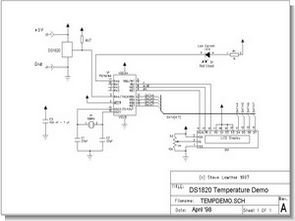
DS1820 sensor designed for use with assembly language PIC16F84 on a circuit board data is displayed via 2 x 16 LCD mplab working on the code you can see step by step. cod file, including all source code available
TEMPERATURE SENSOR SCHEMATIC
DS1820 Reader This code reads a single dallas DS1820 temperature sensor and displays both the raw data, and the high resolution temperature on the LCD. (2 lines x 20 characters, or larger, character display) for example
The first line on the LCD is the family code (10) and serial number with a CRC byte + either a tick if the CRC is right or cross if the CRC is wrong. The second line on the LCD gives data bytes 0, 1, 6 & 7 of the scratch pad and either the high resolution temperature & tick to show the CRC is correct or only a cross to show the CRC is wrong
DS1820 PIC16F84 Temperature Sensor Assembly source code schematic and other files:
FILE DOWNLOAD LINK LIST (in TXT format): LINKS-5476.zip
Source: DS1820 TEMPERATURE SENSOR CIRCUIT PIC16F84 ASSEMBLY
Quick Solutions to Questions related to DS1820 Temperature Sensor Circuit PIC16F84 Assembly:
- What does the LCD display first?
The first line shows the family code (10) and serial number with a CRC byte plus a tick if the CRC is correct or a cross if incorrect. - What information is shown on the second LCD line?
The second line shows scratchpad data bytes 0, 1, 6 and 7 and either the high resolution temperature with a tick for correct CRC or only a cross for incorrect CRC. - Which microcontroller is used in this project?
The project uses a PIC16F84 microcontroller programmed in assembly language. - Which temperature sensor is supported?
The circuit and code are designed for a single Dallas DS1820 temperature sensor. - What development environment is used for the code?
The code is shown and works step-by-step in MPLAB. - Are source code and schematic files available?
Yes, full assembly source code, schematic, and related files including a .cod file are available for download (listed as LINKS-5476.zip). - Does the project display raw and high resolution temperature?
Yes, it displays both raw data bytes and the high resolution temperature on the LCD. - How is CRC indicated on the display?
A tick indicates the CRC is correct and a cross indicates the CRC is wrong.
Related projects
PIC Stepper Motor Controller using PIC16F84A with Proteus Simulation
Introduction Stepper motors are widely used in embedded systems and DIY electronics projects where precise position control is required. This PIC Stepper...
Programmers & ICSP · PIC16F84APIC Musical Doorbell using PIC16F84A with Proteus Simulation
IntroductionThis microcontroller project demonstrates a musical doorbell built around a PIC16F84A and a simple piezo sounder.Using two push buttons, the system allows...
Beginner Tutorials · PIC16C84Exploring the World of PIC Microcontrollers: An Architectural Overview
A Peripheral Interface Microcontroller (PIC), developed by General Instruments Microcontrollers in 1993, operates under software control and is programmed to execute various...
Sensors & TemperatureSpectrum Analyzer using TMS320F28023DA with Proteus Simulation
Introduction This project demonstrates a real-time audio spectrum analyzer using the TMS320F28023DA Piccolo microcontroller, simulated in Proteus VSM. The system captures an...
Sensors & TemperatureDHT22 Low Cost Humidity Sensor using PIC18F25K20 with Proteus Simulation
IntroductionThis microcontroller project demonstrates how to interface a DHT22 (RHT03) digital temperature and humidity sensor with a PIC18F25K20 using Proteus simulation.The project...
Sensors & TemperatureCrafting a Microcontroller-Based Temperature Monitoring System
Abstract As technological advancements progress, processes become increasingly intricate, demanding a corresponding expansion in the parameters necessary for efficient analysis. Data acquisition,...

Muhammad Bilal
I am a highly skilled and motivated individual with a Master's degree in Computer Science. I have extensive experience in technical writing and a deep understanding of SEO practices.