


Summary of Digital thermometer with auto saving log file in excel by Pic microcontroller
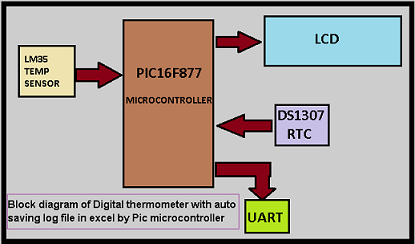
This article details a project using a PIC16F877 microcontroller to create a digital thermometer that automatically logs temperature data into an Excel file. The system utilizes an LM34 sensor for analog temperature reading, converted via the microcontroller's ADC, and includes a DS1307 module for real-time clock functionality. Data is transmitted via UART serial communication in CSV format to a PC running HyperTerminal software, enabling efficient atmospheric data analysis for weather prediction.Parts used in Digital Thermometer with Auto Saving Log File:
- PIC16F877 Microcontroller
- LM34 Temperature Sensor IC
- DS1307 Real-Time Clock IC
- Windows HyperTerminal Software
- Serial Communication (UART) Interface
- MikroC for PIC Compiler
- PC for Data Storage
Digital thermometer with auto saving log file in excel by Pic microcontroller is vary advance, useful and realistic project. The implementation filed of this project is wide. Now a day’s atmospheric prediction saves lots of life. And for getting wright prediction we have to analysis lots of recorded data. By using this project it can be easily serve the purpose.
Project description:
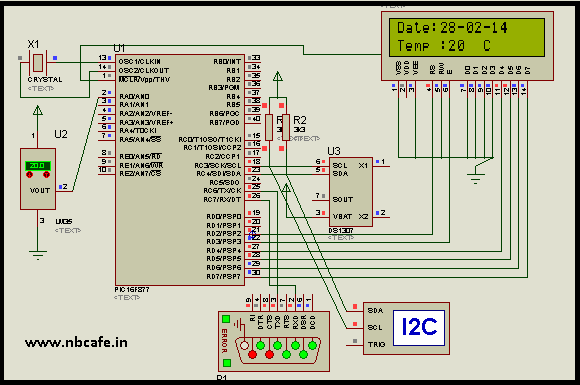
To know the project description you should know that how it works? In this project “Digital thermometer with auto saving log file in excel by Pic microcontroller “we use LM34 IC as a temperature sensor which sense the atmospheric temperature and send the analog value of it. Now we know microcontroller can only process digital value so we convert the analog value which sends by LM34, by inbuilt ADC unit of PIC16f877. After converting the reference temperature value microcontroller process it with some mathematical formula to convert the reference value in Centigrade scale. We interface DS1307 IC for getting the time and calendar in real time mode. To know the details step by step tutorial on “how to interface DS1307 with PIC16f877 microcontroller?” you may follow my old post Interfacing DS1307 Real time clock with PIC16f877. Now big question is how to create log file in excel and save it to PC? For now that you have to see the bellow video where you find the step by step process on how using windows HyperTerminal software, we can receive data via comport (serial communication) and capture the data in CSV format. So for saving the data in CSV format we have to send comma separated data with exact format via UART from PIC16F877 microcontroller.
CSV Data format and Creation inside PIC:
It is a major thing we have to do for sending data in CSV format. As we know the name CSV means comma separated values so we have to send every data separated by comma. And as per Excel for changing column we have to press Tab Key and for change Row we have to press Enter Key. To make our format accordingly our plan we have to send data followd by comma and others key. In this project, we save the data at three column for temperature, time and date see in fig. For that we use code (In Mikroc for Pic) given bellow.
UART1_Write_text(tem); // send data (temperature) via UART
UART1_Write(0x2c); //” comma
UART1_Write(0x09); // Tab
UART1_Write_text(time); // send data (time) via UART
UART1_Write(0x2c); //” comma
UART1_Write(0x09); // Tab
UART1_Write_text(date); // send data (Date) via UART
UART1_Write(0x2c); //” comma
UART1_Write(0x0D); // Enter
For more detail: Digital thermometer with auto saving log file in excel by Pic microcontroller
Quick Solutions to Questions related to Digital Thermometer with Auto Saving Log File:
-
What components are used to sense and process temperature?
The project uses an LM34 IC as a temperature sensor which sends analog values processed by the PIC16F877s built-in ADC unit. -
How does the system handle time and date recording?
A DS1307 IC is interfaced with the microcontroller to provide time and calendar information in real-time mode. -
What software is required to receive and save the data on a PC?
Windows HyperTerminal software is used to receive data via the comport and capture it in CSV format. -
How is the data formatted for Excel compatibility?
Data is sent as comma-separated values where commas separate columns, Tab keys separate specific fields like temperature and time, and Enter keys create new rows. -
Which programming environment is mentioned for the code implementation?
The article references using MikroC for Pic to write the code for sending data via UART. -
What is the primary application of this project described in the text?
The project serves atmospheric prediction by analyzing recorded data to save lives through accurate weather forecasting. -
How does the microcontroller convert the sensor output?
The microcontroller converts the analog value from the LM34 using its inbuilt ADC unit and then applies mathematical formulas to display the value in Centigrade scale.
Related projects
PIC16F877 Driving LCD in 4-Bit Mode using PIC16F877 with Proteus Simulation
Introduction This microcontroller project shows how a PIC16F877 can drive an LCD display using 4-bit mode inside a Proteus simulation.The project demonstrates...
Programmers & ICSP · PIC16F877AEPE PIC/LCD Demo using PIC16F877 with Proteus Simulation
IntroductionThe EPE PIC/LCD Demo is a classic microcontroller project that demonstrates how a PIC16F877 can fully control a PG12864F graphical LCD.Designed as...
Motors & Robotics · PIC16F877AEfficient Sun-Following Robot: A Solar Tracker with Microcontroller Control
Abstract The impending global challenge of dwindling non-renewable fuel resources underscores the urgency of transitioning towards renewable energy alternatives like solar power....
Sensors & TemperatureSpectrum Analyzer using TMS320F28023DA with Proteus Simulation
Introduction This project demonstrates a real-time audio spectrum analyzer using the TMS320F28023DA Piccolo microcontroller, simulated in Proteus VSM. The system captures an...
Sensors & TemperatureDHT22 Low Cost Humidity Sensor using PIC18F25K20 with Proteus Simulation
IntroductionThis microcontroller project demonstrates how to interface a DHT22 (RHT03) digital temperature and humidity sensor with a PIC18F25K20 using Proteus simulation.The project...
Sensors & TemperatureCrafting a Microcontroller-Based Temperature Monitoring System
Abstract As technological advancements progress, processes become increasingly intricate, demanding a corresponding expansion in the parameters necessary for efficient analysis. Data acquisition,...

Ibrar Ayyub
I am an experienced technical writer holding a Master's degree in computer science from BZU Multan, Pakistan University. With a background spanning various industries, particularly in home automation and engineering, I have honed my skills in crafting clear and concise content. Proficient in leveraging infographics and diagrams, I strive to simplify complex concepts for readers. My strength lies in thorough...