


Summary of Digital Voltmeter (0-50v) using PIC Microcontroller
This article explains building a digital voltmeter using a PIC16F877 microcontroller. It utilizes the chip's internal 10-bit ADC to measure voltage, converting the data for display on an LM106L LCD connected to Port D. A voltage divider circuit with specific resistors scales input voltages up to 50V down to a safe 5V range for the microcontroller. The system calculates equivalent integer values based on a 5V reference to ensure accurate readings.Parts used in the Digital Voltmeter:
- PIC16F877
- LCD (lm106l)
- Resistors (100k & 11.11k)
Requirement:
To make digital voltmeter we uses some material here I give you the list of that.
1) PIC16F877
2) LCD (lm106l)
3) Resistors (100k & 11.11k).
Project Details:
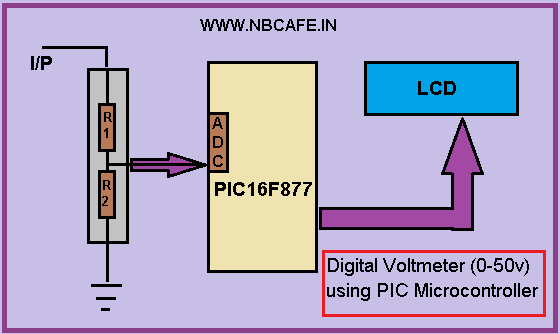
In this project we use internal ADC of PIC16f877 microcontroller for getting input voltage which we have to measure. After getting the input it processed in microcontroller and the equivalent voltage is display in the LCD which is attached with port D. In bellow see the block diagram of our project Digital Voltmeter using PIC Microcontroller.
Working Principal:
We know that PIC16f877 has 10 bit ADC. So input in form 10 bit and we need 8 bit data to farther process. So getting equivalent integer value we have to convert the 10 bit ADC value in equivalent integer number. Now question is how we convert it? For converting it we have to take a reference voltage let we take reference voltage 5 volt. Now the formula of conversion is
Value =value * (reference millivolt / 210-1)
=value * 5000/1024-1
= value * 4.89
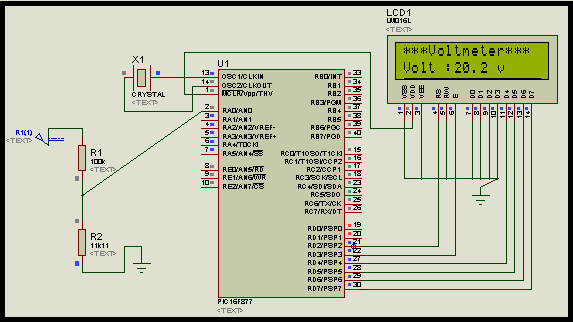
Now here we can use maximum reference voltage 5 Volt beyond that voltage PIC cannot tolerate. Now if we give max 5v as reference then how can we measure 50v? We cannot give 50v at input pin of in build ADC for measure 50 v DC. So we have to reduce the voltage with proportionate with reference voltage 5v. For that reason here we introduce Voltage divider circuit with taking R1 = 100k and R2 = 11.11k. Now for selecting R1 and R2 we use voltage divider formula I,e
Vout = (R2/R1+R2) * Vin .
So using above formula let see what happen if we want to measure 50v
Vout = (11.11/100+11.11)*50
= 5v
So we can easily measure maximum 50 v DC. See the circuit diagram for proteus simulation.
For more detail: Digital Voltmeter (0-50v) using PIC Microcontroller
Quick Solutions to Questions related to Digital Voltmeter:
- What components are required to build this digital voltmeter?
The project requires a PIC16F877, an LM106L LCD, and resistors of 100k and 11.11k. - How does the PIC16F877 handle the input voltage measurement?
It uses its internal 10-bit ADC to capture the input, processes it, and displays the equivalent voltage on the LCD. - Why is a voltage divider circuit necessary in this design?
A voltage divider is needed to reduce high input voltages, such as 50V, down to a maximum of 5V which the PIC cannot tolerate beyond. - What formula is used to convert the 10-bit ADC value to an integer?
The conversion formula is Value = value * (reference millivolt / 1024-1), which simplifies to multiplying by 4.89 for a 5V reference. - How do the selected resistor values allow measuring up to 50V?
Using R1=100k and R2=11.11k in the voltage divider formula results in exactly 5V output when 50V is applied at the input. - Can the built-in ADC accept more than 5 volts directly?
No, the PIC cannot tolerate a voltage beyond 5V at the input pin of the built-in ADC. - Where is the LCD connected in the circuit?
The LCD is attached with Port D of the microcontroller.
Related projects
PIC16F877 Driving LCD in 4-Bit Mode using PIC16F877 with Proteus Simulation
Introduction This microcontroller project shows how a PIC16F877 can drive an LCD display using 4-bit mode inside a Proteus simulation.The project demonstrates...
Programmers & ICSP · PIC16F877AEPE PIC/LCD Demo using PIC16F877 with Proteus Simulation
IntroductionThe EPE PIC/LCD Demo is a classic microcontroller project that demonstrates how a PIC16F877 can fully control a PG12864F graphical LCD.Designed as...
Motors & Robotics · PIC16F877AEfficient Sun-Following Robot: A Solar Tracker with Microcontroller Control
Abstract The impending global challenge of dwindling non-renewable fuel resources underscores the urgency of transitioning towards renewable energy alternatives like solar power....
Meters & Test Instruments · PIC16F688Determine capacitance by measuring the charging time using PIC16F688
When TEST botton is pressed, RA3 pin is set to "1". R2 and R3 are divide the voltage to 1/2 Vra3 which...
Meters & Test InstrumentsFrequency Meter Using Microcontroller
This tutorial simply states how to calculate frequency of a pulse source using a microcontroller. Story https://youtu.be/NAoj-HLRIro This tutorial simply states how...
Meters & Test Instruments · PIC16F84ADigital thermometer with PIC16F84 circuit
This electronic project is a very simple thermometer that is based on the PIC16F84A microcontroller, designed by Microchip. Why to use a...

Ibrar Ayyub
I am an experienced technical writer holding a Master's degree in computer science from BZU Multan, Pakistan University. With a background spanning various industries, particularly in home automation and engineering, I have honed my skills in crafting clear and concise content. Proficient in leveraging infographics and diagrams, I strive to simplify complex concepts for readers. My strength lies in thorough...