


Summary of PIC12F675 Tutorial 7: A Servo controller driving a standard servo motor using serial port command
This article describes a servo controller project using a PIC12F675 microcontroller to manage standard servo motors via serial commands. The system utilizes interrupts for precise pulse timing, allowing simultaneous monitoring of serial input and generation of servo signals. Users can control the servo position by typing text commands into a serial terminal, with the software limiting pulse widths between 1.0ms and 2.0ms.Parts used in the Servo Controller:
- PIC12F675 microcontroller
- Futaba servo motor (or any standard servo)
- Solderless breadboard
- Serial port connector
- MAX232 transceiver
- 1k resistor
The project software works slightly differently to the previous one as interrupts are used for pulse timing - this lets it both service the serial port input and generate the correctly timed servo pulse.
| Serial command | Pulse width | Servo motor position |
| s100<Return key> | 1.0ms | +45° (clockwise rotation) |
| s150<Return key> | 1.5ms | zero position |
| s200<Return key> | 2.0ms | -45° (anti clockwise) |
Note: The software limits the maximum values to 1.0ms and 2.0ms but you can change this in the software if you need to.
Solderless breadboard
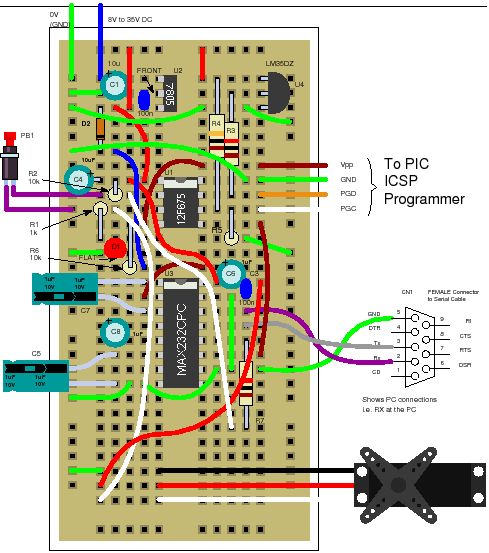
The project uses the same solderless breadboard as before but adds in a link from the serial port connector to the MAX232 transceiver (for receiving serial data) and a 1k resistor.
Circuit diagram
The servo controller only needs a single control line from the 12F675 and a serial input line from the PC serial port to send commands to the circuit.
Again the timing source is provided by the internal 4MHz clock .
ServoController Software operation
Accurate timed pulses are generated using Timer 1 interrupts. For this project Timer 1 is enabled after Timer 0 triggers.When Timer 0 triggers it enables the Timer 1 interrupt and just before this sets the Timer 1 overflow so that the Timer 1 interrupt will occur at an exact time from the triggering of Timer 0.
Also when Timer 0 triggers the servo pin is set high and when Timer 1 triggers the servo pin is set low. In this way an exact output pulse is generated to control the servo motor.
Note: This project does nothing until you type in commands - it does continuously generate the servo position signal but this is only changed from the zero position when a new command is accepted.
Servo Controller : Timer 0
The settings for Timer 0 are exactly the same as those used in Tutorial 6.
Servo Controller : Multitasking
The most interesting part of the servo controller software is that it is doing two things at once - it uses a simple multitasking method that is suitable for use in a memory constrained device e.g. 12F675.
The software services two processes at once:
- Serial port input monitoring.
- Servo motor output.
For more general information on multitasking click here.
As this is not a true multitasking system in which portions of time are allocated to each process you need to carefully decide what the highest priority tasks and lowest priority tasks are before coding starts.
Quick Solutions to Questions related to Servo Controller:
- How is the servo position controlled?
You type a text command into a serial terminal like Hyperterminal to set the position. - What hardware components are required for the circuit?
The project uses a solderless breadboard, a serial port connector, a MAX232 transceiver, and a 1k resistor. - Does the system generate continuous servo signals?
No, the project does nothing until you type in commands, though it maintains a zero position signal. - What clock source provides the timing?
The internal 4MHz clock serves as the timing source for the circuit. - Can the maximum pulse width values be changed?
Yes, the software limits values to 1.0ms and 2.0ms, but these limits can be changed in the software. - How does the software handle multitasking?
It services two processes at once: serial port input monitoring and servo motor output. - Which timer generates the 20ms repeat rate?
Timer 0 interrupt is used to generate the 20ms repeat rate for the servo controller. - How are accurate timed pulses generated?
Accurate pulses are generated using Timer 1 interrupts which are enabled when Timer 0 triggers. - What happens when Timer 0 triggers?
When Timer 0 triggers, it enables the Timer 1 interrupt and sets the servo pin high. - What occurs when Timer 1 triggers?
When Timer 1 triggers, the servo pin is set low to complete the exact output pulse.
Related projects
PIC 12F675 Programmable 12V Battery Monitor
Being an active outdoor guy, I have a few different types of 12V lights and a variety of battery types. - For...
Audio, Sound & Radio · PIC12F675Audio CRO using PIC12F675 Microcontroller
This project is a miniature Audio CRO. For those not familiar with the abbreviation "CRO," it means "Cathode Ray Oscilloscope" and this...
Development Boards & Kits · PIC12F675DIY $1 PIC 12f675 JDM Programmer (Cheap and Easy)
Hi EveryBody i am Again Doing something. and it is with PIC's! Almost Everybody do not want a Big Arduino in their...
Motors & RoboticsReal-Time CAN-Based Vehicle Monitoring System with PIC MCU
INTRODUCTION The Controller Area Network (CAN) is a robust vehicle communication bus standard that was primarily developed for automobile applications but has...
Motors & RoboticsEasy Way to Learn Robotics Using Microcontrollers: A Beginner’s Guide
The title, "Easy Way to Learn Robotics Using Microcontrollers," promises an accessible entry point for those curious about the exciting world of...
Motors & Robotics · PIC16F877AEfficient Sun-Following Robot: A Solar Tracker with Microcontroller Control
Abstract The impending global challenge of dwindling non-renewable fuel resources underscores the urgency of transitioning towards renewable energy alternatives like solar power....

Ibrar Ayyub
I am an experienced technical writer holding a Master's degree in computer science from BZU Multan, Pakistan University. With a background spanning various industries, particularly in home automation and engineering, I have honed my skills in crafting clear and concise content. Proficient in leveraging infographics and diagrams, I strive to simplify complex concepts for readers. My strength lies in thorough...