
Summary of How to Send E-mail using PIC Microcontroller and ESP8266
This tutorial demonstrates sending emails from a PIC16F877A microcontroller using an ESP8266 WiFi module via AT commands. It covers hardware setup, including an optional LCD for debugging, and software implementation using MPLABX and XC8. The process involves configuring the ESP8266 to connect to a network, establishing a TCP connection with SMTP2GO, and transmitting email details like sender, recipient, subject, and body.
Parts used in the PIC Microcontroller Email Sender:
- PIC16F877A IC
- ESP8266-01 Module
- LCD display (optional)
- MPLABX IDE
- XC8 compiler
- Breadboard
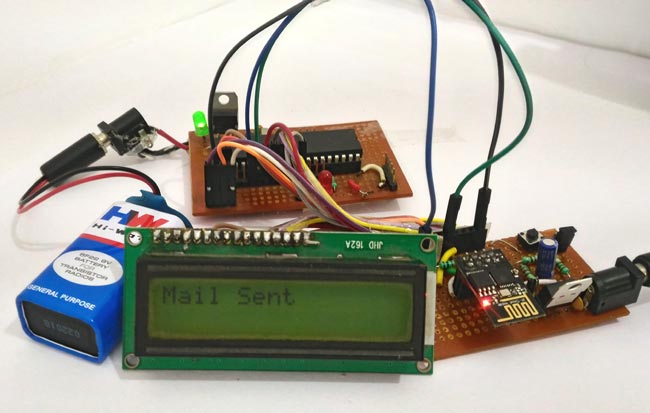
In this tutorial let us learn how to send E-mails from PIC Microcontroller using famous WiFi module the ESP8266. This tutorial uses PIC16F877A IC and MPLABX and XC8 compiler for programming.
At the end of this tutorial you will be able to send E-mail from any normal E-mail ID like Gmail, yahoo etc to any other E-mail ID. Hence this tutorial assumes that you have some basic knowledge on ESP8266-01 Modules and PIC Microcontrollers. If not, the following tutorials will help you
Getting your Hardware Ready:
The complete schematic of the project is shown below.
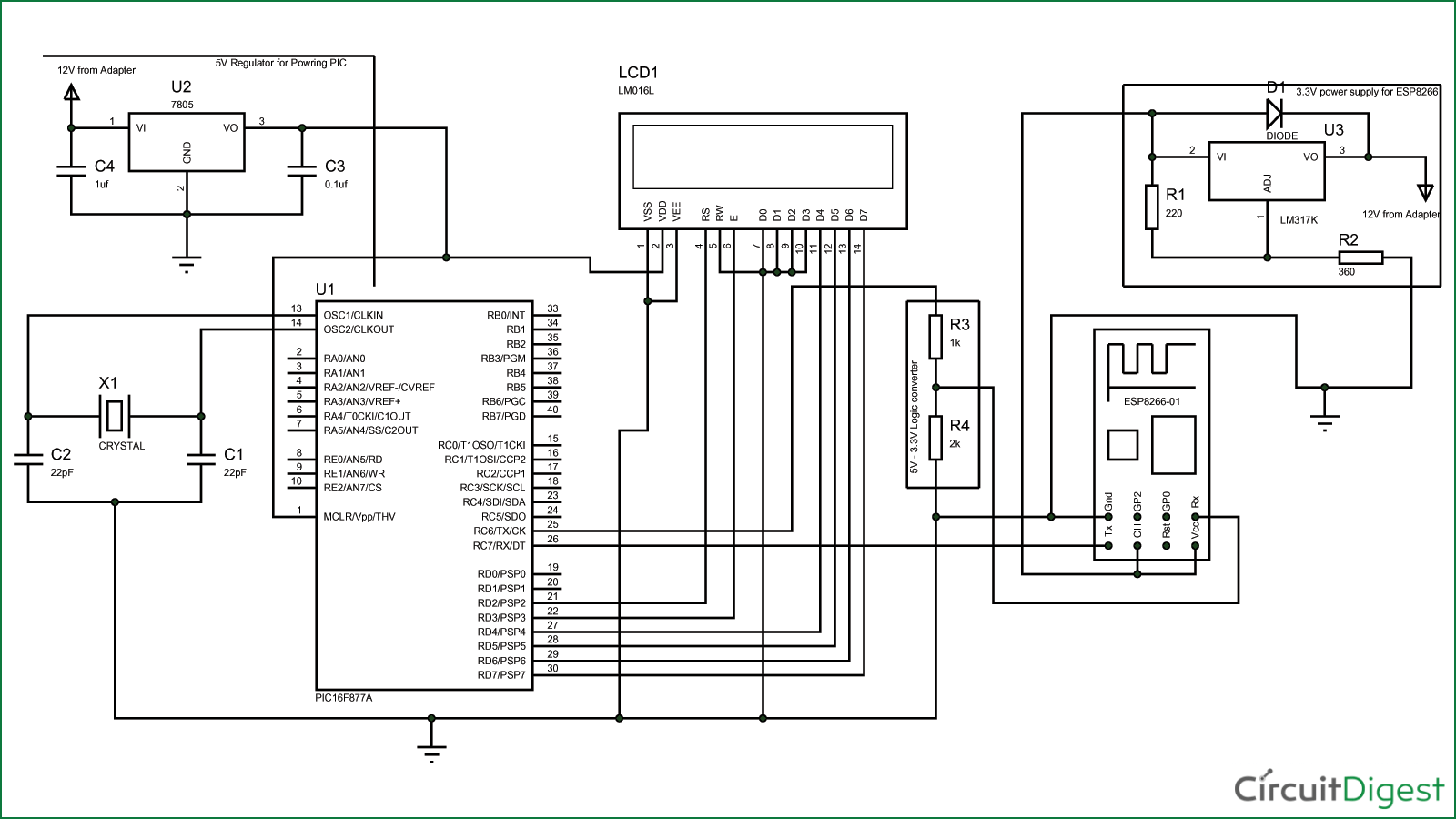
The LCD display is used here for debugging purpose. It is not mandatory for you to connect this. The program will work fine even without the LCD display. If you want to know more about the schematics you visit this tutorial. (Interfacing PIC with ESP).
You can simply assemble this circuit on a breadboard and then proceed with the programming.
Programming your PIC to send E-mail:
In order to send an E-mail from the ESP8266 a sequence of AT commands has to be sent to the ESP module. The following steps have to be followed to send an E-mail from ESP8266.
- Set the module in AP+STA (Access Point and station) mode
- Connect to an Access point to get internet connection
- Enable multiple connections
- Start a server on any specific port
- Establish a TCP connection with SMPT2GO website
- Navigate to the Login section of the website
- Enter the E-mail ID and Password in base64 format
- Enter From mail ID
- Enter To mail ID
- Enter the Subject of the mail
- Enter the body of the mail
- Indicate the end of mail
- Send the mail
- Quit the TCP connection
It is a bit lengthy and tedious process but do not worry. I have simplified the process by creating a header file and you can use it directly by just calling some functions (explained below) which makes this task very easy. The complete code along with the header file can be downloaded from here.
Note: If you are using the code in a new project make sure you download the header file and add it in your project.
I have explained some important parts of the code below, the other parts are self explanatory. But if you have any doubts feel free to use the comment section.
for more detail:How to Send E-mail using PIC Microcontroller and ESP8266
- How do I send emails from a PIC microcontroller?
You can send emails by connecting an ESP8266 module to the PIC and executing a sequence of AT commands to interact with the SMTP2GO server. - Can I use Gmail or Yahoo for this project?
Yes, the tutorial states you can send emails from any normal email ID like Gmail or Yahoo to another email ID. - What programming tools are required for this project?
The project requires the MPLABX IDE and the XC8 compiler for programming the PIC16F877A IC. - Is an LCD display mandatory for the circuit?
No, the LCD is used only for debugging and is not mandatory; the program will work fine without it. - What mode should the ESP8266 be set to?
The module must be set in AP+STA mode, which stands for Access Point and station mode. - How are the email credentials transmitted?
The email ID and password must be entered in base64 format during the login section navigation. - Does the code require a header file?
Yes, a simplified header file is provided that allows users to call specific functions instead of writing lengthy AT command sequences manually. - Which website is used to send the mail?
The tutorial specifies establishing a TCP connection with the SMPT2GO website to send the email.
