


Summary of PICBASIC PRO EXAMPLE PIC16F877 BUTTON KEYPAD APPLICATION
This article describes a PIC16F877 microcontroller project using a 4×4 keypad and LCD. Pressing keys displays numbers on the screen. Button 1 lights LED D8, while button 9 triggers eight flashing LEDs sequentially up to LED 16. The project includes Proteus simulation and PicBasic Pro source code available for download.Parts used in the PIC16F877 Button Keypad Application:
- PIC16F877 Microcontroller
- 4 × 4 Keypad (16 buttons)
- LCD Screen
- LED D8
- Eight additional LEDs (LEDs 9 through 16)
- Proteus Simulation Software
- PicBasic Pro Compiler
Prepared by: @H.KORATEŞ – based on PIC16F877 microcontroller circuit section 4 × 4 keypad consists of 16 buttons LCD screen when pressing the button number button appears. In addition, the number 1 button is pressed, the LED D8 as... Electronics Projects, Picbasic Pro Example PIC16F877 Button Keypad application "microchip projects, microcontroller projects, pic16f877 projects, picbasic pro examples,
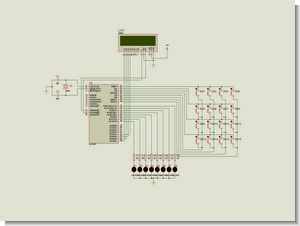
Prepared by: @H.KORATEŞ – based on PIC16F877 microcontroller circuit section 4 × 4 keypad consists of 16 buttons LCD screen when pressing the button number button appears. In addition, the number 1 button is pressed, the LED D8 as number 8 in each press with eight LEDs lit when pressing button after button 9 .16 respectively Flashing LEDs
BUTTON KEYPAD CIRCUIT PROTEUS SIMULATION
Picbasic Pro Example PIC16F877 Button Keypad application schematic picbasic source code files
FILE DOWNLOAD LINK LIST (in TXT format): LINKS-8509.zip
Source: PICBASIC PRO EXAMPLE PIC16F877 BUTTON KEYPAD APPLICATION
Quick Solutions to Questions related to PIC16F877 Button Keypad Application:
-
What happens when a number button is pressed?
The pressed number appears on the LCD screen. -
Which LED lights up when button 1 is pressed?
LED D8 lights up. -
How do the LEDs behave after pressing button 9?
Eight LEDs flash sequentially starting from number 9 up to number 16. -
What microcontroller is used in this circuit?
The PIC16F877 microcontroller is used. -
Does the project include a simulation file?
Yes, a Proteus simulation is included. -
Can I download the source code files?
Yes, PicBasic Pro source code files are available via a download link. -
How many buttons does the keypad have?
The keypad consists of 16 buttons arranged in a 4 × 4 configuration. -
Who prepared this project?
The project was prepared by @H.KORATEŞ.
Related projects
PIC16F877 Driving LCD in 4-Bit Mode using PIC16F877 with Proteus Simulation
Introduction This microcontroller project shows how a PIC16F877 can drive an LCD display using 4-bit mode inside a Proteus simulation.The project demonstrates...
Programmers & ICSP · PIC16F877AEPE PIC/LCD Demo using PIC16F877 with Proteus Simulation
IntroductionThe EPE PIC/LCD Demo is a classic microcontroller project that demonstrates how a PIC16F877 can fully control a PG12864F graphical LCD.Designed as...
Motors & Robotics · PIC16F877AEfficient Sun-Following Robot: A Solar Tracker with Microcontroller Control
Abstract The impending global challenge of dwindling non-renewable fuel resources underscores the urgency of transitioning towards renewable energy alternatives like solar power....
IDEs & CompilersDownload Legacy MPLAB IDE 8 from Microchip
The original MPLAB® IDE 8 series is still relevant when maintaining older PIC® and dsPIC® projects that were created before MPLAB X...
IDEs & CompilersHow to Download MPLAB X IDE Safely
MPLAB® X IDE is used for developing, building, debugging and programming embedded applications across several Microchip device families. For an active firmware...
IDEs & CompilersDownload MPLAB IDE v8.92 from Microchip
MPLAB® IDE v8.92 belongs to the final generation of the original MPLAB IDE 8 development environment. It still appears in older PIC®...

Muhammad Bilal
I am a highly skilled and motivated individual with a Master's degree in Computer Science. I have extensive experience in technical writing and a deep understanding of SEO practices.