
Summary of Interfacing Proteus with Matlab
This article explains how to interface Proteus with MATLAB to overcome sensor limitations in Proteus by using MATLAB blocks as input/output devices. The process requires Virtual Serial Ports Emulator software to create and pair virtual COM ports for serial communication. Additionally, the MikroC Pro for PIC compiler is used to generate the necessary hex file from C code for UART-based microcontroller simulation.
Parts used in the Interfacing Proteus with Matlab project:
- Proteus simulation software
- MATLAB software
- Virtual Serial Ports Emulator
- MikroC Pro for PIC compiler
- C program source code
- Hex file generated from C code
- UART port connection
It is very important topic that how Interfacing Proteus with Matlab is done? And it is obious that after interfacing Proteus with matlab lots of way is open for simulating microcontroller based project. We know that in Proteus there has lack of sensor soif we done Interfacing Proteus with Matlab then we can easily introduce all blocks of matlab as a input or output device for microcontroller.
Now question is how we shall do Interfacing Proteus with Matlab ?
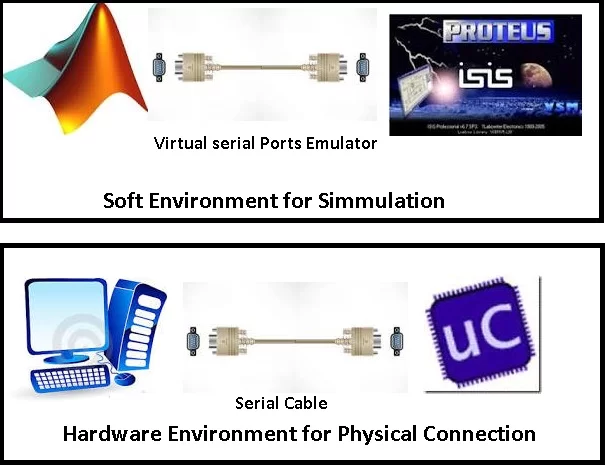
For Interfacing Proteus with Matlab we need support additional software (Virtual serial Ports Emulator) for making virtual com port and making pairing between the ports which are used to Interfacing Proteus with Matlab. So it is now clear that we can connect matlab with Proteus by serial Port. In bellow block diagram shows how it possible.
Code for MiKro C Pro : To run the project we need the hex file. And here I used Mikro c pro for Pic to write the c program and making the hex file. In bellow see the C code for Interfacing Proteus with Matlab by UART port
For more detail: Interfacing Proteus with Matlab
- Why should I interface Proteus with MATLAB?
It allows users to introduce all MATLAB blocks as input or output devices for a microcontroller to compensate for the lack of sensors in Proteus. - How do we connect MATLAB with Proteus?
We connect them via a serial port using additional software to make virtual COM ports. - What additional software is needed for this interfacing?
You need Virtual Serial Ports Emulator to make virtual com ports and pair them between Proteus and MATLAB. - Which compiler is used to write the C program?
The article states that Mikro c pro for Pic is used to write the C program. - What type of file is required to run the project?
A hex file is needed to run the project on the microcontroller. - How is the hex file created?
The hex file is made by writing a C program in Mikro c pro for Pic. - Through which port does the communication happen?
The communication happens through the UART port. - Does Proteus have many built-in sensors?
No, there is a lack of sensors in Proteus which necessitates using MATLAB blocks.

