
Summary of The Trickster – USB Computer Prank using PIC18F14K50
The Trickster is a harmless USB prank device that randomly moves the mouse cursor on any operating system, mimicking a virus or remote control. It can be purchased pre-programmed or built using specific tools. The project utilizes the PIC18F14K50 microcontroller and supports firmware updates for various applications like USB-to-Serial conversion once the prank is over.
Parts used in the The Trickster - USB Computer Prank:
- Soldering Iron
- Solder (Leaded recommended)
- Dikes (Diagonal Cutters)
- PIC Programmer (e.g., PICKIT3)
- PIC18F14K50 Microcontroller
- USB Jack
- Breadboard or Protoboard
The Trickster – USB Computer Prank
Plug The Trickster into your victim’s computer, and it will randomly move their mouse while playing a game or using the desktop.
Compatible with all operating systems
Harmless fun: Acts as a second mouse, and goes away when you remove The Trickster from their computer
Trickster
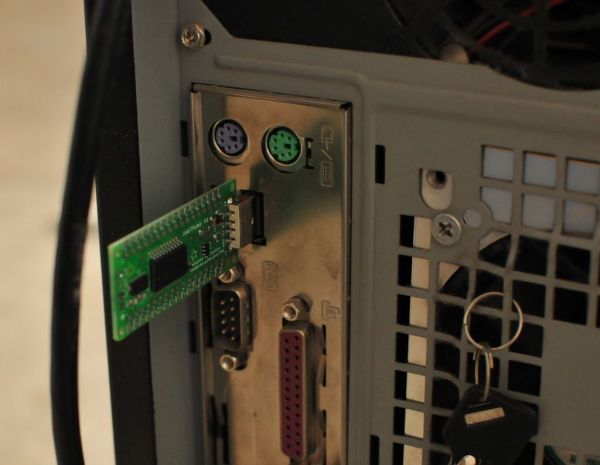
Even if your victim is computer literate he will suspect a virus or remote control software at first. Please observe and stop him before he reformats the entire hard drive.
Another tip – if you really want to conceal the device, the best way to do it is to solder a 4-pin header instead of the supplied USB plug, then plug the device directly into the USB socket on the motherboard inside the computer case. However, be warned that this last step may result in the entire computer being thrown away out of the window.
Trickster is firmware updatable, so once you have had fun with it you can re-purpose it as USB-to-Serial Converter, Propeller Programmer, USB IMU, or one of many other applications running on the UsbThumb platform.
Make It: Tools
The Trickster is available pre-programmed right here. If you pick it up that way, you’ll just need a soldering iron and a bit of solder to add the included USB Jack and you’re ready to go.
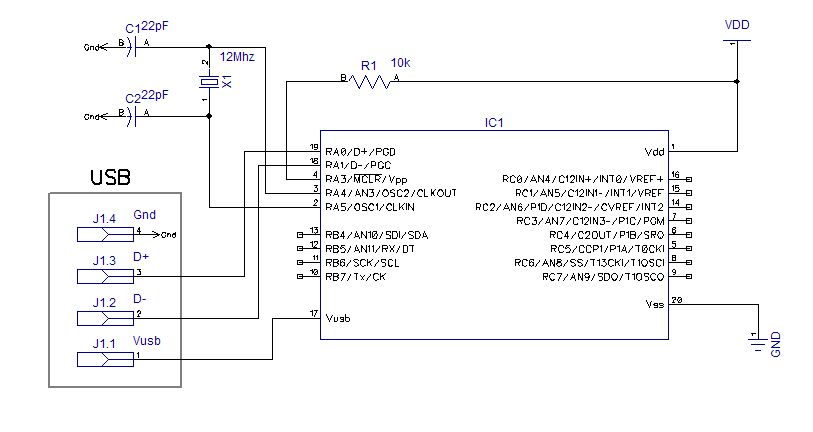
Otherwise, to make The Trickster on a breadboard or protoboard, you’ll need:
1 – Soldering Iron and solder. Leaded solder is easier to work with, and a 15-40 watt iron is just fine. A conical or chisel tip works well.
2 – Dikes. Diagonal cutters are used to trim the excess leads from components after soldering them down.
3 – A PIC programmer. The PICKIT3 works well, you can pick it up from Mouser.
For more detail: The Trickster – USB Computer Prank using PIC18F14K50
- What does The Trickster do?
It plugs into a computer and randomly moves the mouse while the victim plays games or uses the desktop. - Can I use this device on all operating systems?
Yes, it is compatible with all operating systems. - How can I conceal The Trickster inside a computer case?
You can solder a 4-pin header instead of the supplied USB plug and plug it directly into the motherboard socket. - What should I watch out for if the victim suspects a virus?
You must observe them and stop them before they reformat their hard drive. - What tools are needed to build The Trickster from scratch?
You need a soldering iron, solder, Dikes, a PIC programmer, and a breadboard or protoboard. - Is The Trickster firmware updatable?
Yes, you can update it to function as a USB-to-Serial Converter, Propeller Programmer, or USB IMU. - What type of tip works well for the soldering iron?
A conical or chisel tip works well for this project. - What wattage is sufficient for the soldering iron?
A 15-40 watt iron is just fine for making the device.
