


Summary of PICJazz 20PIN Learning and Development Board
The PICJazz 20PIN board by ermicro is a standalone microcontroller module designed for learning and developing with Microchip PIC families like the PIC16F690 and PIC18F14K50. It supports embedded control, robotics, and data logging applications. The board features nanoWatt technology, various peripherals including ADC and PWM channels, onboard LEDs, a reset button, a user switch, and an analog trimmer potentiometer. It includes RS232 conversion for PC communication and is compatible with MPLAB IDE and PICAXE editors.Parts used in the PICJazz 20PIN:
- PIC16F690 or PIC18F14K50 microcontroller
- Four 3mm blue LED
- Reset Button
- User switch (S2)
- Trimmer potentiometer (trimport/VR)
- RS232 Level converter
- Microchip ICSP Port
- Battery power source
The PICJazz 20PIN board from ermicro is designed to be used both as the Microchip PIC microcontroller learning and development board. The PICJazz 20PIN board is stand alone microcontroller module equipped with the latest 8-bit class Microchip midrange and high performance such as PIC16F690 or PIC18F14K50 microcontroller that could be used for wide range of applications including embedded controller, remote data logger, robotics and much more.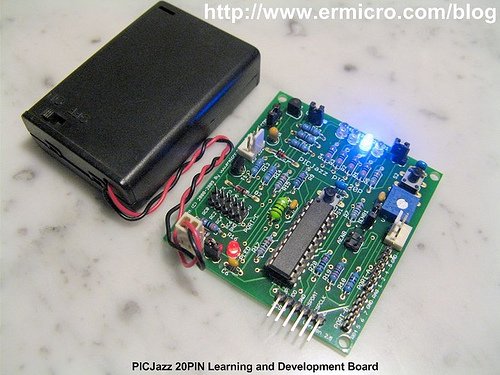
The PICJazz 20PIN board features:
- High performance nanoWatt technology Microchip PIC16F690 microcontroller with 4K word Self-Programmable Flash, 256 bytes EEPROM and 256 bytes Internal SRAM. Peripherals include: one 8 bit and one 16 Bit Timers/Counter, four PWM channels, 12 channels 10 bit ADC, USART, Master/Slave SPI and I2C
- Could be used with other 8,14 and 20 Pin 8-bit Microchip PIC microcontroller families such as PIC12F683, PIC16F684, PIC16F677, PIC18F14K22 and PIC18F14K50 (USB)
- Designed to be used as the PICAXE microcontroller development platform such as PICAXE 8M, 14M, 20M and 20×2 families
- Four 3mm blue LED attached to the PORTC
- Reset Button
- One configurable port digital user switch
- One configurable port user trimmer potentiometer (trimport) for analog input
- High speed instruction throughput using internal 8 MHz (PIC16F690) and 16MHz (PIC18F14K50) oscillator
- RS232 Level converter for communicating with other equipment such as PC
- Separate RS232 port to download the program using PICAXE Programming Editor from Education Revolution Ltd
- Fully supported by Microchip MPLAB IDE v8.x, Microchip C18, HI-TECH C PRO PIC10/12/16 MCU Families and HI-TECH PIC18 compiler
- Standard Microchip ICSP Port to re-programmed the PICJazz 20PIN board using Microchip PICkit2 programmer
- Example project using PICJazz 20PIN board could be found on http://www.ermicro.com/blog
- The PICJazz 20PIN board demo program source code is include in the CDROM; this program demonstrate the capability of the PICJazz 20PIN board such as accessing the RS232 port, using the user switch, using the user analog input (trimport) and running the four 3mm blue LED.

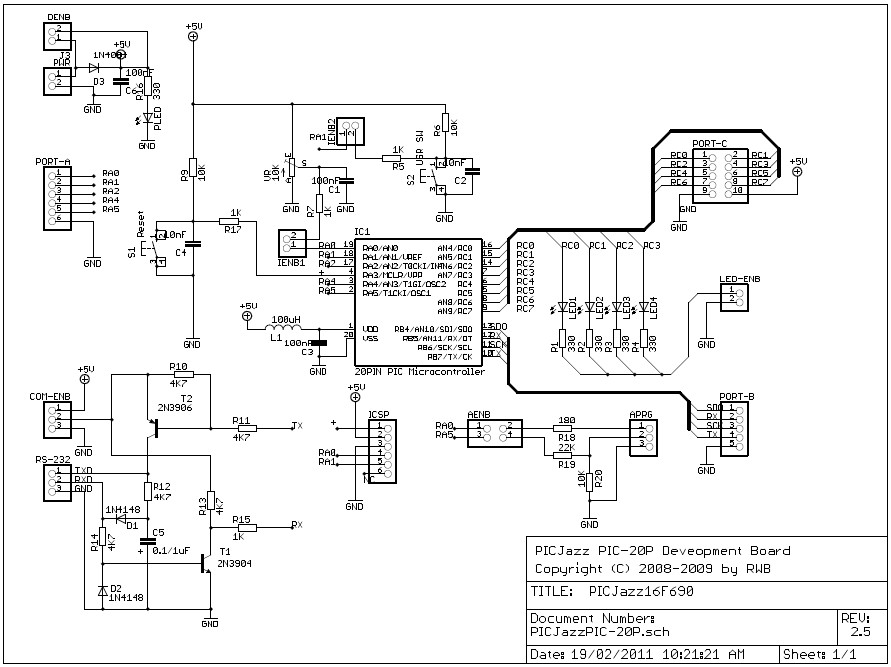
Running the PICJazz 20PIN demonstration program
The PICJazz 20PIN Board comes preprogrammed with a demonstration program (PICJazz16F690Demo.c). To use this program, connect the PICJazz 20PIN to the battery power that comes with the board. The demo program will display the chasing light on the four blue LED (mode 0). Rotate the user trimport, labeled VR, and the chasing LED speed will change in different rate. Press the user switch, labeled S2, and now the board will blink all the LED (mode 1). Press this user switch once again will bring you to the number guessing game through the RS232 port (mode 2).
For more detail: PICJazz 20PIN Learning and Development Board
- What microcontrollers can be used with the PICJazz 20PIN board?
The board supports 8-bit Microchip midrange and high-performance microcontrollers such as the PIC16F690, PIC18F14K50, PIC12F683, PIC16F684, PIC16F677, and PIC18F14K22. - Can the PICJazz 20PIN be used with PICAXE development platforms?
Yes, it is designed to be used as a PICAXE microcontroller development platform for families like PICAXE 8M, 14M, 20M, and 20×2. - How do I change the speed of the chasing light on the demonstration program?
You must rotate the user trimport labeled VR to change the chasing LED speed to different rates. - Does the board include hardware for communicating with a PC?
Yes, it features an RS232 Level converter for communicating with other equipment such as a PC and a separate RS232 port for downloading programs. - Which integrated development environments are supported by the board?
The board is fully supported by Microchip MPLAB IDE v8.x, Microchip C18, HI-TECH C PRO PIC10/12/16 MCU Families, and HI-TECH PIC18 compiler. - How can I reprogram the PICJazz 20PIN board using standard Microchip tools?
You can use the Standard Microchip ICSP Port to re-program the board using a Microchip PICkit2 programmer. - What happens when you press the user switch labeled S2 once during the demo?
Pressing the user switch labeled S2 once causes the board to blink all the LEDs in mode 1. - Where can I find example projects for the PICJazz 20PIN board?
Example projects can be found on the website http://www.ermicro.com/blog.
Related projects
Automotive Voltage Monitor using PIC12F683
Description Recently I got a new motorbike and on my second trip out, with only 50 miles on the clock the rectifier/regulator...
Sensors & Temperature · PIC16F690Air Sampler using PIC16F690 microcontroller
Do you ever wonder what is in the air you breathe? Or maybe you have hay fever and want to know what...
Communication & Interfacing · PIC12F683EnvStick USB Temperature Sensor using PIC12F683
The EnvStick is cheap, homemade temperature sensor that plugs into a USB port. It provides a simple way to collect a room’s...
Development Boards & Kits · PIC18F4520Voltage Measurement with A PIC Microcontroller
Voltage Measurement with PIC Microcontroller articulates a methodical framework for facilitating analog voltage measurement using the PIC18F4520, an advanced member of Microchip’s...
Development Boards & KitsUltra-Low Power: Microcontroller Standby Current to 130uA with OPEnS Power Control Board
At the OPEnS Lab, a key focus for our projects is achieving exceptionally long battery life. This was particularly true for the...
Development Boards & KitsAn Integrated Approach to Developing Applications with Microchip PIC Microcontrollers
1. Introduction In our daily lives, a variety of devices such as telephones, household appliances, and cars incorporate "smart" electronics, typically manifested...

Ibrar Ayyub
I am an experienced technical writer holding a Master's degree in computer science from BZU Multan, Pakistan University. With a background spanning various industries, particularly in home automation and engineering, I have honed my skills in crafting clear and concise content. Proficient in leveraging infographics and diagrams, I strive to simplify complex concepts for readers. My strength lies in thorough...