
Summary of PIC12F675 based simple calculator ( Code + Proteus simulation )
This article details a single-digit calculator project using the PIC12F675 microcontroller, implemented in C with MPLAB and HI-TECH C. It supports addition, subtraction, multiplication, and division via a keypad and displays results on an LCD. The system includes error handling for invalid inputs and features an ON/C reset button. Proteus simulation demonstrates functionality, such as calculating 2+2=4.
Parts used in the PIC12F675 Calculator:
- PIC12F675 microcontroller
- Keypad
- LCD display
- MPLAB v8.85 software
- HI-TECH C v9.83 compiler
- Proteus v7.10 simulation environment
This post provides a simple calculator project implementation for PIC12F675 microcontroller. This is a simple one digit[1] calculator which implements only 4 functions addition(+), subtraction(-), multiplication(x) and division(/). The code for PIC12F675 is written in C language using MPLAB with HI-TECH C compiler. You can download this code from the ‘Downloads‘ section at the bottom of this page.
In this post, it is assumed that you know,
- How to interface keypad with PIC12F675 microcontroller. If you don’t then please read this page.
- How to interface LCD with PIC12F675 microcontroller. If you don’t then please read this page.
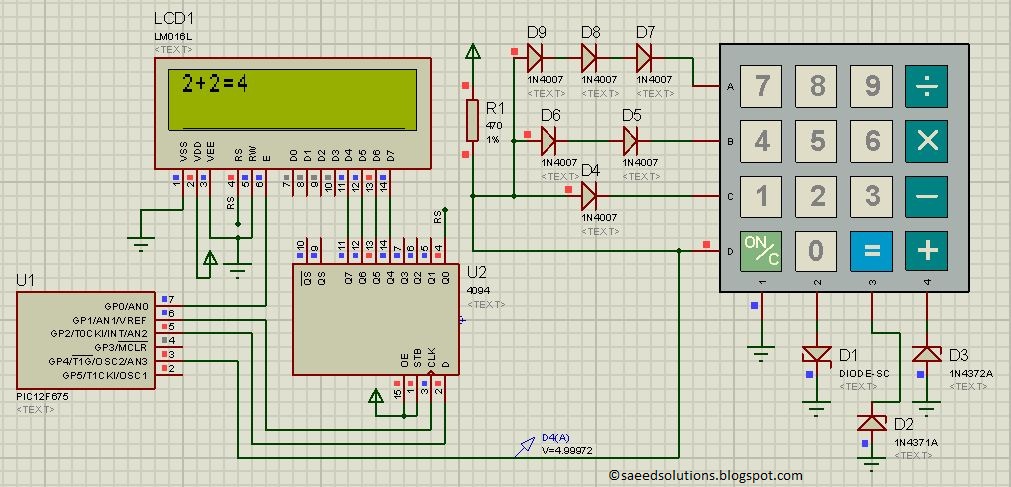
The result of the Proteus simulation is shown below.
In the above figure, we can see that a result of “2+2=4” is shown on the screen. To achieve this result, first press ‘2’ from the keypad. Then press ‘+’ and then press ‘2’ again. After that, on pressing ‘=’ from the keypad the result ‘4’ is automatically displayed on the screen.
Features of this calculator
- You can give any single digit input from 0 to 9.
- You can press ‘ON/C‘ button at any time to reset the calculator.
- 4 functions are implemented i-e addition, subtraction, multiplication and division.
- Error messages are displayed if wrong input is detected. For example, if calculator is expecting a number, but a function key is pressed then ‘Wrong Input‘ message is displayed. Similarly, ‘Wrong Function‘ message is displayed if wrong key is pressed instead of a function key.
Main function code
The code for the main function is shown below.
Downloads
The calculator code for PIC12F675 was compiled in MPLAB v8.85 with HI-TECH C v9.83 compiler and simulation was made in Proteus v7.10. To download code and Proteus simulation click here.
For more detail: PIC12F675 based simple calculator ( Code + Proteus simulation )
- What functions does this calculator implement?
The calculator implements four functions: addition, subtraction, multiplication, and division. - How do you reset the calculator?
You can press the 'ON/C' button at any time to reset the calculator. - Can you input numbers greater than 9?
No, you can only give any single digit input from 0 to 9. - Does the code use assembly language?
No, the code is written in C language using MPLAB with HI-TECH C compiler. - What happens if you press a function key when a number is expected?
An error message saying 'Wrong Input' is displayed. - Which software was used for the Proteus simulation?
Proteus v7.10 was used for the simulation. - What happens if you press the wrong key instead of a function key?
A 'Wrong Function' message is displayed.
