
Summary of PIC16F84A based simple calculator (Code+Proteus simulation)
This article details a single-digit calculator project for the PIC16F84A microcontroller, implemented in C using MPLAB and HI-TECH. It features four arithmetic operations (addition, subtraction, multiplication, division) and includes error handling for invalid inputs. The system utilizes a keypad for input and an LCD for display, with simulation verified via Proteus.
Parts used in thePIC16F84A Calculator:
- PIC16F84A microcontroller
- Keypad
- LCD
- MPLAB software
- HI-TECH C compiler
- Proteus simulation software
This post provides a simple calculator implementation for PIC16F84A microcontroller. This is a simple one digit[1] calculator which implements only 4 functions addition(+), subtraction(-), multiplication(x) and division(/). The code for PIC16F84A is written in C language using MPLAB with HI-TECH C compiler. You can download this code from the ‘Downloads‘ section at the bottom of this page.
In this post, it is assumed that you know,
- How to interface keypad with PIC16F84A microcontroller. If you don’t then please read this page.
- How to interface LCD with PIC16F84A microcontroller using only 3 pins. If you don’t then please read this page.
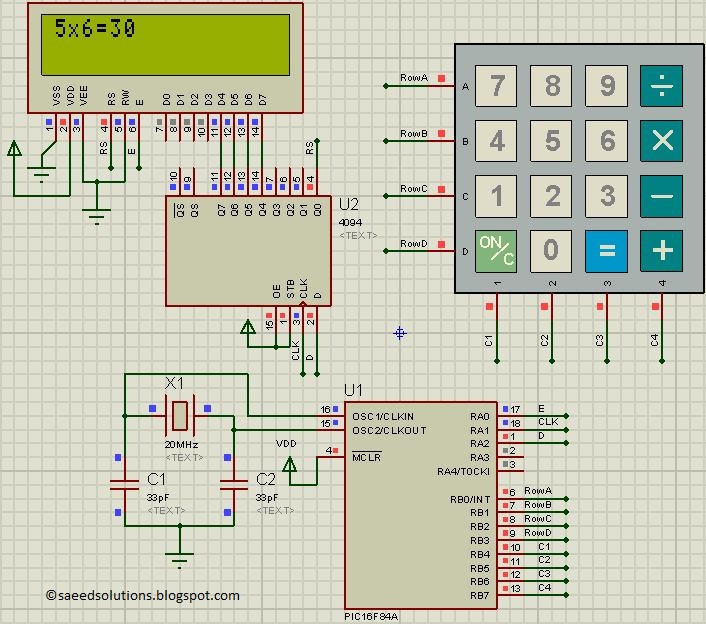
The result of the Proteus simulation is shown below.
In the above figure, we can see that a result of “5×6=30” is shown on the screen. To achieve this result, first press ‘5’ from the keypad. Then press ‘x’ and then press ‘6’ again. After that, on pressing ‘=’ from the keypad the result ’30’ is automatically displayed on the screen.
Features of this calculator
- You can give any single digit input from 0 to 9.
- You can press ‘ON/C‘ button at any time to reset the calculator.
- 4 functions are implemented i-e addition, subtraction, multiplication and division.
- Error messages are displayed if wrong input is detected. For example, if calculator is expecting a number, but a function key is pressed then ‘Wrong Input‘ message is displayed. Similarly, ‘Wrong Function‘ message is displayed if wrong key is pressed instead of a function key.
Main function code
The code for the main function is shown below.

Downloads
The calculator code for PIC16F84A was compiled in MPLAB v8.85 with HI-TECH C v9.83 compiler and simulation was made in Proteus v7.10. To download code and Proteus simulation click here.
For more detail: PIC16F84A based simple calculator (Code+Proteus simulation)
- What functions does this calculator implement?
The calculator implements addition, subtraction, multiplication, and division. - How do you reset the calculator?
You can press the ON/C button at any time to reset the calculator. - Can the calculator handle multi-digit numbers?
No, it only accepts single digit inputs from 0 to 9. - What happens if a wrong key is pressed?
Error messages like Wrong Input or Wrong Function are displayed depending on the specific mistake. - In which language was the code written?
The code was written in C language. - Which compiler was used for the project?
The HI-TECH C compiler was used. - How many pins are required to interface the LCD?
The LCD is interfaced using only 3 pins. - What tool was used for simulation?
Proteus v7.10 was used for the simulation.

