


Summary of 0-9999 COUNTER CIRCUIT WITH PIC16F84A PICBASIC PRO
This article describes a 0-9999 counter circuit using the PIC16F84A microcontroller and a 7-segment display. The system features three buttons: a plus button to increment the count, a minus button to decrement it, and a reset button to clear the value. The project includes schematic details, Proteus ISIS simulation files, and source code written in PICBASIC Pro.Parts used in the 0-9999 Counter Circuit:
- PIC16F84A microcontroller
- 7-segment display
- Plus (+) button
- Minus (-) button
- RESET button
This Counter Circuit and the microcontoller 7-segment display using PIC16F84A 0-9999 counter circuit is formed. Plus (+) button to increase counter value minus (-) button allows the reduction. RESET button will reset the value in the counter. 0-9999 Counter... Electronics Projects, 0-9999 Counter Circuit with PIC16F84A Picbasic Pro "microchip projects, microcontroller projects, pic16f84 projects, picbasic pro examples,
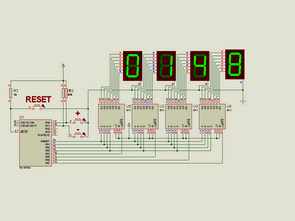
This Counter Circuit and the microcontoller 7-segment display using PIC16F84A 0-9999 counter circuit is formed. Plus (+) button to increase counter value minus (-) button allows the reduction. RESET button will reset the value in the counter.
0-9999 COUNTER SCHEMATIC
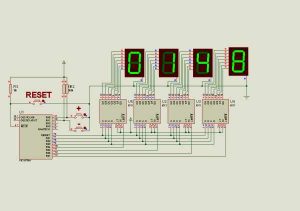
Counter Circuit 0-9999 proteus isis simulation pic16f84 picbasic pro source code files:
FILE DOWNLOAD LINK LIST (in TXT format): LINKS-3373.zip
Source: 0-9999 COUNTER CIRCUIT WITH PIC16F84A PICBASIC PRO
- What microcontroller is used in this counter circuit?
The circuit uses the PIC16F84A microcontroller. - How do you increase the counter value?
Pressing the Plus (+) button increases the counter value. - How do you reduce the counter value?
Pressing the Minus (-) button allows for the reduction of the counter value. - What function does the RESET button serve?
The RESET button resets the value in the counter. - What software was used to write the source code?
The source code files are written in PICBASIC Pro. - Is there a simulation file available for this project?
Yes, Proteus ISIS simulation files are provided for the counter circuit. - What is the counting range of this circuit?
The circuit counts from 0 to 9999. - Can I download the source code files?
Yes, source code files are available for download in a ZIP format.
Related projects
PIC Stepper Motor Controller using PIC16F84A with Proteus Simulation
Introduction Stepper motors are widely used in embedded systems and DIY electronics projects where precise position control is required. This PIC Stepper...
Programmers & ICSP · PIC16F84APIC Musical Doorbell using PIC16F84A with Proteus Simulation
IntroductionThis microcontroller project demonstrates a musical doorbell built around a PIC16F84A and a simple piezo sounder.Using two push buttons, the system allows...
Beginner Tutorials · PIC16C84Exploring the World of PIC Microcontrollers: An Architectural Overview
A Peripheral Interface Microcontroller (PIC), developed by General Instruments Microcontrollers in 1993, operates under software control and is programmed to execute various...
Wireless & IoTExploring Various Applications of Microcontrollers: A World of Tiny Brains
Exploring Various Applications of Micro Controller Microcontrollers have become ubiquitous in the modern world with applications in nearly every industry. This student...
Wireless & IoTIntelligent Sips: Revolutionizing Dining with the SmartCup
Abstract The SmartCup Attachment is a comprehensive system designed for restaurants to monitor the liquid levels in their customers' cups. This system...
Wireless & IoTMaximizing Wi-Fi Capabilities with the Explorer 16 Development Board
As society progresses, the necessity for wireless communication is evolving from a mere luxury to an essential requirement. Wi-Fi, extending beyond conventional...

Muhammad Bilal
I am a highly skilled and motivated individual with a Master's degree in Computer Science. I have extensive experience in technical writing and a deep understanding of SEO practices.