
Summary of How to getting started with microcontrollers projects using PIC12F629 microcontroller
This article introduces microcontrollers as single-chip computers containing memory, processors, and I/O ports. It highlights their cost-effectiveness compared to discrete components like diodes and ICs, using a traffic light project to illustrate how an 8-pin PIC12F629 chip replaces multiple parts via software. The text emphasizes Microchip PICs for their affordability, available documentation, extensive online projects, and low-cost development options under $10.
Parts used in the Traffic Light Project:
- Microcontroller (PIC12F629)
- Diodes
- ICs
- Resistors
- Capacitors
- Transistors
- Software (Code/Program)
- Keyboard
- Display
Microcontrollers are, basically, a computer in a single chip. It contains memory, processor, I/O ports (I/O = Input/Output) and other periphericals. Can you believe a single chip does contain RAM, ROM, CPU, I/O Ports, timers and other gadgets? It only needs a keyboard and display to be a working computer…
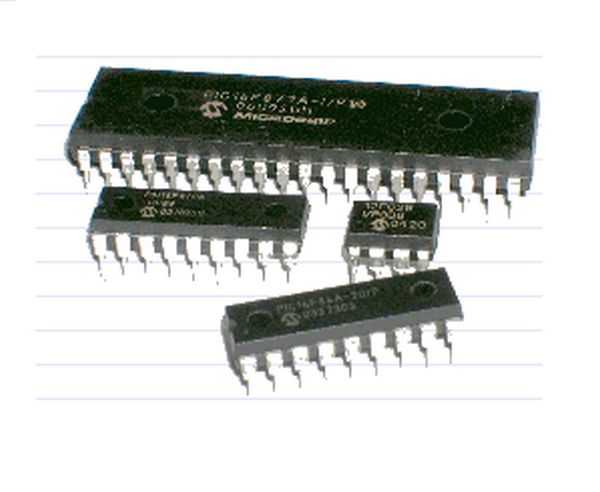
…I almost forgot; It also needs Software.
Microcontrollers are expensive ccompared with CMOS or TTLs chips, but using it on any electronic project allows to save parts and money. Here is an example of the same project using Microcontroller and without microcontrollers:
Traffic Light
WITHOUT Microcontroller:
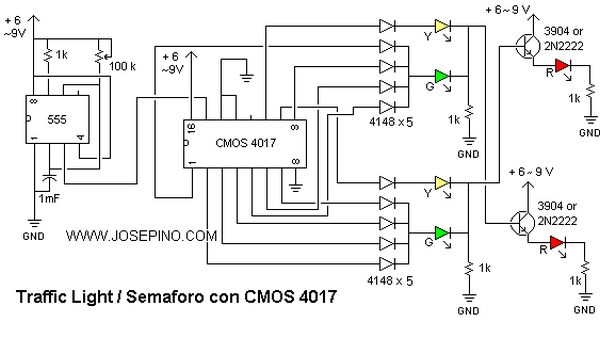
WITH Microcontroller:
A simple 8-pin chip replaces diodes, ICs, resistors, capacitors and transistors. Why? Because the 12F629 chip is a MICROCONTROLLER and replaces all those parts with the SOFTWARE. The software, also known as “code”, “program” or “instructions”. The software looks like this:
skpnz
decf bres_hi,f
decfsz bres_mid,f
goto 0xFE
tstf bres_hi
skpz
goto 0x45
No idea what is this about? Don’t worry. You will be able to find the HEX files that contains the software for the microcontroller. After some time, you will be able to undestand and make your own programs. Meanwhile, let’s learn what we need to start to build some projects with Microcontrollers.
I do use MICROCHIP microcontrollers, also known as Microchip PIC or just PIC. There are some reason why I only use PICs:
1. Inexpensive – Some PICs cost less than $2.00 USD.
2. Documentation available – All technical specifications and datasheets are available at the Microchip website.
3. Lots of projects available – The web shows thousands of projects using Microchip Microcontrollers. Plenty of projects.
4. Low cost development – With less than $10.00 USD, I can make my own programmer and start making projects!
For more detail: How to getting started with microcontrollers projects using PIC12F629 microcontroller
- What is a microcontroller?
A computer in a single chip that contains memory, processor, I/O ports, RAM, ROM, CPU, timers, and peripherals. - Can a microcontroller work without software?
No, it also needs software, which is known as code, program, or instructions. - How does a PIC12F629 replace other components?
The 8-pin chip replaces diodes, ICs, resistors, capacitors, and transistors by using software instead of hardware parts. - Why are Microchip PICs recommended for beginners?
They are inexpensive, have available documentation, offer thousands of projects online, and allow low-cost development. - What is the cost of some PIC microcontrollers?
Some PICs cost less than 2.00 USD. - How much does it cost to make your own programmer?
You can make your own programmer with less than 10.00 USD. - Where can you find technical specifications for PICs?
All technical specifications and datasheets are available at the Microchip website. - What do you need to turn a microcontroller into a working computer?
You need a keyboard, display, and software in addition to the chip itself.
