


This instructable describes how to integrate hobby servos (the kind used in RC planes, cars, etc.) into your microcontroller projects.
Step 1: How Servos are Different from Regular Motors
In a regular DC motor, the amount of torque the motor exerts on the shaft is proportional to the amount of current flowing through the motor. A simple way to control it is by varying the voltage across the motor; more voltage means more current which means the motor pushes harder against its load which means the shaft turns faster.
When using a servo, however, you don't control torque or velocit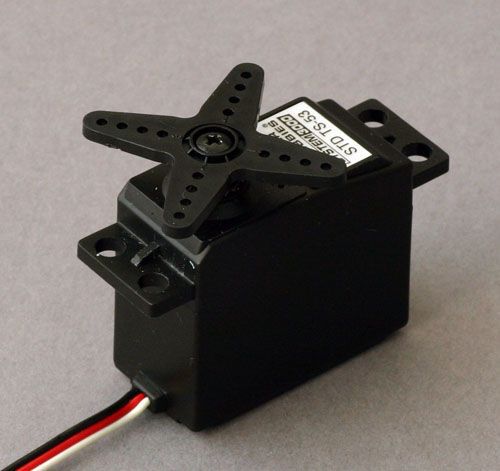 . Instead, you specify what angle you want the shaft at. In other words, you have positional control of the motor.
Inside a servo is a traditional DC motor, a potentiometer (variable resistor), and control circuitry. The potentiometer is connected to the motor such that when the motor shaft turns it also turns the potentiometer. The controller can then measure the voltage at the center pin of the potentiometer and get an indication of the shaft's position. The controller receives a signal (see next step) from the user that sets a desired position. The controller compares the desired position to the current position of the motor and uses that information to turn the motor in a direction that minimizes the error.
The way this works in practice is you specify the angle you want the shaft at using your PIC, the shaft turns to that position, and then holds there. The further it gets pushed away from that position, the harder it tries to turn back. Hobby servos are usually geared way down, so even a wimpy $15 or $20 one can hold its position reasonably well.
Step 2: The Control Signal
In addition to power (red wire, 5 volts works fine) and ground (black wire) connections, the servo accepts a control signal on the third wire (usually white or yellow). The signal is almost pulse width modulated, except that it doesn't have a fixed period.
It is composed of pulses of voltage, the duration of which determine the angle of the output shaft. The pulses can be from 0.9 ms to 2.1 ms long, 1.5 ms being the center position (in other words, pulse duration varies linearly with shaft angle). I don't remember whether 0.9 ms means all the way clockwise or all the way counter clockwise, but it's not a big deal to test our your project, see that the servo is turning the wrong way, and reverse it in your code. A new pulse must be sent to the servo once every 10 to 20 ms (50 to 100 Hz).
These timing/voltage values are for a typical servo. You should be able to find documentation for you specific servo from the manufacturer.
Step 3: The Circuit
This schematic is actually from something else, but it's ridiculously similar to the one I'll use for a quick demonstration.

The only change that needs to be made for this project is to replace the LED and its resistor with the wire for the control signal. So instead of connecting pin 3 to a resistor and then to an LED and then to ground, just connect pin 3 to the white/yellow wire from the servo. The ICD2 block represents the PIC programmer I used, substitute your own if you want. Also, don't forget to hook up the servo's power and ground connections.
For more detail: Use a PIC Microcontroller to Control a Hobby Servo
Related projects
Calculator Test using PIC24FJ64GA006 with Proteus Simulation
Introduction The Calculator Test using EASYHDL is a practical microcontroller project built on the PIC24FJ64GA006 and simulated in Proteus. This project demonstrates...
Programmers & ICSPPID Controlled Oven using TMS320F28027PT with Proteus Simulation
IntroductionThis project demonstrates a PID controlled oven implemented using a PICCOLO TMS320F28027PT microcontroller and verified through Proteus simulation.It is a practical microcontroller...
Programmers & ICSPPICCOLO Motor Controller Sample Design using TMS320F28023PT with Proteus Simulation
IntroductionThis project demonstrates a PICCOLO motor controller sample design implemented using the TMS320F28023PT Piccolo microcontroller and tested through Proteus simulation. It focuses...
Programmers & ICSP · PIC16F84APIC Musical Doorbell using PIC16F84A with Proteus Simulation
IntroductionThis microcontroller project demonstrates a musical doorbell built around a PIC16F84A and a simple piezo sounder.Using two push buttons, the system allows...
Programmers & ICSP · PIC16F877AEPE PIC/LCD Demo using PIC16F877 with Proteus Simulation
IntroductionThe EPE PIC/LCD Demo is a classic microcontroller project that demonstrates how a PIC16F877 can fully control a PG12864F graphical LCD.Designed as...
Programmers & ICSP · PIC16F628ADHT11 Low Cost Humidity Sensor using PIC16F628A with Proteus Simulation
IntroductionThis microcontroller project demonstrates how to interface a low-cost DHT11 temperature and humidity sensor with a PIC16F628A using a Proteus simulation environment.The...

Ibrar Ayyub
I am an experienced technical writer holding a Master's degree in computer science from BZU Multan, Pakistan University. With a background spanning various industries, particularly in home automation and engineering, I have honed my skills in crafting clear and concise content. Proficient in leveraging infographics and diagrams, I strive to simplify complex concepts for readers. My strength lies in thorough...