Projects

Build Your Own 5V 1A Adjustable SMPS Using a Dead Computer ATX Power Supply

Build Your Own 5V, 1A Adjustable SMPS Using a Dead Computer ATX Power Supply

A Switch Mode Power Supply (SMPS) is an indispensable part of any electronic design. It is used to convert mains high-voltage AC to low voltage DC, and it does it by first converting the mains AC to high voltage DC, then switching the high voltage DC to generate the desired voltage. We have already made a few SMPS circuits earlier, like […]

Build Your Own 5V, 1A Adjustable SMPS Using a Dead Computer ATX Power Supply Read More »

Timers on Nuvoton N76E003 Microcontroller Blink LED using Timer ISR and Timer Delay

Timers on Nuvoton N76E003 Microcontroller – Blink LED using Timer ISR and Timer Delay

In our previous Nuvoton Microcontroller tutorials, we used a basic LED blinking program as a getting started guide and also interfaced GPIO as an input to connect a tactile switch. With that tutorial, we are fully aware of how to configure the Keil project and set up the environment for programming N76E003 Nuvoton microcontroller. It is time to

Timers on Nuvoton N76E003 Microcontroller – Blink LED using Timer ISR and Timer Delay Read More »

PWM Signal on Nuvoton N76E003 Microcontroller LED Dimming using Duty Cycle Control

PWM Signal on Nuvoton N76E003 Microcontroller – LED Dimming using Duty Cycle Control

Pulse Width Modulation (PWM) is a commonly used technique in microcontrollers to produce a continuous pulse signal with a defined frequency and duty cycle. In short, PWM is about changing the width of a pulse while the frequency is constant. A PWM signal is mostly used in controlling a servo motor or brightness of an

PWM Signal on Nuvoton N76E003 Microcontroller – LED Dimming using Duty Cycle Control Read More »

Circuit Diagrams ......

How to interface LEDs with PIC Microcontroller (PIC18F4550)

It is necessary to understand basic I/O operations of PIC18F4550 before dealing with its complexities. This article presents a way to take simple output from a PIC microcontroller. This learning would also help in interfacing of external devices with the controller. Here the output from the microcontroller is taken on a set of LEDs which are made to blink in an

How to interface LEDs with PIC Microcontroller (PIC18F4550) Read More »

Circuit Diagrams 6

How to interface Seven Segment Display with PIC18F4550 Microcontroller

The seven segments are used to display decimal and hexadecimal (0-9, A-F) values. A seven segment is cheapest option for applications requiring numeric value display as output. Calculators, watches, lift’s floor indication panel etc. are examples of such applications. The interfacing and operation of a seven-segment display with PIC18F4550 has been explained here. A typical seven-segment consists of 8

How to interface Seven Segment Display with PIC18F4550 Microcontroller Read More »

Bit Configuration of TRISD Register with PortD as input in PIC18F4550

How to take input with PIC18F4550 Microcontroller

Any microcontroller based system typically has an input and a corresponding output. Taking simple output with a PIC microcontroller has been explained in LED blinking with PIC18F4550. This article explains how to provide an input to the controller and get a corresponding output using PIC18F4550. PIC18F4550 has a total of 35 I/O (input-output) pins which are distributed among 5 Ports. Each Port of a PIC

How to take input with PIC18F4550 Microcontroller Read More »

Circuit Diagrams.3

How to interface LCD with PIC18F4550 Microcontroller

The character LCDs are the most commonly used display modules. These LCDs are used to display text using alphanumeric and special characters of font 5×7/5×10. For basic working and operations of a character LCD, refer LCD interfacing with 8051. Here PIC18F4550 has been used to display a single character on a 16×2 character LCD. For basic details and operations of character

How to interface LCD with PIC18F4550 Microcontroller Read More »

Circuit Diagrams 3

How to display text on 16×2 LCD using PIC18F4550 Microcontroller

Several automated and semi-automated devices require a message to be displayed in order to indicate their working status. In continuation to LCD interfacing with PIC18F4550, this article explains how to display a message or string on a 16×2 character LCD. Programming steps: ·         Configure the LCD. ·         Store a string in a character array. unsigned char data[20]=“EngineersGarage”; ·         Run a

How to display text on 16×2 LCD using PIC18F4550 Microcontroller Read More »

How to create custom characters on 16×2 LCD using PIC18F4550

How to create custom characters on 16×2 LCD using PIC18F4550

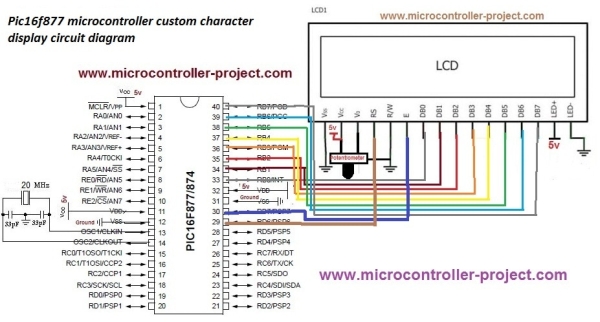
The 16×2 character LCD can also be used to display custom characters other than numerals, alphabets & special characters. Refer LCD interfacing with PIC. Some special shapes like hearts, arrows, smileys etc. can easily be displayed on the 5×8 pixel pattern of character LCD. These shapes are first stored at a special location in LCD’s controller and then

How to create custom characters on 16×2 LCD using PIC18F4550 Read More »