


Summary of How to interface Seven Segment Display with PIC18F4550 Microcontroller
Summary: This article explains interfacing a single seven-segment LED display (common anode or common cathode) with a PIC18F4550 microcontroller. It describes wiring, required data bytes to show digits 0–9, using mikroC IDE tools to generate segment codes, and provides example C code that cycles digits with delays. Typical applications and a circuit diagram and video are referenced.Parts used in the Seven Segment with PIC18F4550:
- PIC18F4550 microcontroller
- Seven segment display (Common Anode or Common Cathode)
The seven segments are used to display decimal and hexadecimal (0-9, A-F) values. A seven segment is cheapest option for applications requiring numeric value display as output. Calculators, watches, lift’s floor indication panel etc. are examples of such applications. The interfacing and operation of a seven-segment display with PIC18F4550 has been explained here.
A typical seven-segment consists of 8 LEDs arranged in a pattern to display values. A seven-segment can be either of the two types, namely, Common Anode (CA) and Common Cathode (CC). For more details, refer Seven segments.
A single seven-segment requires a minimum of 7 data pins of controller to display different values. The connections of seven-segment with PIC18F4550 are shown in the adjoining circuit.
To display a numeric value, a particular data-byte is sent by the microcontroller. Refer seven segment interfacing with 8051. This data byte can either be calculated manually or by using Seven Segment Editor tool of mikroC IDE. (Also see Working with mikroC)
Project Source Code
###
// Program to Interface seven segment display with PIC18F4550 Microcontroller
// Configuration bits
/* _CPUDIV_OSC1_PLL2_1L, // Divide clock by 2
_FOSC_HS_1H, // Select High Speed (HS) oscillator
_WDT_OFF_2H, // Watchdog Timer off
MCLRE_ON_3H // Master Clear on
*/
#define seg_port LATB
void main(void)
{
TRISB=0; // Configure PortB as output port
while(1)
{
seg_port=0xC0; // Display '0'
Delay_ms(1000);
seg_port=0xF9; // Display '1'
Delay_ms(1000);
seg_port=0xA4; // Display '2'
Delay_ms(1000);
seg_port=0xB0; // Display '3'
Delay_ms(1000);
seg_port=0x99; // Display '4'
Delay_ms(1000);
seg_port=0x92; // Display '5'
Delay_ms(1000);
seg_port=0x82; // Display '6'
Delay_ms(1000);
seg_port=0xF8; // Display '7'
Delay_ms(1000);
seg_port=0x80; // Display '8'
Delay_ms(1000);
seg_port=0x90; // Display '9'
Delay_ms(1000);
}
}
###
Circuit Diagrams
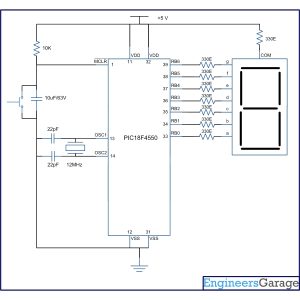
Project Components
Project Video
Source: How to interface Seven Segment Display with PIC18F4550 Microcontroller
Quick Solutions to Questions related to Seven Segment with PIC18F4550:
- What values can a seven segment display show?
The seven segments are used to display decimal and hexadecimal values 0-9 and A-F. - What types of seven segment displays are there?
A seven segment can be Common Anode (CA) or Common Cathode (CC). - How many controller pins are required for a single seven segment?
A single seven-segment requires a minimum of 7 data pins of the controller to display different values. - How are digits sent to the seven segment from the PIC18F4550?
To display a numeric value, the microcontroller sends a particular data byte corresponding to the digit. - Can mikroC IDE help with segment data bytes?
Yes, the Seven Segment Editor tool of mikroC IDE can be used to calculate the data byte values. - What example behavior does the provided code implement?
The example C code cycles through digits 0 to 9, displaying each for 1 second using delays. - Which port is used in the example code for the segments?
Port B (LATB/LATB) is used for the seven segment in the example code, with TRISB configured as output. - Where can I find the circuit diagram and demonstration?
The article references an accompanying circuit diagram and an embedded project video demonstration.
Related projects
PICDEM FS USB CDC Evaluation Board using PIC18F4550 with Proteus Simulation
Introduction The PICDEM FS USB CDC Evaluation Board is a practical microcontroller project built around the PIC18F4550, designed to demonstrate USB communication...
Peripheral Tutorials · PIC18F4550PICDEM FS USB Mass Storage Device using PIC18F4550 with Proteus Simulation
Introduction This microcontroller project demonstrates how to simulate a USB Mass Storage Device (MSD) using the PIC18F4550 in a Proteus simulation environment....
Development Boards & Kits · PIC18F2550Pinguino Project: A PIC Microcontroller Based Arduino
This is a complete tutorial to make a PIC Microcontroller based Arduino. This is a complete tutorial to make PIC microcontroller based...
Games, Toys & CalculatorsExploring Leon’s Mini Random Number Generator (mRNG)
Sales Pitch Feeling overwhelmed by choices? Who isn't? Decision-making can be a maze. White, rye, or wheat? Pinstripes or polka dots? Feast...
Games, Toys & Calculators · PIC16F628ATIC TAC TOE game using PIC16F628
This project is not to introduce Tic Tac Toe. Everyone knows this game. It's to introduce two features. Bi-coloured LEDs, microcontrollers and...
Games, Toys & CalculatorsInteractive Blitz Chess: A Physical Blitz Chess Board Powered with PIC32
Introduction We created a companion system for physical chess boards to help players enjoy their fast paced blitz game with a chess...

Muhammad Bilal
I am a highly skilled and motivated individual with a Master's degree in Computer Science. I have extensive experience in technical writing and a deep understanding of SEO practices.